How To: Report to Yelp Wrong Hours, Addresses, Numbers & Other Incorrect Business Listing Information

How To: Report to Yelp Wrong Hours, Addresses, Numbers & Other Incorrect Business Listing Information

Business hours and addresses change, but they're not always updated on Yelp by business owners for the rest of us to see. Showing up when a business is closed or going to the incorrect address is a major annoyance, which is why the company allows us, the customers, to help update business information through the Yelp mobile app on iOS and Android. If owners won't do it, somebody has to.If you notice that information about a bar, restaurant, doctor's clinic, home cleaner, grocery store, or other business is outdated or incorrect, take advantage of Yelp's editing feature to help fix any mistakes for you and everyone else who would otherwise be following wrong information. There's a Yelp app just for business owners, but only a small percentage of businesses likely use it, so it's up to us.You can edit the name, category, address, map location, hours, phone, website, and menu. In return for your good deeds, Yelping will be a better experience for all.
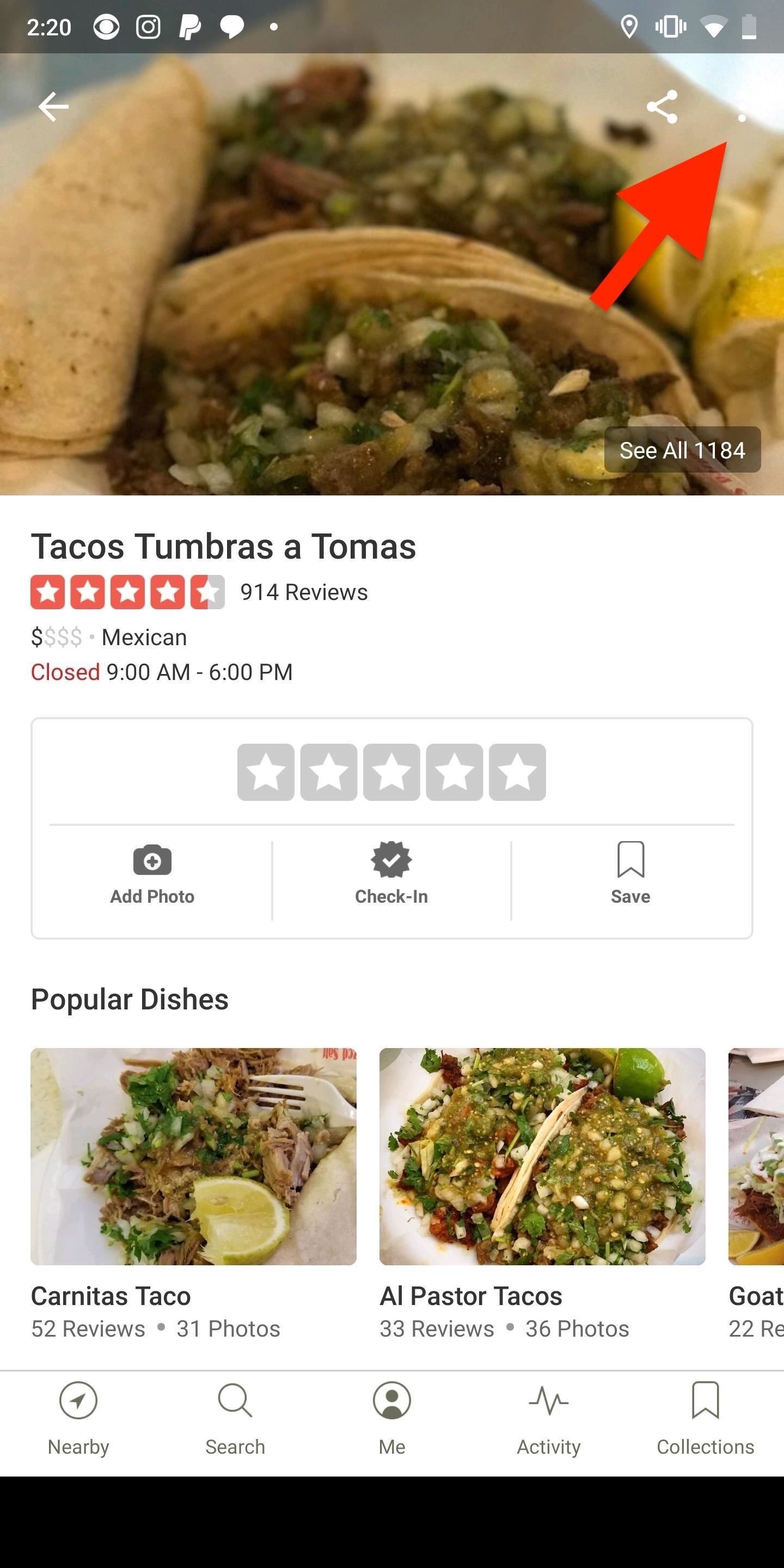
Step 1: Access the Business Listing EditorOn the Yelp business listing in which you want to update or correct information, in the top right, tap on the vertical or horizontal ellipsis (•••), aka the "More Options" menu, then select "Edit Business." Alternatively, you can scroll down on the business listing, tap on "More Info," and hit "Edit" or the pencil icon in the top right.
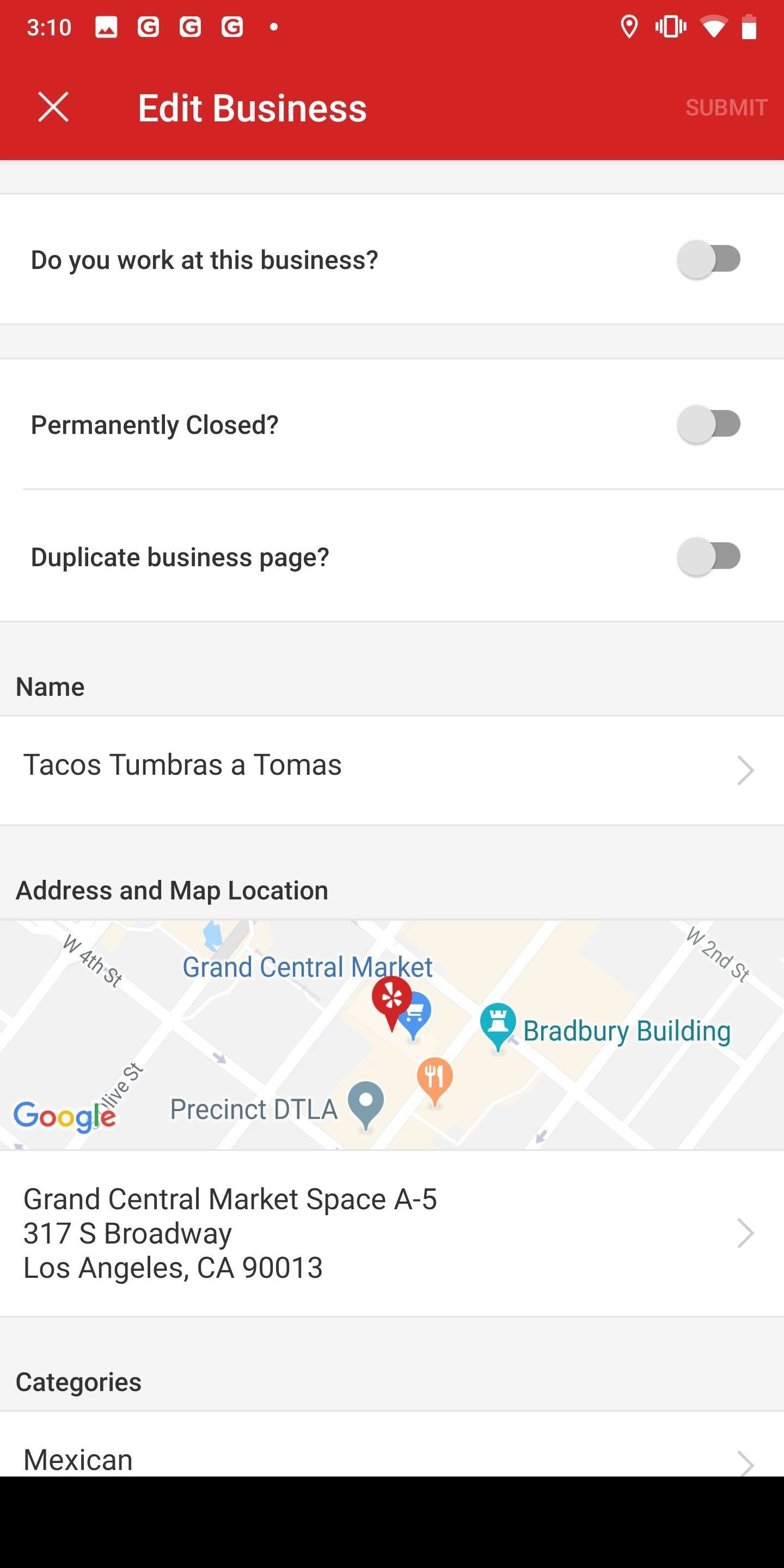
Step 2: Correct Any Wrong or Outdated InformationYou can edit the name, category, address, map location, hours, phone number, website, and menu URL, as well as mention if the business is permanently closed or if the listing is a duplicate. Skip down below the screenshots for more details on filling out each section.
1. Permanently Closed?Toggle this setting on if the location has been permanently closed. If the business is open, leave this setting alone. Do not toggle it on if the business is temporarily closed, for example, because there's construction, fumigation, or another temporary reason. Temporary closures should only be mentioned in the "Notes" section at the bottom of the Edit Business page.
2. Duplicate Business Page?If you've seen multiple listing of the same business, toggle on the "Duplicate business page?" setting. You may not know which page is the official one, but fewer reviews and incomplete or wrong information may be an indication that the listing should be reported. Just keep in mind this is for the same business location, not the company's other locations, even if they have the same name, such as McDonald's.
3. NameEnter the full name of the business. Avoid including store numbers since they aren't part of the official name of the business and won't be how customers refer to the place. Also, leave out any keywords, tag lines, neighborhoods, and other information that's available elsewhere in the listing. For example, the address will help determine the neighborhood, and the category is basically the same as keywords.
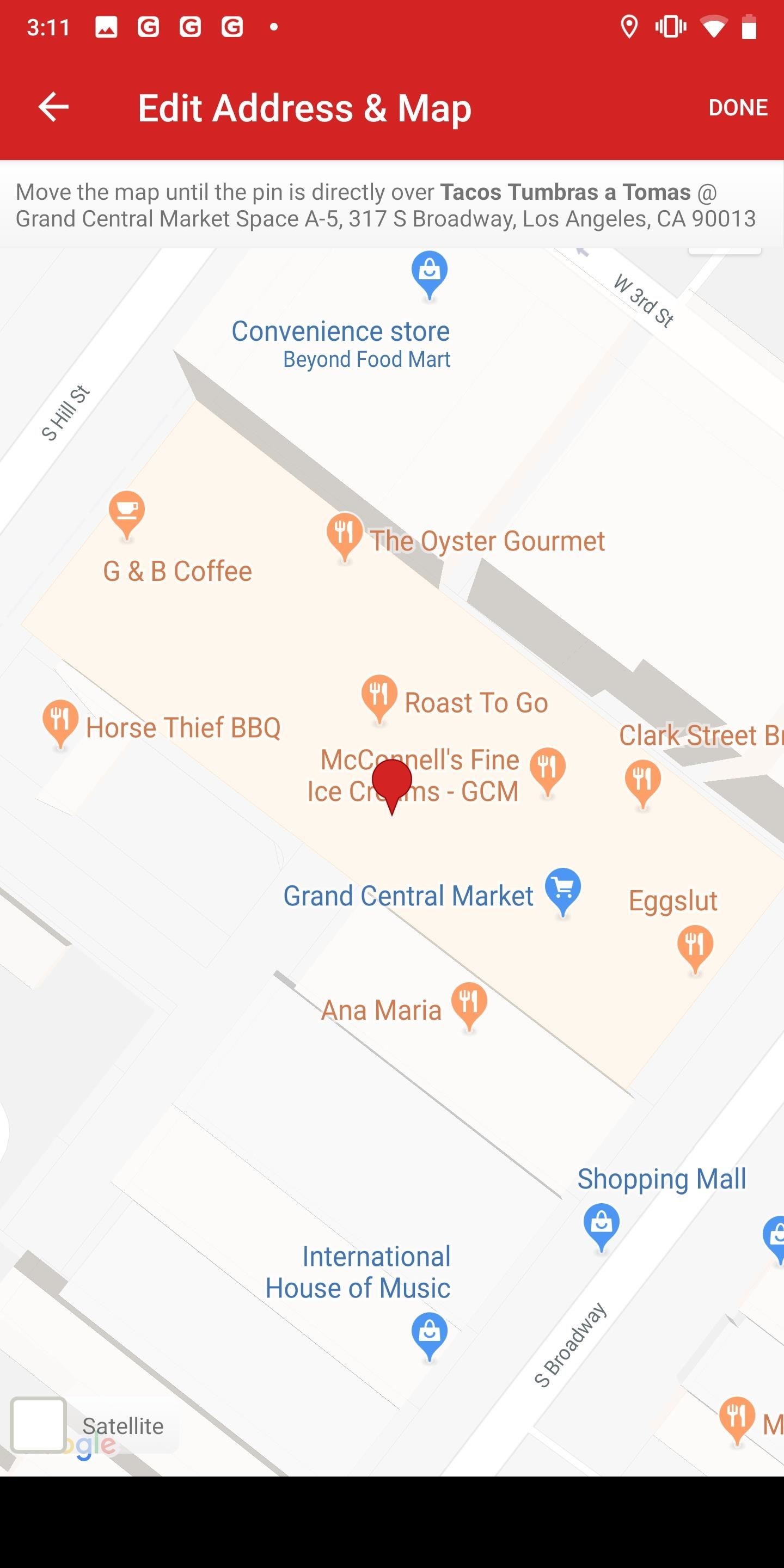
4. Address & Map LocationIf you tap on the map, you can select where the location actually is, if incorrect. Yelp uses the default map app to pinpoint a building for an address, and you'd be surprised how many times it could be wrong. Move the map until the pin marker is exactly where the business's building is.Moving the pin in the map will not automatically change an address since you're just fixing the map location for the address already provided. If the address is wrong, edit that first before messing with the map since you'll have to double check it afterward anyway. Tap on the address underneath the map to do so. You can either enter the address manually or have it auto-populated by tapping on "Fill with Current Location," which will use your phone's GPS to pinpoint where you are.Be considerate to some business locations. If there is not an exact address for a business, it may be because it's a residential address for a side job such as a handyman, pet sitter, or photographer. Yelp only requires a ZIP code or service area for these locations, and these small businesses may not want everyone to know their home address. If you know the ZIP, just use that.
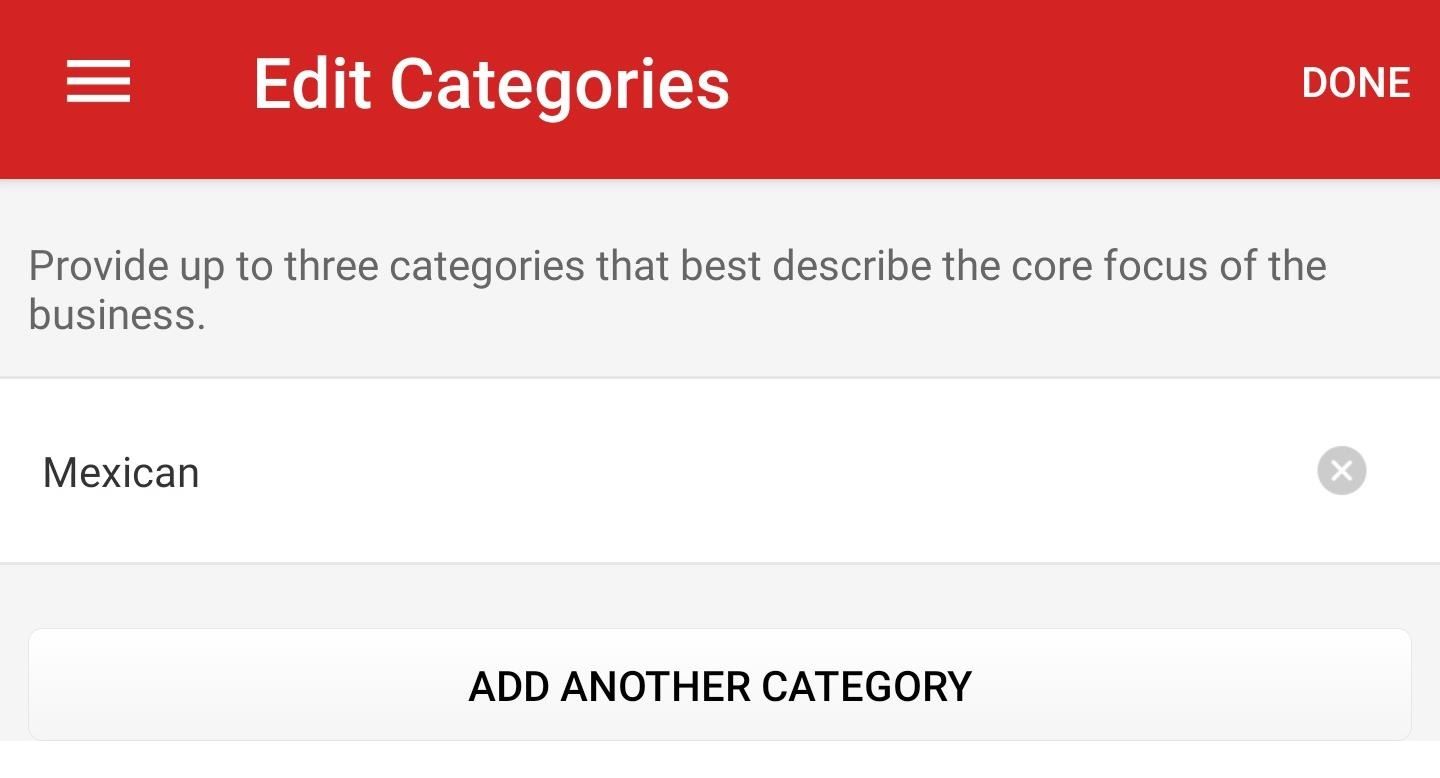
5. CategorySelect the correct category or categories for the business under the Category section. You can choose up to three categories that best fit the description of the "core focus of this business," according to Yelp. New categories are added every quarter, and Yelp has a complete list for reference. If something works better than what's already in there, tap on the old category to replace it, and "Add Another Category" for a second or third one, if not already there.
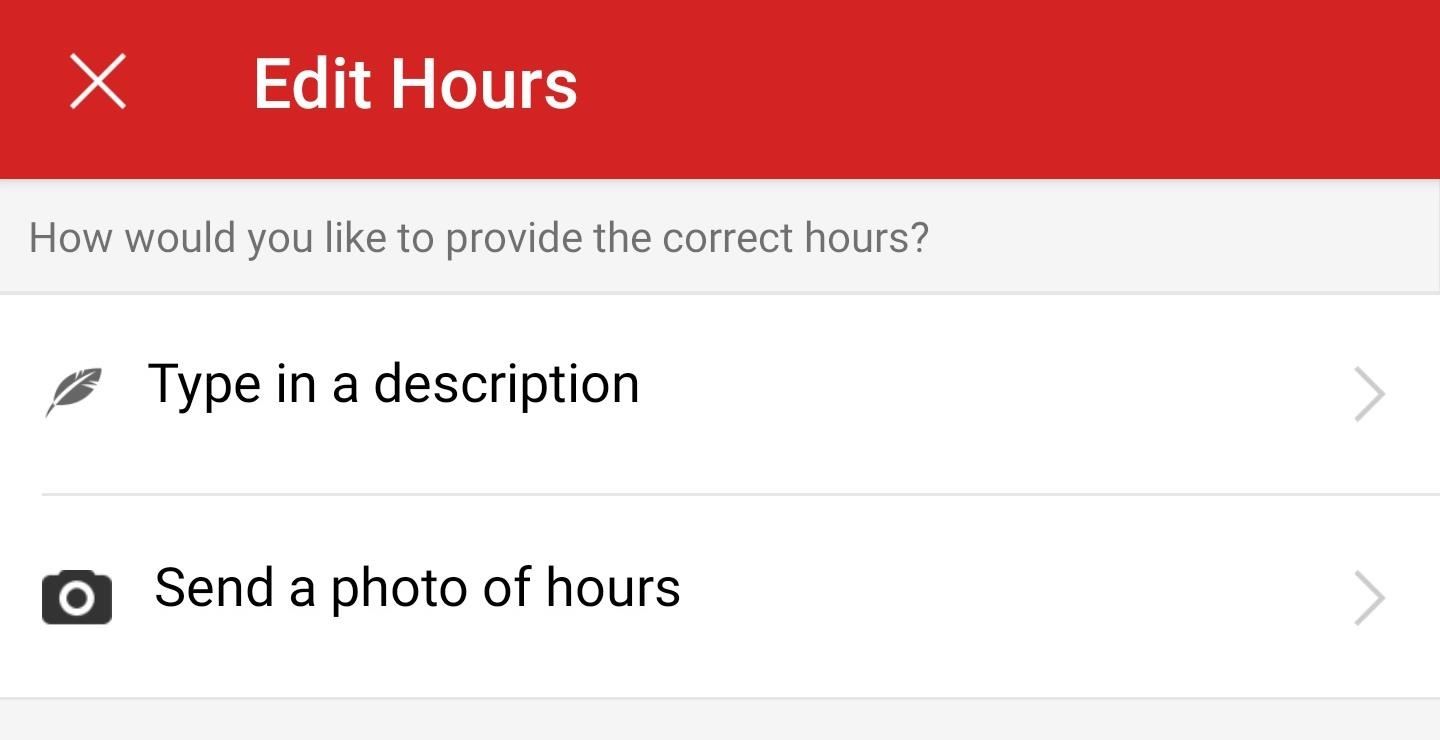
6. HoursYou can either enter a description of the new hours ("now closes at 5 p.m. on Sunday") or include a picture of the updated hours (from the storefront or menu). These should be normal operating hours, not temporary hours when they are off schedule for a few days. Adding a photo definitely lends credibility to your edit and can help it become permanent on the listing. If the business is now open 24 hours, you can include that in the notes field when suggesting changes.
7. PhoneThis needs to be a direct local phone number with its area code. No extensions, national call center numbers, or cell phone numbers should be entered.
8. WebsiteIt must be the business's website. No directories, social media sites, or other third-party websites. That means no Facebook pages. If the business doesn't have a website, this should be left blank.
9. Menu URLIf there's a website, and there's a direct link to the menu (for restaurants, cafes, or bars), include that in this section. If a business is a part of Eat24 or SinglePlatform, those menus will already be included in the food and drink establishment and won't need a link. However, if you want to include a menu image you took, you'll want to add that manually to the business's "View Menu Photos" section.

Step 3: Add Notes & Proof if AvailableIf there's any other information you want to mention, such as a temporary closure, renovation, or anything else that didn't fit in the existing editing page, write it down in the "Notes" section at the bottom. You can also use this section to include links to Facebook posts or tweets that back up any of the changes or updates you've made to the listing. Hit "Done" when ready.In some scenarios, you may see a "Do you work at this business?" option at the top of the Edit Business page. You can toggle that on which can add more umph behind your edit requests.
Step 4: Submit Your Changes & WaitWhen you're finished with your updates or edits, hit "Submit" at the top right. A Yelp moderator will review any changes and either accept them or reject them if they're unable to verify the information. Typically, changes are updated within 24 to 48 hours after being submitted. If there are any complex issues, it can take more time.Yelp's team verifies changes by looking at your user submissions, the business' website, social media, news articles, or even directly contacting the business. Your best bet to having your changes accepted is to follow Yelp's guidelines and include supplemental information in the notes field.This article was produced during Gadget Hacks' special coverage on traveling with your smartphone. Check out the whole Travel series.Don't Miss: How to View & Leave Tips on Yelp (& Why It's Important)Follow Gadget Hacks on Pinterest, Reddit, Twitter, YouTube, and Flipboard Sign up for Gadget Hacks' daily newsletter or weekly Android and iOS updates Follow WonderHowTo on Facebook, Twitter, Pinterest, and Flipboard
Cover photo and screenshots by Nelson Aguilar/Gadget Hacks


How to Use Google Chromecast with iPad, iPhone and Android. or any app that is compatible with Chromecast. (Amazon Video is Select your Chromecast. If you have multiple casting devices in
How to Cast Chrome Browser to TV From iPhone or iPad


How To: The Real Story Behind Rooting the Samsung Galaxy S4—And Its New Secured Kernel How To: Root and install a custom Hero ROM on a T-Mobile MyTouch 3G How To: Install a Custom Recovery & New ROM on Your Bootloader-Locked Samsung Galaxy S4
How to ROOT Samsung Galaxy S3 for AT&T, Sprint - Gadget Hacks


An Apple Watch exploit lets thieves use Apple Pay without needing to enter PIN Posted by Evan Selleck on May 14, 2015 in Apple News The Apple Watch is a means to use Apple Pay , the company's mobile payments solution, without having to pull a phone out of a pocket.
Apple Watch vulnerability could let thieves use Apple Pay


For $9.99 per month, you can enjoy over 40M high quality tracks without ads. Moreover, Groove service lets you download the tracks and albums you like to your iPhone. If you want to try Groove, you can get a 30-day trial and decide whether you feel comfortable with it. To save music songs with Groove, you should:
How to Rate Songs with Stars in iOS 10's Music App « iOS


How to Download the Facebook Application for the iPhone. This wikiHow teaches you how to download the Facebook application onto your iPhone. Open your iPhone's App Store. Tap the App Store icon, which is a light-blue app with a stylized,


Launch Chrome for Android and open the website or web page you want to pin to your home screen. Tap the menu button and tap Add to homescreen. You'll be able to enter a name for the shortcut and then Chrome will add it to your home screen. The icon will appear on your home screen like any other app shortcut or widget, so you can drag it
How to add an app shortcut to the Android home screen


News: Use Android's Airdrop-Like Nearby Service to Share Things More Easily Facebook Messenger 101: How to Hide Your 'Active' Status to Go Incognito Online Instagram 101: How to Share Posts & Stories to All Your Close Friends' Feeds Only
Select All Contacts with Just One Tap in Snapchat's Android


How Can I Improve My Web Site Code for SEO? Bad code can contribute to the majority of performance problems. Writing tight HTML, JavaScript, and CSS code will speed up a web site. What are ways to write tight code? Actually, it is pretty easy. Here are a few. Pure CSS Design
How to Speed up Website (WordPress) without Changing Web Host


3. Clear Up Your iPhone's RAM Used by Apps. If you're looking to move away from swiping away apps every time entirely, then you can try to clear your iPhone's RAM used by all your apps which works just as like how you would Force close all your apps every time except this way you're getting to the root problem.
How to Get the iPhone X's Swipe-to-Go-Home Gesture on Any Android


The BT GNOW app is just the Blutooth's button intercept. You do not need this for it to work. To get voice dial from the google. That google bar on your android's home screen, not google chrome, there's a small microphone icon. click on that, and say nothing, the setting will open.
Voice For Replace Bluetooth Google With Dialer 's Now Better


This also improves recharging efficiency and the battery use duration. Method 2: Bring a dead battery back to life by freezing. Lithium reactions in batteries work using a charge-discharge process in which positive and negative electric charges collide with each other.
How to Revive a dead cellphone battery (Any Brand) - YouTube


One of the coolest things about Kodi is that you can use it to watch live TV, just like with a cable/satellite subscription — only better, because it's free! On Kodi live TV, you can watch most (if not all) of the most popular channels live, including AMC, HBO, ABC, CBS, FX, ESPN, and many more.
Watch TV Networks Online Without Cable — How To Get Access


Introduction - remove unwanted results from Google Discovering your business has a bad search result associated with it, is a business owner's worst nightmare. All of the hard work you've put into ensuring your customers are satisfied with your product or service, may be thrown out the window as a result of one review which found it's way to the top of your branded Search Engine Results
How To Block Websites From Google Chrome Search Results - YouTube


Because of Android's new SafetyNet system, certain apps can now block rooted users or prevent you from accessing them altogether — but at least for now, there are still ways around these restrictions. You can pass most of SafetyNet's checks with Magisk and systemless root, but Google's Compatibility Test Suite (CTS) remains a hurdle in some
Root Exploit: Memodipper Gets You Root Access to Systems


And don't worry, if you ever find out you don't like having a rooted device, unrooting your Nexus 5 is fairly easy. Step 1: Enable USB Debugging. On your Nexus head to Settings-> Developer options, then check the box marked USB debugging, which will allow your Windows PC to issue commands to your device.
On-Screen Navigation Buttons And Failed Expectations: A
How To: Turn an Automatic Air Freshener Dispenser into a Silly String Launcher

How To: Turn an Automatic Air Freshener Dispenser into a Silly String Launcher

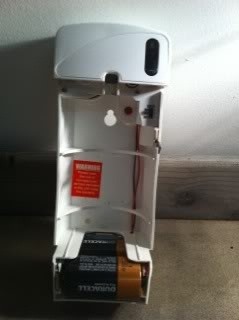
The electric air freshener is one of those devices that seems like it could only have one possible function, but can actually be repurposed in a few different ways. If you're looking for a practical use, you can turn it into a bug killer, but it's also perfect for pranks.With a super simple mod, you can make what would be more appropriately called a room UN-freshener. Or, you can take a cue from Calvin over on HalloweenForum.com and turn your electric air freshener into a DIY silly string launcher.Start by removing the cover and the top faceplate so you can see the motor and wires, then take out the circuit board. Images via photobucket.com Next, solder the ground from the battery to the ground from the motor, then attach the positives to a switch. Now, just put a can of silly string where the fragrance spray goes, replace the covers, and start making your list of targets! Images via photobucket.com Calvin used a push-button momentary switch for his, but if you wanted to make it more fun, you could easily use a motion sensor instead. Think of all the kids you could scare on Halloween by hiding it on your doorstep!For more details, plus a video of the silly string launcher in action, check out Calvin's post.


In this article we look at how to get special face filters by following AR creators on Instagram. This simple way to get cool Instagram special face filters is to follow the people who create them. But to make it more simpler we're here to show you how to get special face filters by following AR creators on Instagram.
Social Media « Gadget Hacks


Step 5: Verify Root & SafetyNet Status. Next, go ahead and open the Magisk Manager app. If everything went off without a hitch, you'll see a message towards the top of the screen that says "MAGISKSU (topjohnwu)" with a green check mark next to it.


Build a Foxhole Radio!: It's an Instructable with a story! What happens when RickGyver suddenly finds himself in the middle of a zombie apocalypse? He jury rigs his way around the problem of course! This series puts a fun fictional situation around a DIY project video
Make a Foxhole Radio - Weekend Project PDFcast | Make:


Are you marketing on Facebook? Do you want better reach for your Facebook posts? Using the right posting tactics will give you better results from your Facebook marketing. In this article you'll discover six tips for more effective Facebook posts. Discover six tips to improve Facebook posts. Listen to this article:
The 5 Things You Should Never Post on Facebook - Lifewire


Taser Camera Hack. News : Taser dear friends with hacked camera. We almost forgot about the disposable camera. With every cell phone outfitted with a camera, who
Hacking Cell Phone Camera Module - mankind.com.au


iOS 13 Beta. iOS 13 Beta: Early (Developer) and Late (Public) June 2019. For those daring enough to test unfinished versions of iOS, Apple makes beta versions available to developers on the same day as the keynote (which require a Developer Account, which costs $99). Apple has been offering public betas, which are slightly more stable, since 2016.
Neurable Releases Limited Beta SDK for Brain Control


If you're scratching your head trying to figure out which smartphone is best for you, then come on in and we'll show you how to choose a cell phone. Dive into our comprehensive guide on how to
How to Choose a Cell Phone: 14 Steps (with Pictures) - wikiHow


Change the font size on your iPhone, iPad, and iPod touch. You can change the size of your font in Mail, Contacts, Calendar, Phone, Notes, and other apps that support
How To Change Font On Your iPhone - iPad - iPod Touch 2016


You'll need to record your special phrase to get the Moto X to hear you, even when you're feet away from your phone. Open the Moto app in the application drawer and tap on the microphone icon
5 Ways To Fix Moto X Camera Not Working Problem | Technobezz


This article shows you 7 ways to control your Android from a PC. You'll be able to share your mouse and keyboard, mirror the screen, send files and answer WhatsApp messages - all without getting


How to Save Snapchat Pictures Without Notifying Others. Snapchats are supposed to be quick, fleeting photos. The idea behind the app is that the picture disappears after 10 seconds or less.
3 Tricks To Take Screenshot on Snapchat Without Getting Caught


How to use Gmail's 'Multiple Inboxes' for extra Gmail accounts Go back into the settings menu of your primary Gmail account and open the Multiple Inboxes menu. In each of the panes simply type
How To: Get Organized with Multiple Inboxes in Gmail | Techerator


More Proof Emerges: iPhone 7 Will Not Have a Headphone Jack How To: Charge Your iPhone 7 While Listening to Music News: Finally, Real Proof That the iPhone 7 Will Come with a Headphones Lightning Adapter News: Here's Everything We Know About What's Coming in the iPhone 7
Always-Updated List of Phones With No Headphone Jack Built-In

How To: Create a Bootable Install DVD or USB Drive of OS X 10.8 Mountain Lion

How To: Create a Bootable Install DVD or USB Drive of OS X 10.8 Mountain Lion

If you have a Mac, you've probably been anticipating the release of OS X Mountain Lion. If you have multiple Macs, you've probably been dreading the long process of downloading and installing it on all of them. Here's how to create a bootable backup disk and save yourself some time. Image via mzstatic.com

Before You StartThe obvious first step here is to download OS X Mountain Lion. But before you do anything else, a word of caution: once you've used the OS X installer, it will automatically delete the file you need to make the backup disk, so you'll want to either make a copy of the installer or create your disk before you upgrade.You can use a USB flash drive, external hard drive, or DVD-R disc, but the USB drive is quicker. If you're using a USB drive, it has to be formatted as "Mac OS Extended (Journaled)" and set to partition type "GUID Partition Table" in order to work. Image via arstechnica.net You can find out more on how to do this here.

The Quick WayIf you want to make the process as painless and automated as possible, there's an app you can use called Lion Diskmaker. Image via arstechnica.net Simply download the app and in a few clicks (and about 30 minutes) your disk will be finished. The app also works with OS X Lion.
The DIY WayIf you'd rather make the disk yourself, you can do it in a few simple steps.

Step 1:Open your Applications folder and right-click on "Install OS X Mountain Lion." Click on "Show Package Contents" and then find the folder called Shared Support. Image via arstechnica.net Once inside, browse to the "Contents > SharedSupport" folder where there will be a file called "InstallESD.dmg." This is the image file that contains the information you need to create the backup disk.
Step 2:Open Disk Utility (located in your Applications > Utilities folder).

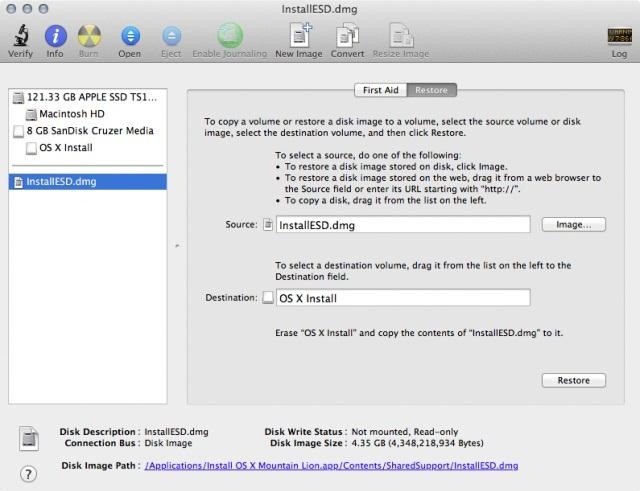
Step 3:Drag and drop the "InstallESD.dmg" into the list of drives on the left and select it. This should make it appear in the Source box on the right. If not, you may have to click the "Restore" tab as seen below. Image via arstechnica.net
Step 4:Drag your USB (or a Dual-Layer DVD) drive from the list on the left into the "Destination" box and click "Restore" (or just click the "Burn" button in the upper left if you're using a Dual-Layer DVD) and in 10-30 minutes (depending on whether you're using USB 2.0 or 3.0) you'll have your backup disk ready to instal on as many Macs as you like.
You're Done!If you need help using your disk to restore your Mac, Apple has a helpful page in its Support section.


How To: Boost Performance & Battery Life on Your Galaxy S5 with These "Build.prop" Hacks How To: Enable Free WiFi Tethering on Android Marshmallow How To: Make a Cheap & Easy Prop Skull News: Android's Best Build.Prop Tweaks for Better Speed, Battery Life, & Customization
How to Enable the Built-in Screen Recorder on Android 10


Apple released the fourth developer beta for iOS 11.4 on Monday, May 7, followed the next day with the public beta release. This update arrives just six days after the company seeded beta 3 to users, which fixed an 11.3 issue with 3D Touch, among other various bugs.
Hack Phone App Store iPhone / News: iOS 11.2 Beta 4 Released


A new widget in the iOS 10 Notification Center lets you speed dial iPhone contacts from the Today View, but you might want to plug a security hole first.
How to Add an App to Notification Center in iOS: 6 Steps


You can play around with VSCO Cam's editing settings and create your own set of presets. 50 VSCO Cam Filter Settings. In this post, we have collected 50 such filter settings you can try on your photos. Don't be afraid to experiment, then let us know what you love.
10 best VSCO Instagram filters to enhance your feed


To embed videos on your WordPress blog or website with Freemake Slider, simply install it from here. Then go to the plugin settings and choose to create a new slider. Select Add YouTube option. You can also add YouTube playlist, offline videos from your PC, and Vimeo videos. Upload your offline videos or insert your YouTube/Vimeo video links.


Static FBML is a Facebook application that allows Facebook page administrators to create custom tabs on their Facebook pages. This application is only available for Facebook pages, not for personal profiles or Facebook groups. Adding Static FBML to Your Facebook Page. You can add Static FBML in four easy steps.
How to Create a static FBML page for your Facebook fan page


All the latest cameras news, rumours and things you need to know from around the world. Stay up-to-date with the most interesting cameras news here.


So if you've procrastinated an afternoon away, reboot your productivity by accepting what you've done, forgiving yourself, and moving forward with renewed willpower. What other tips do you have to increase productivity at work? Tell us your tips & tricks on how to improve efficiency at work in the comments below.
6 office organization ideas to boost productivity - Quill.com


Radio making runs in my family. My Grandpa Charlie made his own radios in the 30s and during the war as well. In fact, in a recent email, he mentioned that they were encouraged to make radios and "learn by doing." Radios were the hottest technology of the time and after the exhilaration of getting this radio work, I can understand!
PDF Build a Foxhole Radio - Make


Connect your light bar directly to the vehicle battery or another DC voltage source. If you going to use a power supply, make sure its voltage output is within the light bar's specifications. Also, make sure it can supply the maximum current your light bar draws. Use a wire gauge that matches or exceeds the maximum current of your LED light bar.
Police Light Bars - Police Officers, Cops & Law Enforcement


Each year, Google issues an annual report on Android security, and once again a BlackBerry phone was named one of the most secure Android devices on the market. We are honored that PRIV was included in Google's Android Security: 2016 Year in Review, and we take this as a signal that we're living
News: 8 Reasons the BlackBerry KEY2 Is Already the Best Phone


The only way - Use hacked Instagram app, modded version. But why [1] do you want to use it? Less strain on eyes? It compromises your security, if Instagram wanted it could have added that feature but it is not done officially.
How To: Get Dark Mode on Facebook for Less Eye Strain When


Something that's sure to be brought up in the following days, as with most new devices, is the battery life. As we previously provided you tips on saving battery life with the iPhone 5 and Samsung Galaxy S III, we now bring you a few tips on how to extend battery life on the new iPad mini.

How To: Turn Your Phone's Screen On Just by Waving

How To: Turn Your Phone's Screen On Just by Waving
The Samsung Galaxy S6 includes a pretty nifty feature known as "Gesture wake up," which lets users wave their hand over their locked display to wake it, making those periodic notification checks from the lock screen a lot more simple than having to press the power or home key every time.Don't Miss: 9 Ways to Lock Your Android Without the Power Button The only real bummer about this feature is the fact that non-Galaxy devices don't have it. But in true Android fashion, developers like Team Fluxion are making third-party apps that give us these native, device-specific features on any Android. So without any further delay, let's show you how to make your device's display turn on and off just by waving your hand.

Step 1: Install Wake on GestureFirst, grab the app by Team Fluxion, appropriately titled Wake On Gesture. It's free, and works with most Android phones and OS versions.Install Wake On Gesture from the Google Play Store

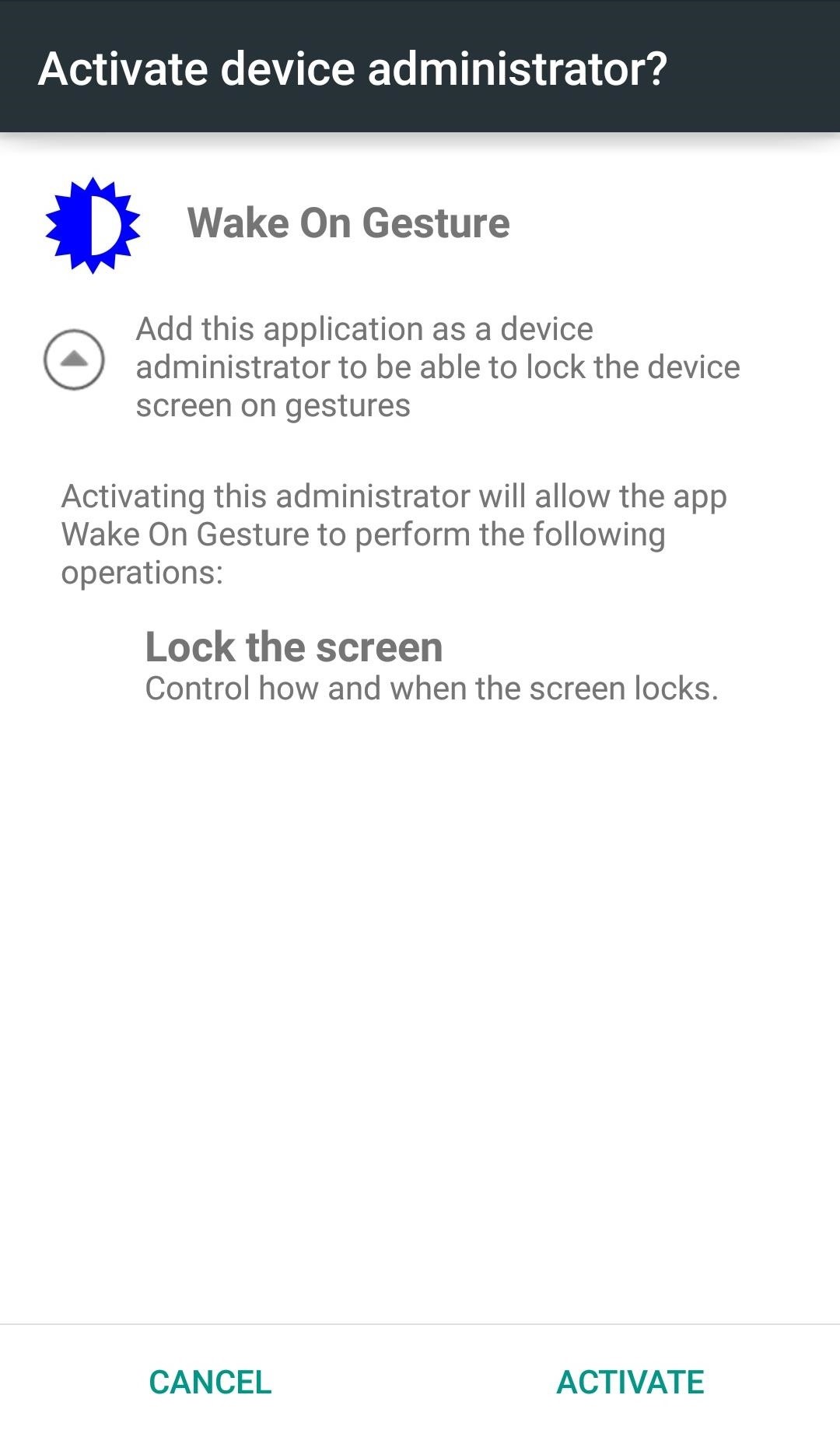
Step 2: Activate Device AdministratorAs soon as you launch Wake On Gesture, you'll be prompted to "Activate device administrator" in order to allow it to control when the screen locks. After activation, you will then be able to access its Settings.

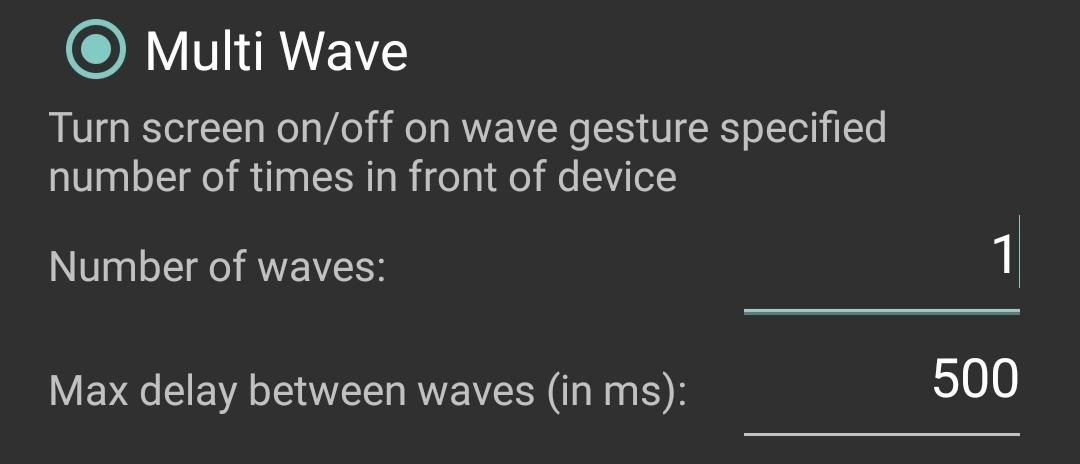
Step 3: Set Up Your PreferencesWithin the Settings, you'll want to enable the app, then decide whether you want an ongoing notification for it, which will let you quickly toggle the service on and off.There are also other features, such as "Pocket" (detects when the device is in your pocket) and "Flip Cover" (allows for third-party flip cover detection) that offer additional screen activation options, but only one can be applied to the device at a time.Select "Multi Wave" to mimic the S6's Gesture Wake Up, then adjust the preferences to your liking. You can specify the number of waves needed and the delay between them. In my opinion, using one wave works the best, but to each their own. Once you've enabled the service and specified your preferences, try it out. The app will allow you to turn the screen on and off with a simple wave. You may have noticed that root feature labeled "Do just what my power button does," but after enabling and disabling it, I've noticed no difference in the app's behavior or the ability to turn the screen on and off.

How to Uninstall the ApplicationBecause this app was activated as a Device administrator, you won't initially be able to uninstall it like any other app. To deactivate it, enter your system Settings and search for the Security preferences where you'll find "Device administrators." Toggle off Wake On Gesture and you'll be able to uninstall it like you normally would. Follow Android Hacks over on Facebook and Twitter, or Gadget Hacks over on Facebook, Google+, and Twitter, for more Android tips.


Using the app which we are going to mention here it is also possible to upload your video to cloud services like Dropbox and Google Drive. Upload Video to Multiple Sites At Once. To achieve this you will need to download Vid Octopus app. It is available on App Store and Play Store both. After installing the app use the steps below.
Upload Videos to Multiple Video Sites Like YouTube, Facebook


News: In a Rare Moment, Pixel's Sales Figures Are Revealed News: The Pixel 3a XL Is Shaping Up to Be the Best Google Phone This Year How To: Get the iPhone's Emoji on Your Google Pixel or Pixel XL How To: Get the Entire Google Pixel Experience with One Simple Mod
Get the Google Pixel 2's Product Sans Font from Android Oreo 8.1


diy handheld . The concept of creating a gaming portable out of a home console has been around for some time, but it's hardly seen the other way around. you too can build your own games
How to Make a DIY Portable Wii | Hackaday.io


NetEase Music vs. The Competition. Just like Spotify, NetEase Music lets you search, save, and download any song from their catalog. You'll also have the ability to sync your playlists and favorite tracks across all your mobile devices and their web interface by creating a free NetEase account.
Spotify's New UI : Android - reddit.com

Quick Tip: Speed Up Gboard Performance on Android by


Now, let's proceed with the tutorial below to unlock Razer Phone 2 bootloader. How to Unlock Bootloader on Razer Phone 2. We have put together a detailed step-by-step instructions guide on how to unlock bootloader on Razer Phone 2. If you are used to unlocking bootloaders on any previous Nexus devices, then this should not be any different
How to Unlock Bootloader of Android Device With KingoRoot


How To: Secretly Save Snapchat Photos on Your Samsung Galaxy Note 2 Without Notifying the Sender How To: Get the New Jelly Bean 4.3 Camera & Gallery Apps on Your Samsung Galaxy Note 2 (No Root Required) How To: Save Instagram Photos Without Posting Them (And Stack Filters for the Perfect Pic)
How do I set my photos and videos to always save to SD card


About; Privacy; Terms; Cookie Policy; Careers; Help; Feedback © 2019 IAC Publishing, LLC
Tampa Bay, Florida news | Tampa Bay Times/St. Pete Times


I had downloaded MS office application runtime from microsoft.com. However I accidentally clicked "Never Install from Microsoft Corporation" when an annoying popup appeared a couple of times. Now I can't Install any program from Microsoft corporation. Instead, a message appears "Your administrator has blocked you from running this program.
How to block and hide Facebook applications and requests


Love old-school games like Pac-Man and Space Invaders, but don't have the extra space for an arcade machine? Get the best of both worlds (and save some cash) with this DIY Arcade Coffee Table built by Sam Wang. He started with just an ordinary IKEA table and drawers, then cut out a space for an LCD monitor.
Arcade Hacking: 6 Tricks to Getting - Cons :: WonderHowTo


This easy trick allows you to keep YouTube playing in the background on your mobile device (iPhone, iPad or Android). This trick is primarily useful for listening to music and podcasts (where the
How to Play YouTube Videos in Background on iPad & iPhone


Download any video from any site using url online for free. Best free online video downloader, youtube video downloader, facebook video downloader, youtube mp3 converter
Download you favorite music and video from any website in

How To: Black Dot Character Crashing Messages? Try These Fixes on Your iPhone

How To: Black Dot Character Crashing Messages? Try These Fixes on Your iPhone

There are some nasty iOS bugs out there, many determined to crash the Messages app. For example, in February 2018, we saw a Telugu character render the iPhone messaging app totally useless. While that bug has been fixed, the nightmare continues in a new bug, aptly dubbed the "Black Dot."The Black Dot bug appears to have originated in WhatsApp on Android, so this isn't just an iOS issue. Users would receive the message seen below indicating they should tap the dot. If they did, their phone would then freeze up. Now, the bug has spread to iOS 11.3 and 11.4, but instead of freezing iPhones, it, of course, locks users out of their Messages apps.Don't Miss: Indian (Telugu) Character Crashing Apple Messages? Try This According to Apple's speech engine, this translates to: "less than, medium black circle, greater than, space, backhand index finger with light skin tone pointing left."
Why Is This Happening?In order to understand why a simple black dot can cause so much chaos, you need to know that this is no ordinary symbol. The black dot here is actually made up of thousands of hidden Unicode characters, designed to push your iPhone's CPU beyond its limits. Because your iPhone cannot process this enormous string of characters, your Messages app crashes and becomes "impossible" to reopen.It seems like the sheer number of invisible characters just causes the text processing engine to spin near indefinitely on processing the string, which then ultimately locks up the wider OS and apps.
— Benjamin Mayo/9to5MacIt also didn't help that popular YouTuber EverythingApplePro published a video teaching people how to spread the bug to their friends. While he insists that his viewers share the remedy for the glitch with their victims, it's a bit out of his hands.So, if you're affected by the dot, is all hope lost? Not at all. There are a few ways you can undo the damage and restore balance to your iPhone.
Method 1: Update to iOS 11.4While the official build of iOS is currently on 11.3.1, Apple has found a fix for the Black Dot bug for its beta testers — iOS 11.4 beta 6 introduced a fix for the bug, which will presumably find its way to the official 11.4 release in coming weeks.If you can't wait that long to escape the Black Dot bug, considering joining the beta for iOS 11.4. You can find out more about it in our guide below, which can walk you through downloading the latest beta version to your iPhone today.More Info: How to Download the Latest iOS 11 Beta to Your iPhone Right Now

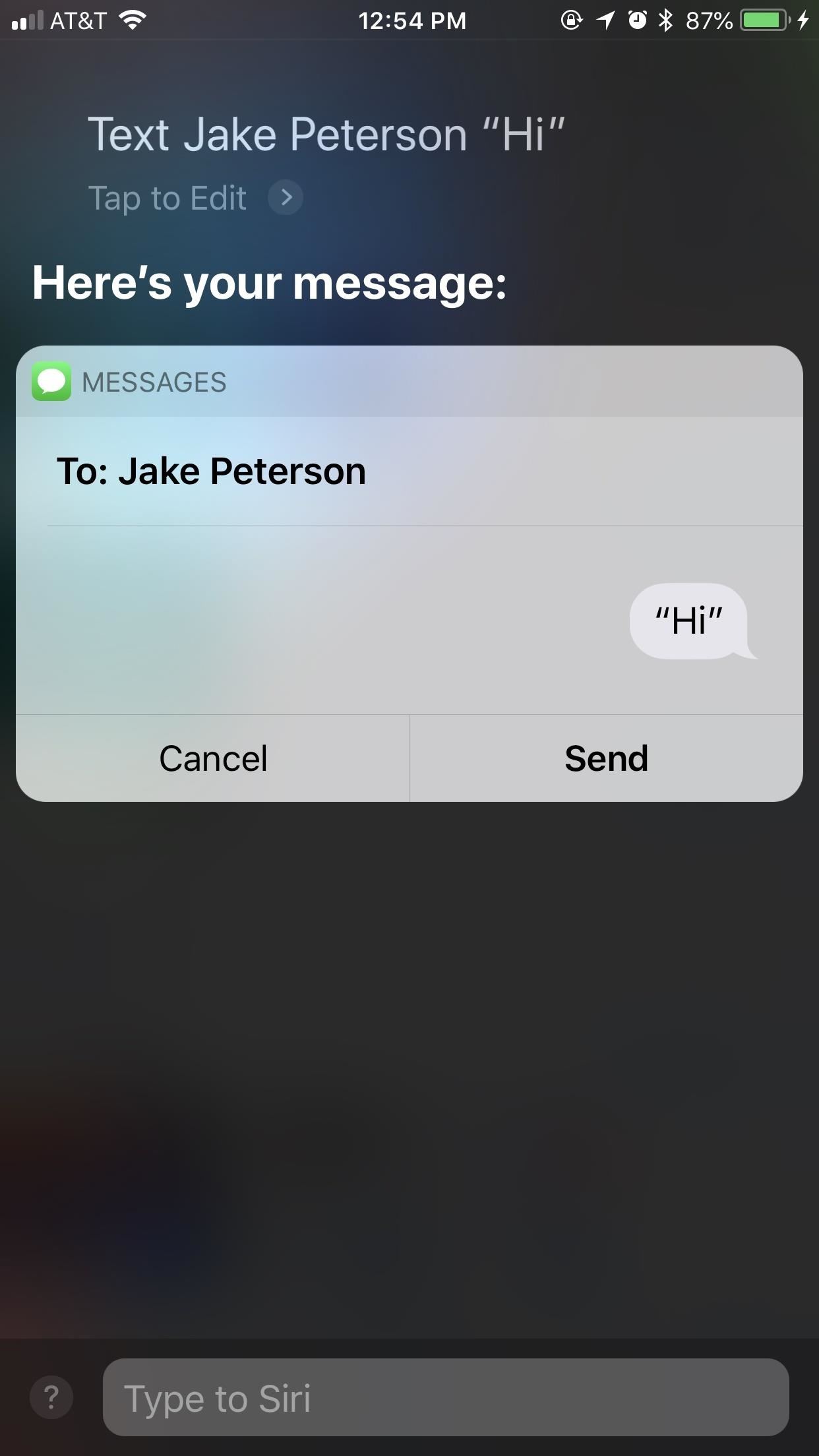
Method 2: Use SiriYour Messages app will never respring on its own because it's trying to open the message containing the black dot. Instead, you'll need to force that message out of the way by adding more messages to the thread in question.Of course, you could have your friend text you, but if they sent you this message in the first place, they probably aren't too keen on helping you out of your situation.Instead, use Siri. First, force-close the app. Then, use Siri to send a message or a series of messages to the contact that sent you the black dot. The goal here is to push the dot out of view, so you can safely reenter Messages without triggering the issue again.Once you've sent your message, open Messages. If it works, get over to the main "Messages" page, then immediately delete the thread containing the dot.

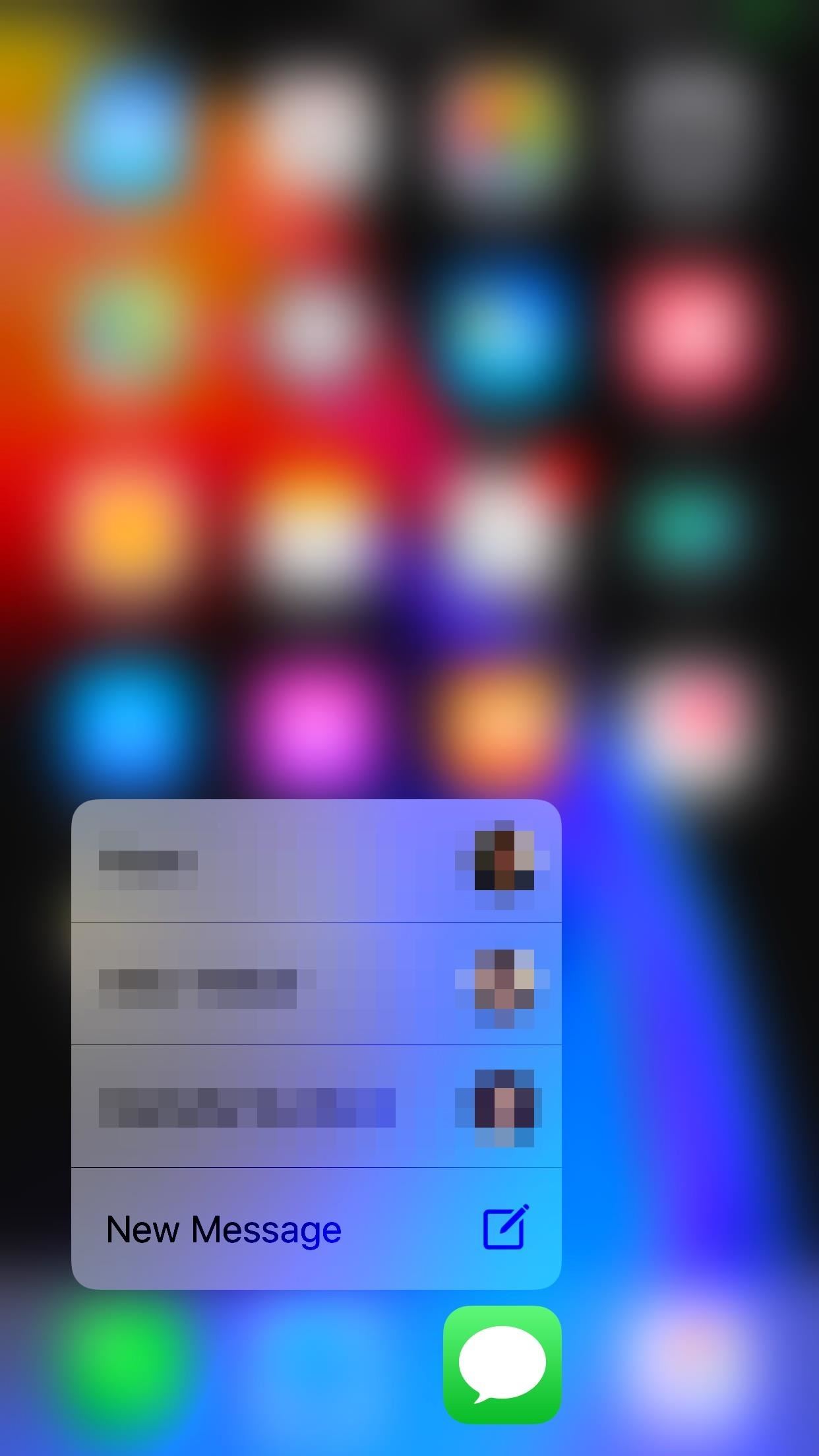
Method 3: Use 3D Touch to Enter a Different ThreadIf this first method doesn't work for you, try this: 3D Touch allows you to enter one of three of your most recent threads in Messages. Presuming at least one of these threads doesn't contain the malicious black dot, you can simply select it to launch yourself back into Messages.To start, force-close Messages again, just to be safe. Next, use 3D Touch to enter a non-dot thread. Once there, simply go back one page to the main "Messages" screen, then delete the thread with the black dot.
Method 4: Delete It from Another Device with Messages on iCloudMessages on iCloud is currently only available as part of the iOS 11.4 beta. However, if you have the feature set up, you can use it to delete the black dot message from one of your other connected devices. Unfortunately, that other device needs to be running the latest beta in order for Messages on iCloud to work, so if you want to set it up, make sure your iPhone, iPad, or Mac is on the beta.More Info: How to Sync All Your Messages With iCloud on iOS 11.4 If both of your devices are set up with Messages on iCloud, simply find the thread on your other device and delete it quickly. Be careful not to tap or click on the black dot, as well — the bug wrecks just as much havoc on an iPad as it does an iPhone, and is also known to have severely affected the memory of Macs.Don't Miss: 5 Cool New Features in iOS 11.4 for iPhoneFollow Gadget Hacks on Facebook, Twitter, YouTube, and Flipboard Follow WonderHowTo on Facebook, Twitter, Pinterest, and Flipboard
Cover image and screenshots by Jake Peterson/Gadget Hacks


Your iPhone 8 or iPhone X battery could wear out in 18 months. Wireless charging and fast charging might be a great solution to the pressures that more power-thirsty devices are placing on


Use a Third-Party QR Code Scanner in the Meantime. If you find yourself scanning a lot of QR codes and don't want to update to iOS 11.3.1 just yet, you might want to go back to one of your third-party QR code scanners until you're ready to trust Apple again.
5 Reasons You Should Use Be Using Norton Mobile Security on


Here you can find the answer of all question about how to put an iPhone or iPad into DFU Mode. DFU Mode is a "Device Firmware Update" mode, when you wish to Jailbreak your iPhone/iPad or update latest iOS release on your device, activating DFU Mode is necessary to bypass the standard restoring procedures and load custom firmware on your iOS device.
If you can't update or restore your iPhone, iPad, or iPod


If you do, you must restart from the disc again to access Disk Utility. Click the Erase tab. Click the disclosure triangle to the left of the hard drive icon to display the names of your hard disk volumes and partitions. Select your Mac OS X volume. Highlight the drive, select Partition Tab, then Format type
Make Your Mac Feel Like New Again With a Fresh Install of OS X


How to send SMS from Gmail - 2014 Disclaimer: The JRESHOW receives free products to create these videos from companies, start-ups, and distributers all around the world. These videos created are
How to Send SMS from Gmail for Free? - techwithlove.com


As you improve your site, you can use Google's recommendations and benchmarks to set your goals and measure your performance. After all — as the largest search engine in the world, Google can have a major impact on your success. So using their standards as your standards is never a bad idea. How to speed up your website in 2019
3 Ways to Speed up Your Site with PHP - Code Envato Tuts+


The Google Pixel 3 may still be a relatively new device, but already rumors and leaks have started emerging about the Google Pixel 4. Notably, it seems as though Google could add better support


Apple today seeded the second beta of an upcoming iOS 10.2.1 update to public beta testers for testing purposes, one week after releasing the first iOS 10.2.1 public beta and one day after
Apple releases iOS 12.3 beta 3 to public beta testers - Geeky


Export Still Photo in Adobe Premiere Pro. Adobe Premiere Pro is more sophisticated video editing software which I prefer to use. It is even easier to extract your favorite image from this program. Click on a video file in the bottom left quadrant.
Adobe Clip - Free downloads and reviews - CNET Download.com


News: Nexus 6P Bootloop Nightmare Turns Your Phone into a Fancy Paperweight How To: Hide the Home Button on Your Galaxy S8's 'Always On Display' Screen How To: Wake Up to Spoken Calendar Events & Weather Forecasts for the Day on Your Nexus 7
Magic Leap's Biggest Problem May Not Be Legal Fights but a


Phones Google Pixel 3 XL's latest leak is in the back of this guy's car. The phone was found by a Lyft driver, so don't go checking your backseat unless you give rides to strangers.
Google Pixel 3 'Lite' leaks in extensive video - The Verge


For email, send your message to: phonenumber@vzwpics.com That works for verizon wireless anyway. For Yahoo! Messenger I believe you just type in the phone number (no spaces) as the user name, but I am not sure about this.
send text messages from your computer? | Yahoo Answers


For the sake of the safety of you and your family, there is some information that you should never post on Facebook. Here are five things you should consider removing or not posting to Facebook and/or other social networks.
Facebook Help Center | Facebook


How to set custom notifications for your VIP inbox on iPhone and iPad. Launch the Mail app from the Home screen of your iPhone or iPad. Tap Mailboxes in the upper left corner of your screen. Tap the ⓘ on the right end of the VIP inbox row.
Shop Today For A New Mailbox | Official Lowe's® Website
AD

How To: Increase Battery Life on Your Samsung Galaxy S5 for More Power Every Day

How To: Increase Battery Life on Your Samsung Galaxy S5 for More Power Every Day

There's a 2800mAh battery powering the Samsung Galaxy S5, but even it's no match for the constant day-to-day torture you put it through. Taking photos, watching videos, and playing games can make your fully charged S5 powerless in no time.While there are some features built-in to help you better manage battery life, most of them aren't very obvious, so let's go over them one by one and get your rapid-draining battery back up to snuff.

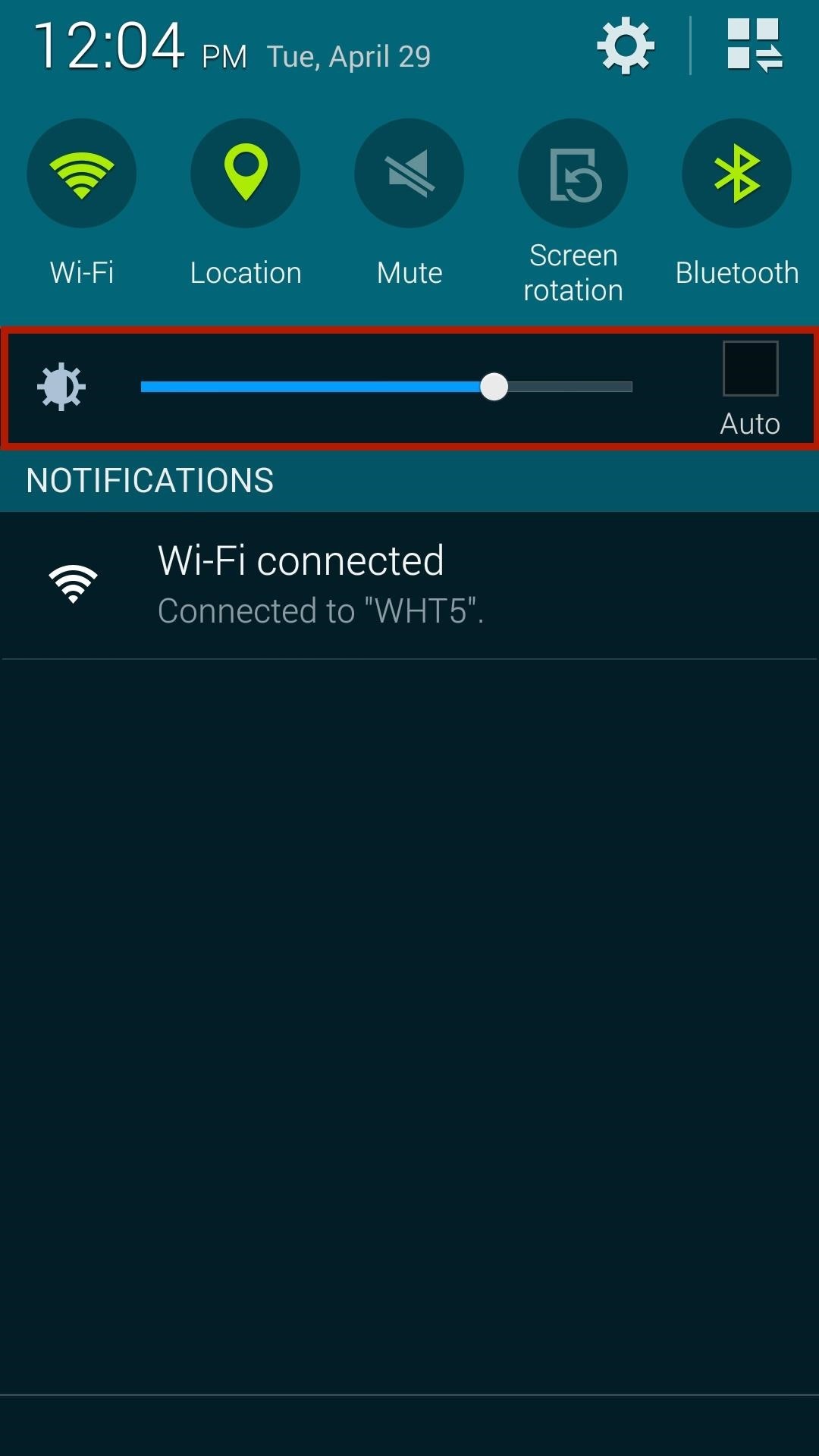
Tip #1: Lower the Screen BrightnessThe leading culprit for rapid battery loss is the brightness of your screen. With a resolution of 1080 x 1920 pixels and 432 pixels per inch, the Galaxy S5 packs a brilliant, albeit power-hungry punch.When you don't need an extremely bright screen, simply lower the brightness. Additionally, if you spend a lot of time outdoors, you can enable the Automatic brightness feature, which uses the ambient light sensor in your device to automatically adjust the screen's brightness. If you're not spending the majority of your day outside, it's better to keep a lower brightness set, and adjust up for those times that you need it.You can access these settings by swiping down on the status bar, or by going to Settings -> Display -> Brightness. Also found in the Display settings is the Auto adjust screen tone feature, which saves power by adjusting the display brightness based on an analysis of images on your screen.

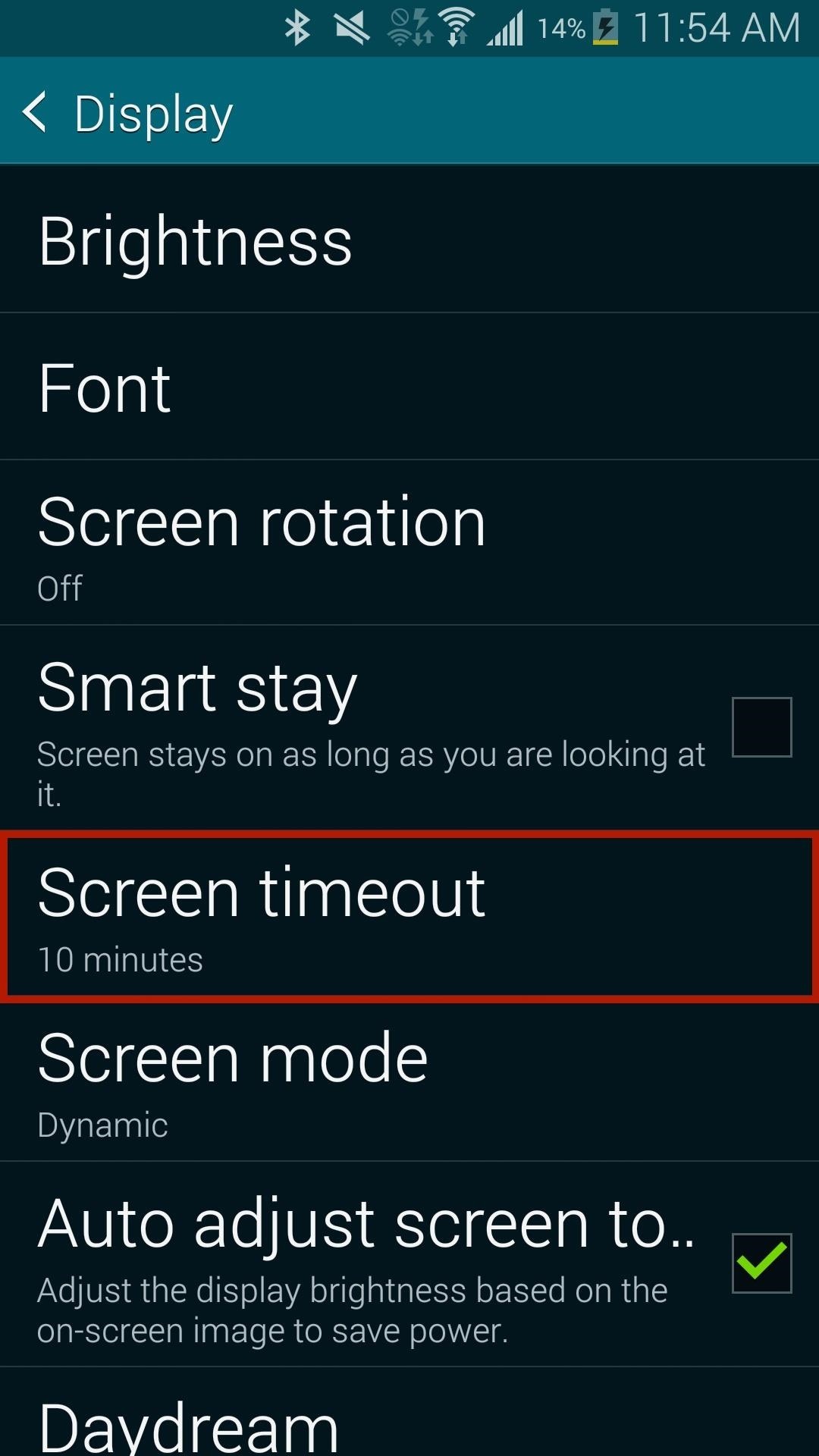
Tip #2: Adjust the Screen Timeout IntervalWhile still in the Display section, Screen timeout can be configured to a lower interval for when your idle screen turns off. Use shorter timeouts—15 or 30 seconds—because the longer your screen stays on, the more juice it consumes.

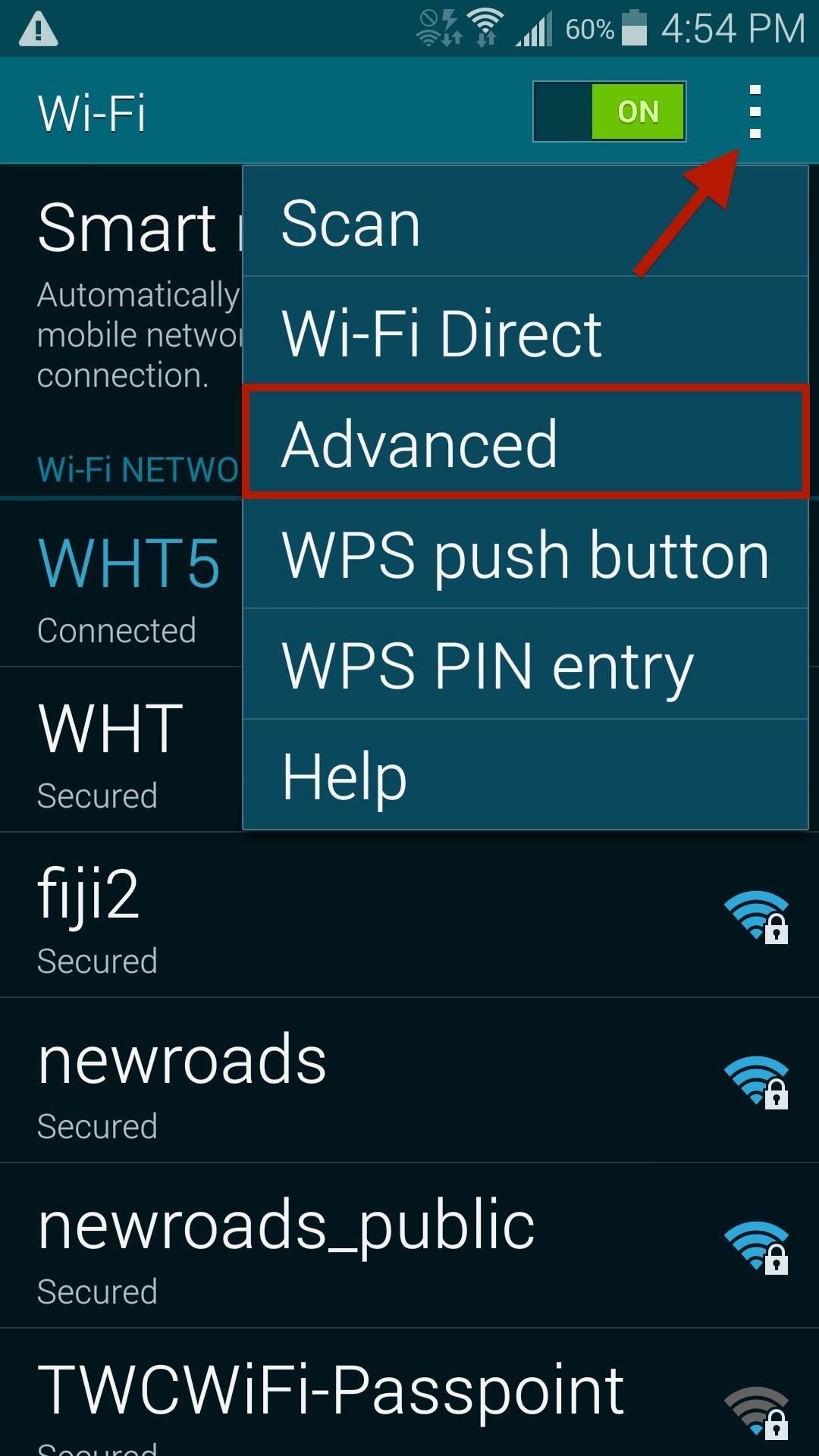
Tip #3: Control Your Data & Wi-Fi UsageWhen in an area that has strong Wi-Fi, take advantage! Using Wi-Fi will drain your battery significantly less than using your carrier's data. Alternatively, turn off Wi-Fi when you're not in an area with an available connection, thus preventing your device from checking for available networks and wasting battery.If you don't want to turn Wi-Fi off completely, tap on the three-dot menu in Wi-Fi settings and head over to the Advanced page. For best results, keep Always allow scanning enabled, as this can be used for location data instead of GPS, which wastes even more battery. You can also choose when to keep Wi-Fi on during sleep and whether or not you want Google Location Services to scan for hotspots, even when Wi-Fi is off. Select either Only when plugged in or Never for when you want to keep Wi-Fi on during sleep. Furthermore, if you're in an area that doesn't have great data connection or available Wi-Fi networks, turn them both off. When you have bad data connection, your phone will continuously try and connect in the background, wasting an absurd amount of battery.

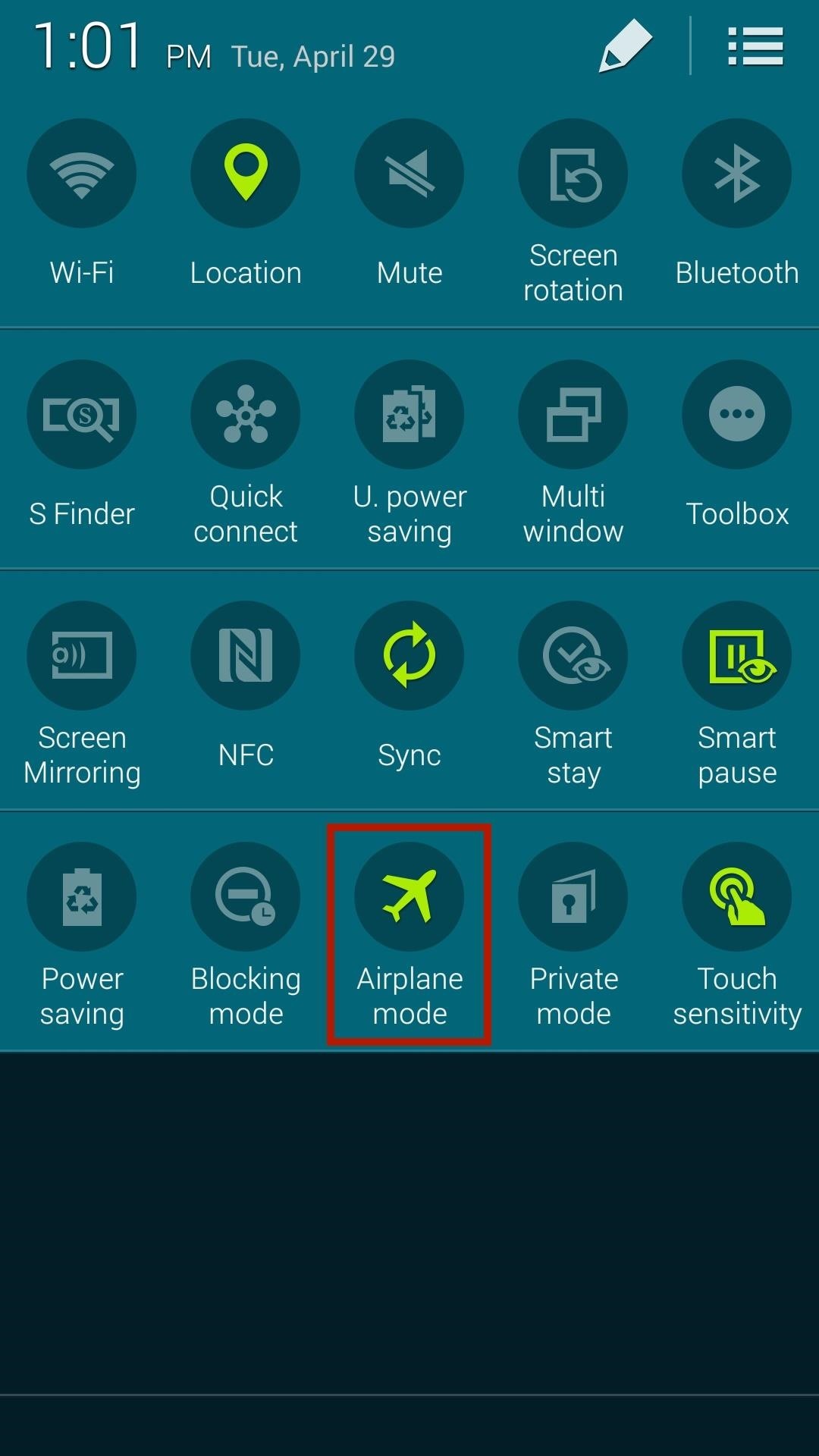
Tip #4: Use Airplane Mode When NecessaryTo turn off data, W-iFi, and Bluetooth all at the same time, simply pull down at the status bar menu with two fingers and put it your device into Airplane mode.

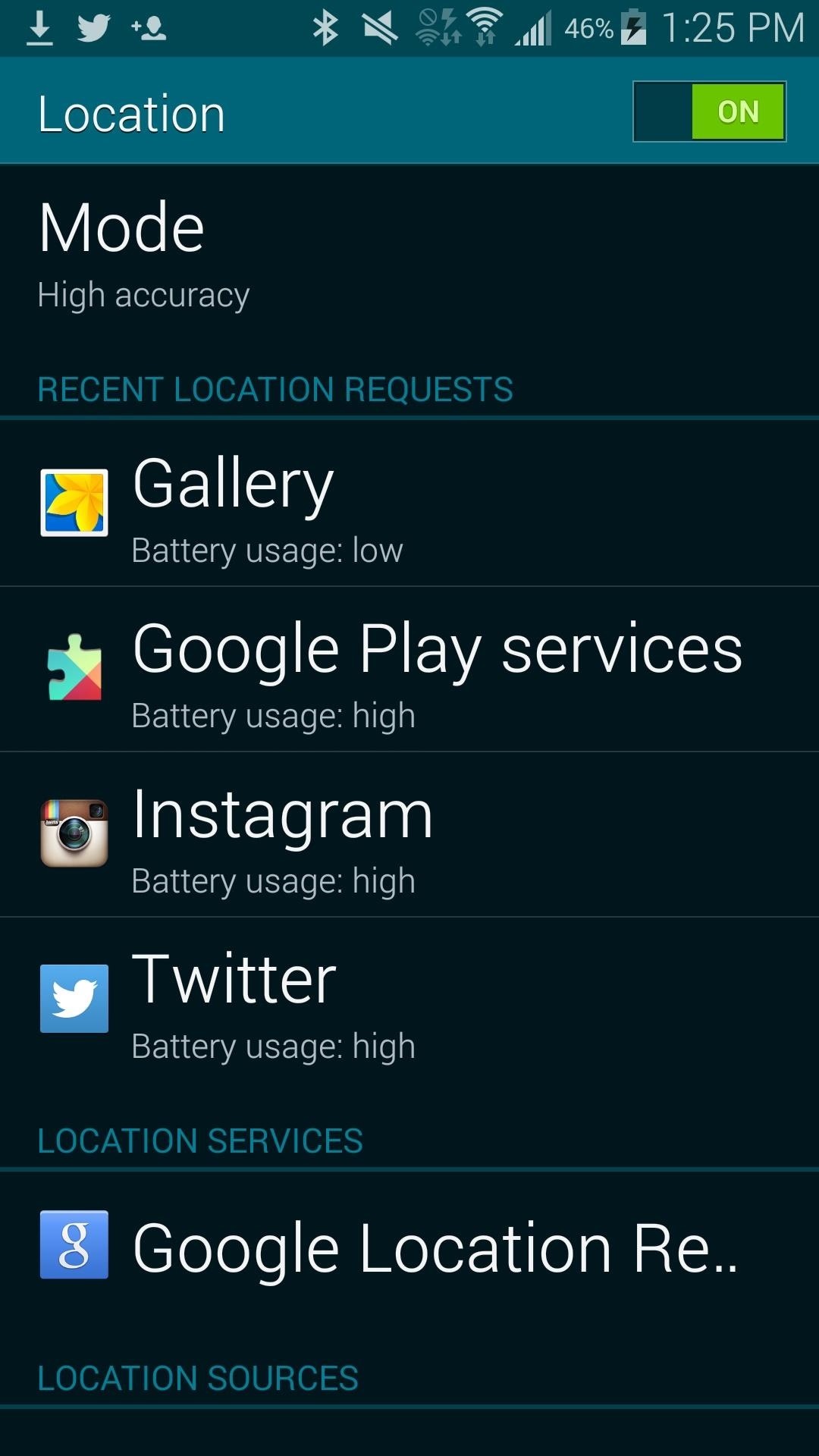
Tip #5: Turn Off Location ServicesWhile location services are useful for navigating through unfamiliar streets, finding local restaurants, or checking into Facebook and Instagram, they don't always have to be on.From Settings -> Location, tap on Mode and enable the Power saving locating method, which uses WiFi and mobile networks to estimate your location without using GPS. In this same menu, you can also see which applications use the most battery with their location services. To disable location services for a specific app, go to its own settings and disable or uncheck location services.In the screenshot below, you can see that Twitter has a built-in setting to turn off location.

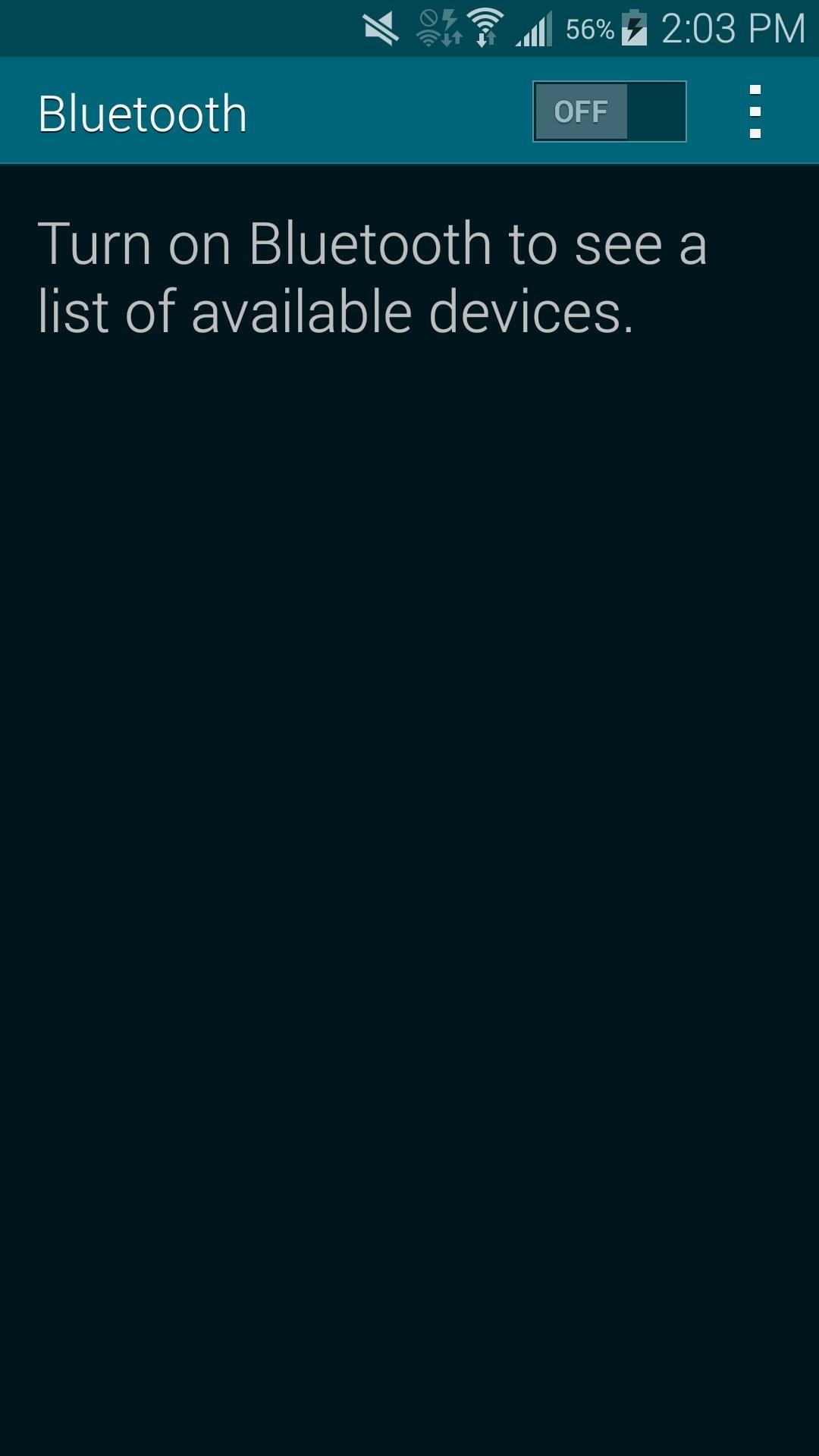
Tip #6: Disable Bluetooth & NFCBluetooth and NFC are useful for connecting to other devices in order to share music, pictures, videos, and more, but since these are mostly used for specific periods of time, why have them on throughout the day? To minimize battery drain, turn off Bluetooth and NFC when you're not using them. You can find Bluetooth and NFC in Settings, or access them from the toggle menu by swiping down on the status bar with two fingers and long-pressing their respective icons.

Tip #7: Use a Black Wallpaper & Leave Out Live WallpapersYour Galaxy S5 comes with an AMOLED screen, meaning it doesn't have a solid backlight. Instead, each pixel produces its own light. If the pixel is white, it produces light. If it's black, no light is emitted.So what does this mean for you?If you place a black background on an AMOLED display, less light will be produced, thus saving battery on your device. Live wallpapers are on the other end of the spectrum when it comes to saving battery, so steer clear if you don't want your battery drained at a much more rapid pace. They not only keep your display active, but can use quite a bit of processing power.

Tip #8: Take Control of Your WidgetsWidgets sort of work as standalone apps that are always on, often updating in the background in order to serve up the latest news, weather, and notifications. It only makes sense that the more widgets you have on your device, the quicker your battery drains.Limit your widgets to only the ones you really need, and adjust the settings for each one, which you can usually access by tapping on the widget or opening up the full app. You'll be able to change the rate at which they update automatically, if at all.

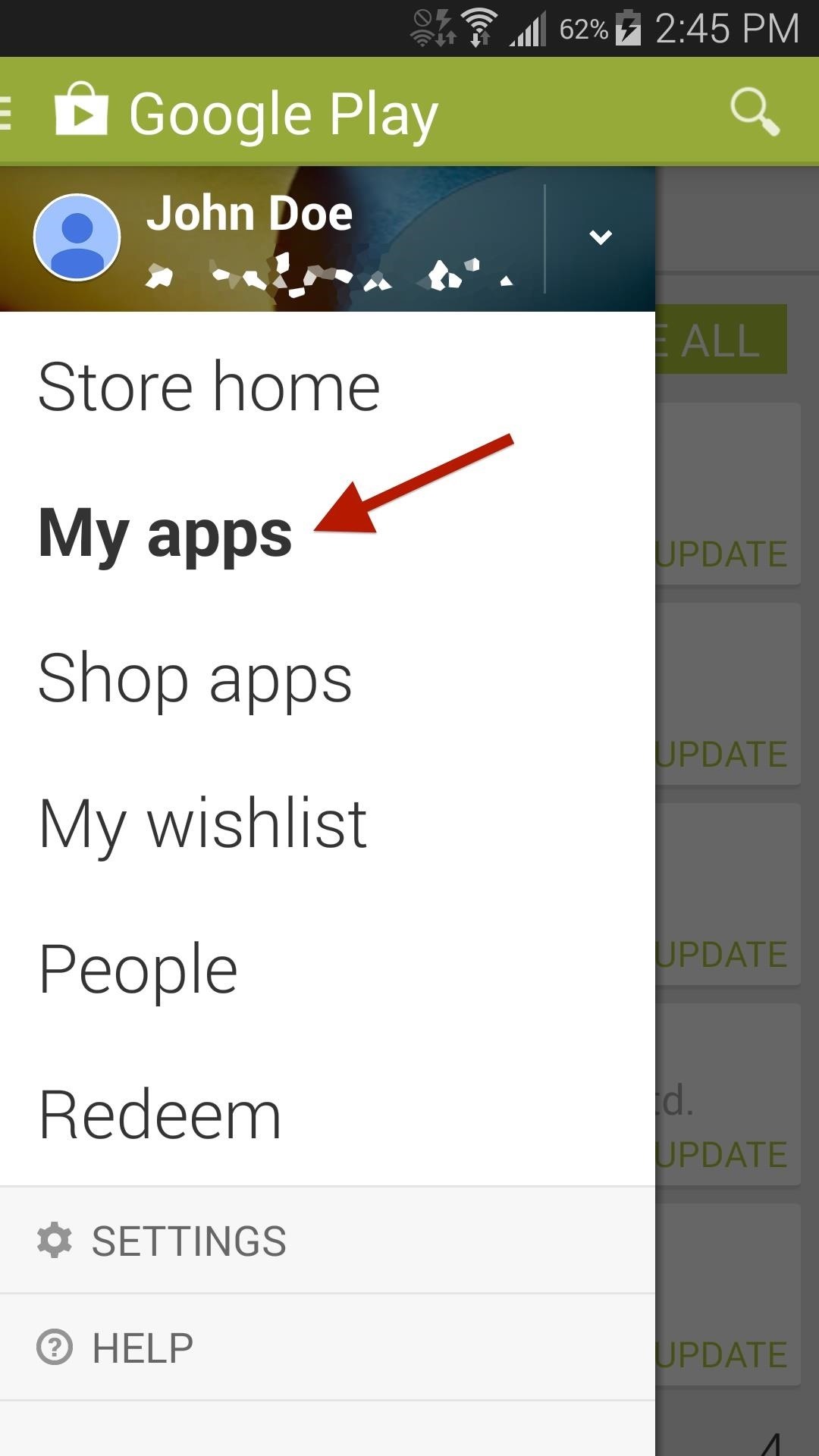
Tip #9: Keep Your Apps Up to DateApp updates help fix bugs, as well as improve any issues that an app might have. These issues can sometimes lead to battery drain, so always make sure to keep your apps updated.From the Google Play app, go to My apps and update all of the ones that need it. You can also set apps to auto update in Settings -> Auto-update apps -> Auto-update apps over Wi-Fi only.

Tip #10: Check for Rogue AppsThe Android system does a great job at monitoring for malicious apps, but some can slip through the cracks. In Settings -> Battery, you can check battery usage for individual apps and processes. If you see an app that is using more battery than normal, tap on it to either report it, or force-stop and uninstall it.

Tip #11: Pay for the Apps That You Use a LotThis might sound strange, but paying for applications could help you save battery. If you're using a free app that has a paid version, it mostly likely has ads. According to New Scientist, up to 75% of the energy used by these free ad-supported Android apps is spent serving up ads or tracking and uploading user data. Image via wonderhowto.com So, if you're using one of these free ad-supported apps quite often, why not shell out a few extra dollars for the pro version? You'll not only help the developer, you'll probably get more features and save battery life in the process. Alternatively, you can always try removing ads from certain apps manually.

Tip #12: Use a Wearable DeviceIf you own any of the Samsung Galaxy Gear watches compatible with the S5, you could use them to check your notifications, look at the time, and just keep your phone's display off altogether—saving battery in the process. Of course, then you have to worry about your Gear's battery life, but it makes much more sense to have a dead wearable than a dead phone. Image via wonderhowto.com

Tip #13: Enable Ultra Power Saving ModeFinally, in dire times where you need to squeeze out those last few precious minutes of battery life, you have the option of putting the phone into battery saving mode. The Galaxy S5 comes with two options—Power saving mode and Ultra power saving mode.Power saving mode restricts background data, limits performance, and turns off several other battery-sucking features. While it works great, Samsung has upped the ante with Ultra power saving mode. This feature is great for those times when you have very little life left, but just need your device to stay on for basic functions like calling and texting. It will turn your screen grayscale, with an altered and minimal interface. You'll be limited to only a few apps (Internet, Messages, Phone, etc.), but you can bet that your S5 will last much longer than usual.
Other Tips You Should Try OutAs with most Android phones, there are universal tips that you can follow to help your battery drain problems on your device.Uninstall unused apps (they may be running in the background). Turn off haptic feedback (consumes battery with each vibration). Configure how often an app syncs in the background. Turn off voice services like S Voice. Clear notifications to turn off the blinking LED. Use the AC adapter when near an outlet. Update your firmware when available (newer versions will better optimize your battery power). Are there any other tips that have helped you save battery on your Galaxy S5? Let us know in the comments below.


Follow the guide below to get Bitmoji Keyboard on Android device. How to Get Bitmoji Keyboard on Android. This step by step guide will help you in installing the Bitmoji Keyboard. Step 1 - First open the Google Play Store app from your app drawer and install the following applications. Download: Gboard - the Google Keyboard. Download
Type in style: How to change your Android keyboard | Greenbot


The iPhone 11 could scan the veins in your face to unlock Tom Bedford. but until then we'll keep you updated with all the latest iPhone news and rumors. New Honor 20 leak shows off the
A Face Can Unlock iPhone X, But Can It Be Fooled? - VOA


An introduction to the Speed Dial feature on BlackBerry® smartphones. Speed dial is a handy function that does what the name implies: it quickly dials a phone number. With the push of one or two buttons (depending on your model of BlackBerry smartphone) your device is making an outgoing call.
Speed dial contacts - BlackBerry Forums at CrackBerry.com


This is a tutorial on how to SSH into your iPhone/iPod touch without having a WiFi network. This means that you can easily SSH into your iPhone in the car or on a plane or actually from anywhere.
How To SSH Into Iphone/Ipod touch (No WiFi) - YouTube


Learn how to do anything with wikiHow, the world's most popular how-to website. Easy, step-by-step, illustrated instructions for everything.
eBay - Electronics, Cars, Fashion, Collectibles, Coupons and More


Send My Location: How to Send Your Current Location on iPhone Chris Hauk - Nov 2, 2017 If you're like I am, you can take someone directly where you want to go, but if I have to give them turn-by-turn directions to follow to pick me up somewhere, forget about it.
How to share location, contacts, and more with iMessage on


I'd like to access files in an iPhone, such as using remotely connecting via ssh and telnet. But it appears that the iPhone's ssh or telnet are not supported. I can ping it, but cannot use telnet or ssh. I read through some internet article, it appears that using jailbreak or Cydia it is doable, but I guess it would break my iPhone's license.


Hi Buddy My HTC Camera is not working at all, when i tried to open the camera it open and it shows black screen and then after sometime it comes to home scree. Can you tell me how to rectify this issue. Rgds Sameer - HTC One M8
HTC announces One M9+ with Duo Camera and fingerprint sensor


Now we want to make it even easier to catch up with shows you love. Introducing Watch. We're introducing Watch, a new platform for shows on Facebook. Watch will be available on mobile, on desktop and laptop, and in our TV apps. Shows are made up of episodes — live or recorded — and follow a theme or storyline.


14 Things You Should Know Before You Go Skydiving For The First Time As explained by someone who is terrified by heights but survived — and even loved! — his skydiving experience. Posted on


When you unlock the bootloader on your Essential PH-1, you open your device to a host of new possible tweaks. One popular modification is a custom kernel, which can not only speed up your phone, but give you new features that wouldn't be possible otherwise. The kernel controls the communication
Essential Phone Forum on XDA Developers


Apple announced the release of their newest Mac OS X version at this year's Worldwide Developer's Conference, and it's called "El Capitan." Like the majestic rock formation it's named after (located within Yosemite National Park), El Capitan promises to emphasize and expand on some of the great features we used on 10.10 Yosemite.
How to Get the OS X El Capitan Public Beta - Laptop Mag


Solve math problems instantly across a wide range of topics, ranging from Arithmetic to Calculus. Save your results in "History" tab so you can go back to them anytime. Math is hard - but with SnapCalc, it's never been easier. Get SnapCalc Premium Upgrade to Premium version and get step-by-step solutions and remove ads.
How to Solve Math Problems by Mobile Camera - techbulu.com

How To: Forgot Your Apple Watch Passcode? Here's How to Bypass It Using Your iPhone or Watch

How To: Forgot Your Apple Watch Passcode? Here's How to Bypass It Using Your iPhone or Watch
Using a passcode on your Apple Watch is a good way to keep other people out of your data, but what happens when you see that "Wrong Passcode" screen yourself? You can, of course, try again in a minute, but if you've forgotten it for good, there's still a way to get back into your Apple Watch.In order to bypass the passcode on your Apple Watch, you will have to wipe it. This will restore it back to factory settings, but you can always restore from a backup to get it back how you had it. Erasing your Apple Watch can be done in two ways: with your iPhone or without your iPhone. We'll cover both below using an Apple Watch Series 3 (GPS + Cellular) provided by Verizon Wireless, but the process is the same on any Apple Watch model.Don't Miss: Lock Your Apple Watch with a Passcode to Increase Security

Remove the Passcode Using Your iPhoneIn the Apple Watch app on your iPhone, select the "My Watch" tab, then choose "General." Once there, scroll all the way to the bottom and select "Reset." Make sure your Apple Watch is close by during the whole rest of this process. Next, tap the "Erase Apple Watch Content and Settings" option up top, then tap "Erase All Content and Settings" on the warning prompt that states all media and data will be deleted. Since this is obviously a big deal, you'll get yet another warning prompt asking if you're sure you want to continue. Tap "Erase All Content and Settings" to confirm. If you have an Apple Watch Series 1 or 2, or an Apple Watch Series 3 without cellular capabilities, that's all there is to it.However, if you have an Apple Watch Series 3 (GPS + Cellular) model with an active cellular plan, you'll be asked if you want to "Keep Plan" or "Remove Plan" from the Apple Watch. If you keep the plan, you won't have to worry when it comes to setting up your Apple Watch again, but if you remove it, you may need to contact your carrier to have it added back onto the Apple Watch. Your iPhone will start unpairing your Apple Watch, which doesn't take very long. After it's unpaired, you'll see the "Start Pairing" screen on your iPhone, and the Apple Watch will begin wiping itself and restoring itself back to factory settings. The restoring process may take a little while, so be patient. After it's done restoring back to factory settings, you'll need to pair your Apple Watch again with your iPhone, just like you did when you first set it up.More Info: How to Pair & Set Up Your Apple Watch with Your iPhone

Removing Your Passcode Without an iPhoneIf you don't have your iPhone handy, you obviously won't be able to do the above steps. But there is still a way for you to remove the passcode on your Apple Watch to start fresh. First, make sure your Apple Watch is on its charger, and keep it there until you're all done.Next, press-and-hold the side button until you see the power menu come up. Instead of sliding the "Power Off" switch, firmly press on it and let go. On the prompt, tap "Erase all content and settings," tap the green checkmark to confirm, then just wait for the process to finish.Keep in mind that you will need your iPhone nearby in order to set up the Apple Watch again, otherwise, it's just a useless thing on your wrist in the meantime. Replacement Apple Watch Magnetic Charging Cables: Amazon | Best Buy | AppleFollow Gadget Hacks on Facebook, Twitter, YouTube, and Flipboard Follow WonderHowTo on Facebook, Twitter, Pinterest, and Flipboard
Cover photo and screenshots by Justin Meyers/Gadget Hacks

How to Hack a toy radar gun into a real one « Hacks, Mods


Make It Rain Down Chocolate! for Real! Here's How to Make Your Own Pneumatic Candy Cannon!: Be the coolest person on the block by building a pneumatic device that will launch candy 100 feet in the air, and make it rain down all kinds of sugary treats!!!
The King of Random's Profile « Wonder How To

How to Count Calories & Log Nutrition with Samsung Health


If you want to block or block any application from using Internet, then un-check the application which you want to block the application. This means that this application will not by-pass the firewall. If you want to allow the Internet usage to the application, just check the check-box against it, press OK button.
Which Is the Best Antivirus,VPN and Firewall?? « Null Byte


Surge pricing during peak travel times can leave you shelling out hundreds of bucks for As the most popular service Uber offers, UberX is especially vulnerable to surges. While Lyft rides are generally pricier than UberX, when a surge is in effect all bets are off.
Nine ways to avoid surge pricing on Lyft and Uber


For Linkin Park fans, that gem comes today in the form of a free MP3 download of the entire Hybrid Theory album. Normally priced at $11 as a digital download, this is a pretty good deal.
Linkin Park Gives Away Free Download Of 'Hybrid Theory


To celebrate the Harry Potter prequel that's still out in select theaters, Fantastic Beasts and Where to Find Them, Google Assistant has a few Hogwarts-style voice commands that let you control your Android device like magic. To try them out, just say "OK Google," then cast the following spells:
Turn Your Phone into A Wand Using Google Assistant's Voice


How to create a 3D Terrain with Google Maps and height maps in Photoshop - 3D Map Generator Terrain - Duration: 20:32. Orange Box Ceo 4,634,498 views
myFloppyDriveQuartet (Musical Floppy Drives with - YouTube

How to Find Your Missing Android Phone, Wipe It Clean


Google changes its logo with another logo called doodle on some special days or occasions. If you are using the Google web browser, then you can replace the Google logo to any doodle of your like anytime you want. The Favorite Doodle extension for the Google Chrome browser makes this possible. You will still see the new doodles on special
Change Google Logo With Your Favorite Google Doodle in Chrome


It might not be as big a deal for photos that stay on our hard drives but for those we share, a little caution is always a good idea. Meet EZ UnEXIF Free (EXIF Remover), a free Android app that removes all the EXIF data in a photo and saves it as a copy or overwrites the original one, according to your preference.
Smartphone Pictures, Exif, and Personal Privacy - Anti-virus
stopsign.com/blog/smartphone-pictures-exif-personal-privacy/
Find out more details on this blog: "How to Scrub the EXIF Data from Photos on Your Android Phone Before Sharing Them". The up side to all of this is that certain social networks such as Facebook and Twitter proactively strip out Exif data, but that can change in the future and I personally wouldn't trust it if you're really concerned
How to Scrub the EXIF Data from Photos on Your Android Phone


The first step in using your new Galaxy Tab is setting it up. Odds are good that the folks who sold you the Galaxy Tab have already done some preconfiguration. In the United States, the Tab is available primarily from cellular phone providers, and getting digital cellular service is a usual part of
How to Use the Galaxy Phone for Beginners


A deletion request is cancelled if you log back into your Facebook account during this time. It may take up to 90 days to delete data stored in backup systems. Your information isn't accessible on Facebook during this time. Some information, such as messaging history, isn't stored in your account.
Facebook Doesn't Make It Easy to Delete Your Account. Here's


You can Protect the email with an OTP. Send Self-destructing Email through Gmail Website. You can follow these simple steps to send an email with expiration date using Gmail's Confidential mode: Login to Gmail.com and Click "+" icon to compose a new email and type in Email address and body.
Cambridge Analytica used self-destructing email


If you want to Increase download speed without doing any technical experiment, you have come to right place. We can Increase download speed with free download manager. Before reading this article, I recommend you to buy Internet download manager . IDM is the best download manger in the world.
How To Double The Download Speed Of IDM (3 Methods)