How To: Share Audio & Video Clips in Overcast to Show Off Your Favorite Podcasts

How To: Share Audio & Video Clips in Overcast to Show Off Your Favorite Podcasts
In a world of seemingly endless streaming services, podcasts continue to offer free, unlimited entertainment for all. When you find a podcast that's just too good to keep to yourself, sharing it with family and friends is inevitable, but how you share may determine whether or not they listen to it or not. Links alone aren't enough. Audio and video clips are how you get them sucked in.It's not common for a podcast app to let users share audio and video clips, but that's why Overcast for iPhone shines over apps like Castbox. When listening to any podcast in Overcast, you can create a clip of up to 60 seconds long for any section you want. It's a cool way to share what you've been binging on your commute, your workouts, or your free time at home.Instead of spending the time writing up your own pitch for why "The Daily" or "Song Exploder" is worth your time, let the podcast itself do the talking for you. Just note that Overcast only supports audio podcasts. You'll see what we mean by "video clips" down below.Don't Miss: Customize Skip Length in Your iPhone's Podcasts App

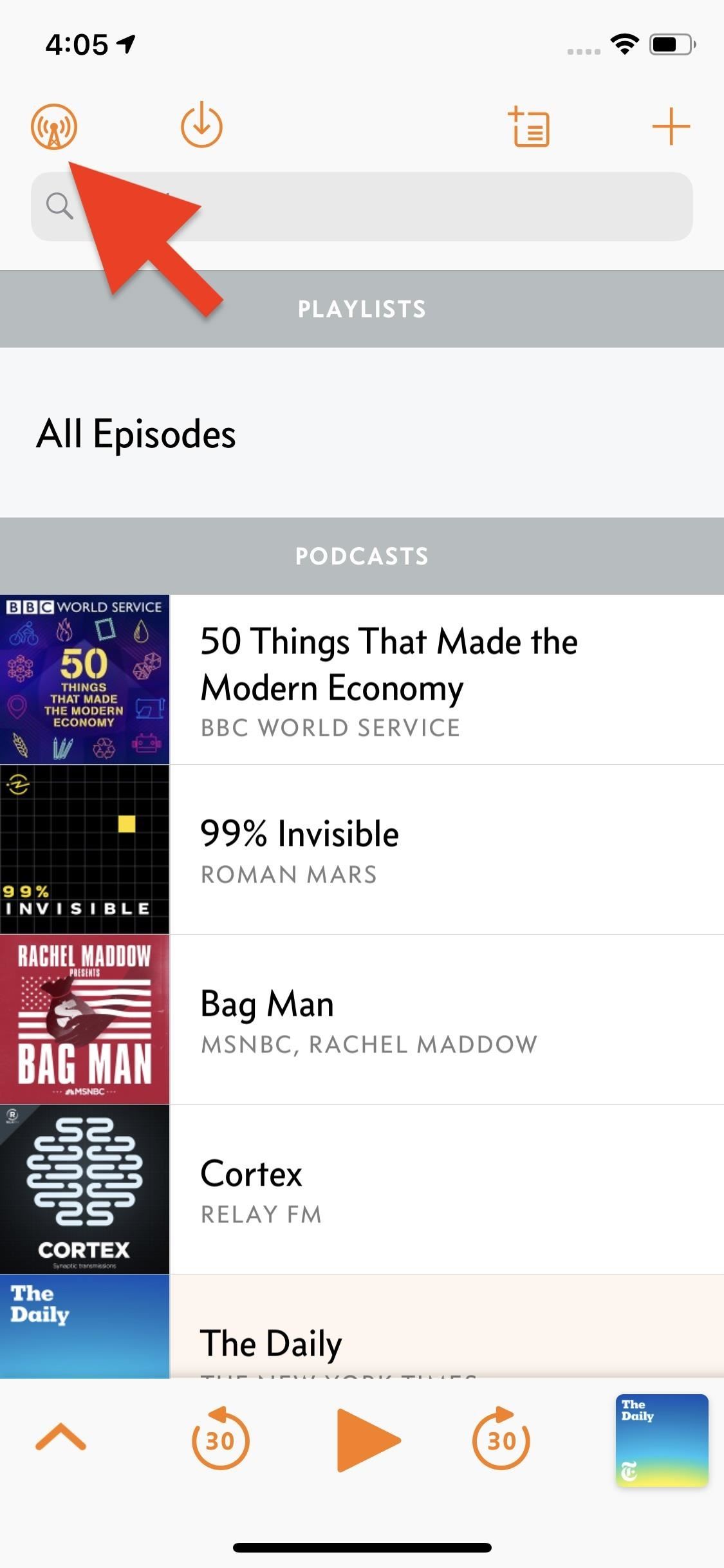
Step 1: Make Sure 'Downloads' Are EnabledWhile the UI isn't quite perfect, Overcast makes it pretty simple to cut up an episode to your liking. First, make sure the episode you want to edit is downloaded to your iPhone. Episodes set to "Stream" will not work with this feature.To make sure episodes download when played, tap the "Overcast" logo in the top left, then select "New Episodes." Next, simply make sure one of the two "Download" options is selected here, then listen to the podcast as such, on Wi-Fi or on either Wi-Fi or cellular.

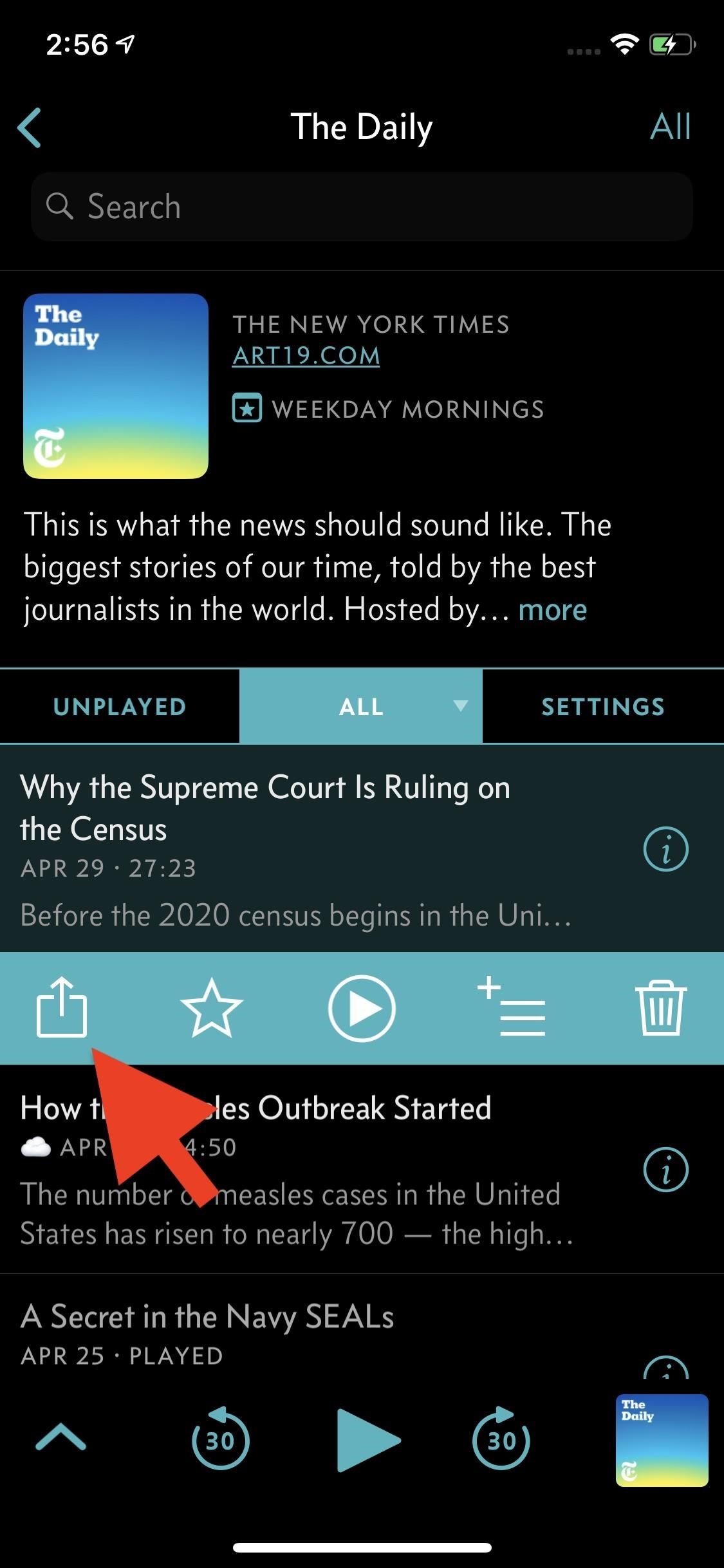
Step 2: Start Editing Your ClipNow, find the podcast episode that you want to share, tap on it from the list, then select the Share icon that pops up. If you only see the Share icon, play button, and info button there, you'll need to tap the play button before the Share icon will do what you want. Without the five icons in that menu, the Share icon will just open the standard activity view and not the action sheet we want.However, if you tap the play button, you'll be on the now playing screen, and you don't have to go back to hit the Share button from the list. Instead, just tap the Share (aka Action) button in the top right. No matter if you did it from the list view or from the now playing screen, the action sheet should show up with a few options, "Share Clip" being the one to tap. Once you tap "Share Clip," Overcast will load up the clip editor. Right off the bat, you'll see the trimmer tool at the top of this page. You can use the left-most slider to choose where to start your clip and the right-most slider to control where the clip ends (max length being 60 seconds). The tall slider can be used to control where the playback starts when you tap the play button — it doesn't control anything with your final clip output, it's just here so you can quickly find your desired start and stop points in the clip.It is a bit buggy at this time — once you move the start time, Overcast won't let you bring it all the way back. If you want to start your clip at 0:00, you'll need to leave this slider in place or cancel your clip and start over. Plus, to get to your end time slider, you need to manually move the timeline by swiping left.Once you set your parameters, check out the options below the play button. From left-to-right, you can choose to have your clip be Audio Only, Portrait Video, Landscape Video, or Square Video. In addition, you'll find the option to include an Overcast badge, an Apple Podcast + Overcast badge, or no badge to your final product. Note: no badges will appear when choosing Audio Only, even if you select either badge option. When you're finished with these options, tap "Next" to see a preview of your clip.

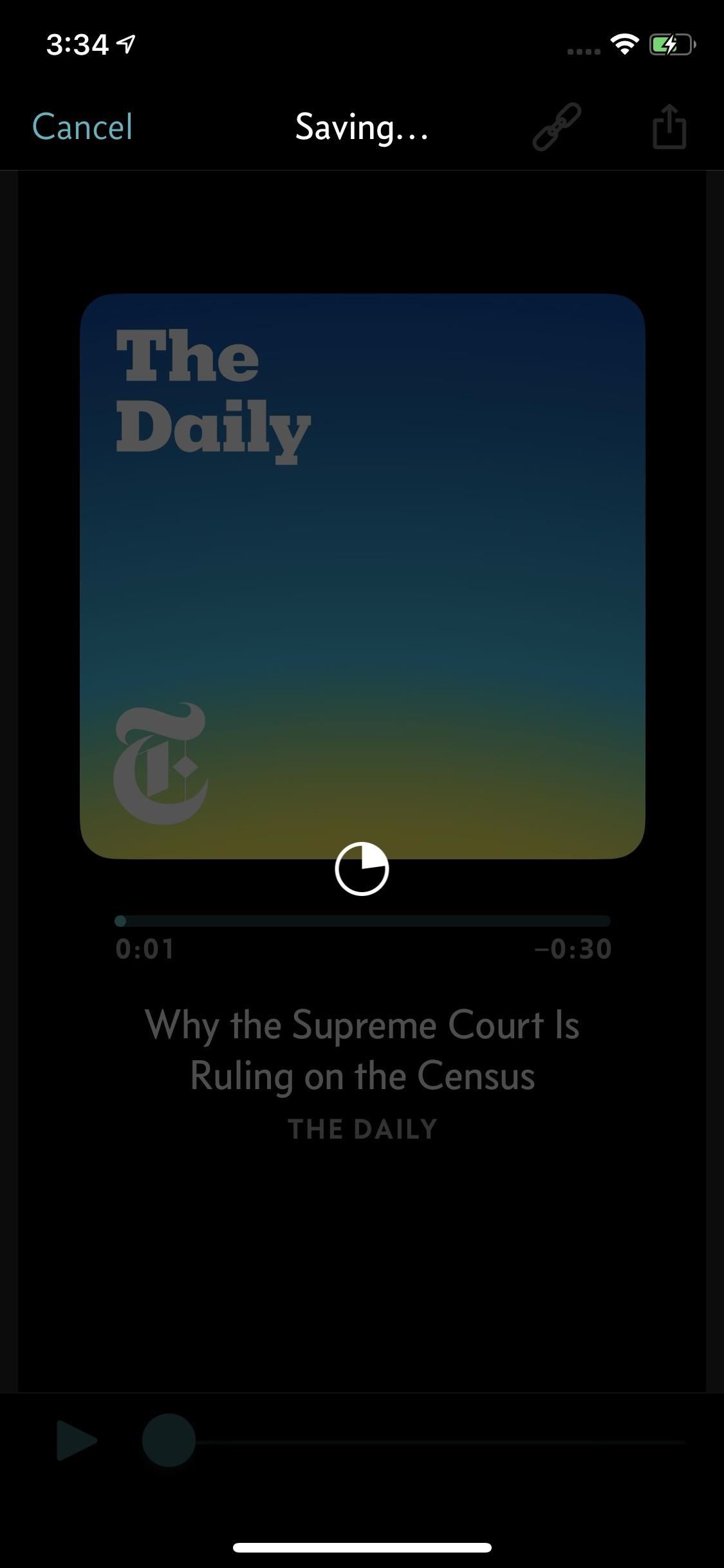
Step 3: Share Your ClipWhen you're satisfied with your preview, you have two options. You can tap the link (chain) icon to share a URL to the podcast itself — not the preview you made. When you do, the regular activity view (aka Share sheet) appears, where you can choose which app or service to send the link to.More likely, you'll want to share this clip preview. In that case, tap the Share button. Overcast will first take some time to share your clip. Once it does, it will also open the Share sheet. Choose your desired location and, when finished, repeat the process to share elsewhere as well. If you want to share a video clip to a platform not listed here, tap "Save Video," and the clip preview will save as a video to your Photos app. You won't see this option for audio clips, but you might find "Save to Files" useful instead. Don't Miss: How to Snag Hulu & Showtime with Spotify Premium for Just $5/MonthFollow Gadget Hacks on Pinterest, Reddit, Twitter, YouTube, and Flipboard Sign up for Gadget Hacks' daily newsletter or weekly Android and iOS updates Follow WonderHowTo on Facebook, Twitter, Pinterest, and Flipboard
Cover image, screenshots, and GIF by Jake Peterson/Gadget Hacks

Galaxy S8 Oreo Update: Lock Screen Clock Now Matches

Drippler's New iOS App Tells You Everything You Need to Know


How To: Get Samsung's New WatchON App from the Galaxy S5 on Your Galaxy Note 3 How To: Disable Those Annoying 'Displaying Over Other Apps' Notifications on Your Galaxy S9 News: How to Watch the Samsung's Galaxy S5 Launch Today Live How To: Galaxy S5 Battery Dies Too Fast? Here's Why & How to Fix It
Windows 10 tip: Disable annoying app notifications | ZDNet


The above browser extensions work in conjunction with the EndlessJabber web interface, so if you want to reply to a message popup, you'll be directed there.. If you're using another web browser on your computer, like Internet Explorer, Safari, or Opera, just bookmark the web interface so you can view and send text messages whenever you want.
How to Sync Your Android Text Messages and Phone Calls with


How To: Install a Custom ROM on Your Nexus 5 (A Newb-Friendly Guide) How To: Hack Your Nexus 7 into a Hybrid Android Tablet That Looks & Feels Like Both iOS & TouchWiz How To: Add Your Own Custom Screensaver Images to Your Kindle Lock Screen
How to Choose Which Apps Are Allowed to Start Up


Starting on Android 4.2, a new feature called Quick Settings was integrated into the Notification tray, which allows you to quickly turn on and off certain device features such as Wi-Fi, Bluetooth, GPS, etc.
How to Monitor Your Kid's App Usage on Android « Nexus


How To Change The Zelotes 5500 DPI Gaming Mouse Colors From Cycling To One Solid Color! 7 Things That Can Change Your Eye Color 2015 Zelotes 5500 DPI 7 Button LED Optical USB Wired Gaming
Why are optical mouse LEDs red? - Super User


Your friends are ditching Snapchat for Instagram. After the social network turned camera company announced it lost $13.30 per user in its first quarter as a publicly traded company, well, it doesn't look too good for the platform's future, y'all.
Facebook is losing its younger U.S. audience to Snapchat, and


iPhone XS, XR tips and tricks. There's a lot to learn when you start using Apple's iPhone X, XS, Max and XR.The lack of a home button, for one, completely changes the way you interact with the phones.
Print These iPhone XR, XS & XS Max Cutouts to See Which Size


So well lets begin the full guide to Unlock Bootloader On Any HTC Smartphone. If you are always opting to install Root, Custom Recovery or any Custom ROM, then your phone must be unlocked. In this guide, So here is the full guide to Unlock Bootloader on Any HTC Smartphone. If you unlock bootloader you may void the warranty.
Unlock Your Bootloader & Delete Tamp… | HTC One (M7)


Disabling Two-Factor Authentication. For security reasons, the process of disabling two-factor authentication on your iPhone is a little bit more involved. So you can't just turn it off by going into your iPhone's settings — instead, you'll actually have to go to your Mac or PC.
The Best Two-Factor Authentication App for Android


The title of this post is lie number one of a litany of lies to be found on the Internet. You are NOT going to learn how to rewire a vintage phone. You are not. I know this from experience. But I'm getting a bit ahead of myself as I am want to do when I'm in fits. I have a number of oddities
How to Create an Untraceable Messaging Device With an Old Phone


How to remove bloatware and preinstalled Android apps but it also means that the app is not really 'gone', in the sense that it is if you have uninstalled it. into one of these two
» Google Stadia Unlikely To Support Android TV Devices At


50 VSCO Cam Filter Settings for Better Instagram Photos

How To: Hack Your Old Phone Line into an Emergency Power Supply for Your Cell Phone

How To: Hack Your Old Phone Line into an Emergency Power Supply for Your Cell Phone

"Ahoy-hoy."If telephone titan Alexander Graham Bell had his way, we'd all be answering phones like Mr. Burns. Thankfully, frienemy Thomas Edison had enough sense to realize we weren't always on the briny. He preferred "hello" as our standard telephone greeting, which he is credited with coining in 1877. Image via staticflickr.com Fellow American pioneer Davy Crockett actually used it as a greeting first in 1833 (as compared to an exclamation)—but in print, not over the phone."Hello" is also the recommended greeting published in the first ever telephone book from 1878 (actually, it was "hulloa," but close enough).Since then, the landline telephone had been our primary method of long distance communication—until now. With the widespread adoption of cell phones in the states, "hello" is the only thing sticking around for the long haul.I can definitely say that this thing is not: No, it's not an Ethernet port that somehow shrank. This not-so-newfangled contraption is called a telephone jack, and if you're like me, you haven't used one in at least a decade or so.You may not even notice them anymore, but if you look around your house or apartment, you've probably got at least one or two of them on your wall. Or, something that looks like this: Now, here comes the interesting part of the story—they are not useless.

Using Old Phone Jacks for SmartphonesWhile a cell phone is incredibly convenient, without a charged battery it's just useless weight. If a storm causes a power outage in the area, I'm not looking for candles and flashlights—I'm figuring out how to charge my iPhone! Image via cultofmac.com There are a few well-known options for charging your smartphone without help from the electric company, including charging cases, car chargers, power inverters, laptops, and more.However, something we all have readily available already is that old landline jack. Corded phones don't need to be plugged into a power outlet; they actually get enough power to operate from the phone line itself. When the power goes out, land lines will still operate on their secondary source of power feeding from the telco. Meanwhile our cell phones will slowly drain and die.With this simple hack, you can put that old relic to good use and convert it into an emergency power supply for your smartphone. Image via instructables.com You'll need a regular USB cable, your cell phone's USB charging cable, an available phone line, a phone cord, a voltage regulator, and a multimeter.The multimeter is used to check the voltage of the jack in question and the voltage regulator keeps the output at 5V. The regulator makes a simple circuit with the phone cord and USB cable to convert the phone signal into power that your phone can use.Check out this video guide by Make to see how it's done. Please enable JavaScript to watch this video.
And take a look at the complete guide by Make's Jason Poel Smith over on Instructables to see the process step by step.
Photos by Loren Kerns, Foxpa, Cult of Mac, Hana/Shutterstock, James Steidl/Shutterstock


I tried looking around for their sub reddit but it is somewhat dead, thought I'd try my luck here. My friends from FFXIV have been convincing me to give it a shot and said its pretty good, however when I youtube it up the gameplay looks average at best and the graphic doesn't seem to be on par with Lineage.
Final Fantasy: All the Bravest for iOS (iPhone/iPad) - GameFAQs


If you wish to disable all notification previews when iPhone is both locked and unlocked, choose "Never". Disable Notification Previews for All Apps in iOS 11. Disable Notification Previews for Individual App in iOS 11. Also you can disable notification previews for individual app. Take News app as an example. Step 1.
How To Disable Push Notification Previews On iPhone Locked


If you've ever had an iPhone, it's fairly easy to adjust the intensity of your flashlight using apps like this one to dim the LED, but for some reason, this is not an easy task on Android devices like our Samsung Galaxy Note 2s. But it can be done.
Quick Tip: Change Your Galaxy S8's LED Flashlight Brightness

8 Best Apps to Download Music on iPhone Free - Freemake


With more than one billion users, Instagram is indisputably the new home for brands who want to make an impact on social. Its emphasis on clean, high-quality visuals makes it ideal for showcasing products—and now it's the place for shopping, too. Sixty percent of users (that's 600 million
I Get Paid to Instagram: Here's How I Make $1,600 a Month on


Additionally this module offers you to get rid of another Lollipop quirk once and for all: You can allow alarms. By default Lollipop blocks your alarms when your device is in the "None" mode. While Google introduced a workaround in 5.1 which wil disable the mode prior to ringing the Alarm, this option allows you to just set and forget your
Set up Priority mode in Android Lollipop - YouTube


A step by step guide to creating and installing your own custom boot animations on Android. Head over to

Depending on how you use your phone, you may have noticed your status bar is a bit crowded due to various icons being enabled. While some icons make sense to have, such as Wi-Fi and Bluetooth, the VPN key icon can be redundant, especially if the app uses a notification.
How to Customize the Status Bar on Android (Without Rooting)

Apple Pay Cash 101: How to View Your Transactions History


iPhone 7 and iPhone 7 Plus models sold in Japan—A1779 and A1785—contain FeliCa for payment and transit with Apple Pay. Information about products not manufactured by Apple, or independent websites not controlled or tested by Apple, is provided without recommendation or endorsement.


The company will pay up to $250 for your old iPad in the form of an Apple gift card. Unlike when trading in an iPhone, Apple requires you to share the serial number of the iPad to see the trade-in
Want iPhone GIFs? Here's how to get the iMessage GIF keyboard


In the new iOS 11, Apple lets you hide purchased apps from the App Store no matter if you have "Family Sharing" turned on or not, which is an interesting change from iOS 10. It's a fairly easy task to hide an app from your list of purchases, but unhiding it is anything but easy. First, if you can't
Hide App Store purchases - Apple Support


Launcher 10 brings a dash of Windows Phone to Android If you just can't let go of Windows Phone, Launcher 10 for Android might be a good option. Jez Corden.
Win 10 Launcher - Apps on Google Play

How To: Just Got a New Android Phone? Here's All the Apps & Info You Need to Get Started

How To: Just Got a New Android Phone? Here's All the Apps & Info You Need to Get Started
If you were a particularly good little girl or boy this year, Santa might have finally brought you that cool new smartphone you've been wanting. Or perhaps you just took advantage of a great sale and treated yourself to a new gadget this holiday season—totally justifiable, and surely a well-deserved gift.No matter how you got your new Android device, you'd be well served to learn a few tricks to help get the most out of your phone or tablet. In addition to that, you probably now have an old Android that could be put to good use instead of just shoved in a junk drawer. So to help you with all of this, we've compiled a list of our favorite apps, tips, and tricks that every Android user should know.Don't Miss: 20 Google Home Easter Eggs & Fun Commands

Completely New to Android? Learn the Basics in No TimeIf you're completely new to Android, there's plenty to learn about your awesome new smartphone. It can be intimidating at first, so we created a series of tutorials called Android Basics that will walk you through the important aspects and give you a better understanding of how everything works.The following link serves as our Android Basics landing page, so bookmark it if you have the chance. The topics are arranged in logical order like a school curriculum, so it starts at the beginning with "How to Install Apps," then progressively covers more difficult topics as you learn.Don't Miss: Android Basics: A Series of Tutorials for Beginners

Essential Apps to Get You StartedNext, let's talk about apps. If you previously used an iPhone or iPad, you should know that some of your favorite iOS apps are not available on Android. But that's just a minor hurdle, because there are plenty of great alternatives, as well as apps that you can only get on Android, and we've covered both at the following link:Don't Miss: 21 Apps You'll Need When Switching from iPhone to AndroidBut let's say you just got a new Android tablet. Even if you're familiar with Android already, many apps just aren't optimized for bigger screens. So to help you take full advantage of the larger display on your new device, we created a list of all the best tablet-optimized apps on the Play Store:Don't Miss: Make Use of Your Bigger Screen with These 12 Tablet-Ready Android AppsTwo of the hottest phones this holiday season are Google's new Pixel and Pixel XL. If you were lucky enough to get one of these bad boys for Christmas, there are a bunch of Pixel-exclusive features that you might not know about. So to make sure you're not missing out on awesome functionality, hit up the following guide:Don't Miss: 18 Tips & Tricks to Help You Master Your Google Pixel

What to Do with Your Old Android PhoneBefore you get too caught up with the ins and outs of your new smartphone, you should take a second to come up with a plan for your old Android device. Instead of just sticking it in a drawer to be forgotten about, one great way to put an old smartphone to use would be to turn it into a dedicated Chromecast remote:Don't Miss: How to Turn Your Old Android Phone Into a Dedicated Chromecast RemoteAnother great use for an old smartphone would be to turn it into a live security camera for your home or office. There are several apps that can do this, but we've covered your best option at the following link:Don't Miss: How to Turn an Old Android Device Into a Security Camera
Help Set Up a Smartphone for Family MembersIf you're the tech support person in your family, you can expect a few troubleshooting calls in the coming weeks when family members start having issues with their new devices. If you'd like to get ahead of this problem, we've written a guide on how to make Android as user-friendly as possible with a few small tweaks. This one would be particularly useful if an elderly family member just got their first smartphone, so check out the full guide below:Don't Miss: How to Make an Android Phone or Tablet Grandma-FriendlyFollow Gadget Hacks on Facebook, Twitter, Google+, and YouTube Follow Android Hacks on Facebook, Twitter, and Pinterest Follow WonderHowTo on Facebook, Twitter, Pinterest, and Google+
Cover image and screenshots by Dallas Thomas/Gadget Hacks


Supercell's highly anticipated Brawl Stars has soft launched in Canada, with gamers worldwide salivating at the prospect of a full debut around the corner. Unbeknownst to many, this game can be played on your iPhone right now, regardless of where you live. As a testament to this game's potential


AirPlay offers a seamless, integrated method to stream music, video, and just about anything else from your iPhone, iPod Touch, or iPad to any other iOS device, like an Apple TV or an Apple computer.
How to connect your iPhone or iPod to your home stereo


Access your favorite features and apps quickly and intuitively with moto experiences: exclusive software that responds to natural gestures and interactions. only on the Moto app Manage all the moto experiences that your phone supports through the preinstalled Moto app .
How to unlock advanced camera settings on the Moto G and Moto


Because I compared some Spotify songs with songs I own that I have tagged with ReplayGain tags and 89.0 dB target volume. These pretty much have the same volume as their Spotify counterparts with Spotify normalization enabled. But I think my local MP3s sound a little better than the 320 kBit Spotify streams, in general.
Why Spotify's 'set the same volume level for all tracks
productionadvice.co.uk/spotify-same-volume-setting/
For casual "shuffle" listening, you can enable Spotify's 'set the same volume level for all tracks' option - and put up with some pretty crass limiting on more dynamic material, unfortunately. If you want to listen to a whole album with the internal dynamics intact and no extra limiting, you can disable it.
Spotify Lowers Normalization Level - meterplugs.com


News: A Theory of Holographic Music Synthesis Red Wine: The Secret to Superconductivity News: NAB 2010 - Red Day Videos News: In Just a Clik, Turn Your Smartphone into a YouTube Remote for Any Web Display
How to Play Your Own PS4 Games on Your iPhone with Sony's New


You will see the apps which sent you the notification will be shown on the Notification tray along with numbers that will tell you how many notifications you have received. Related: How To Get Floating Bar On Your Android Device. This is how you can keep your Android's Notification Tray Clean and Clear with the Centralized hub.
How to See the Notifications You Cleared by Accident - Android


Android Q adds hidden native "chat head" bubbles for all notifications. 2019/03/18 5:32am Samsung Galaxy S4 Pops Up On Cricket For Pre-Order, Ships June 7th The Galaxy Note 10 won't have a
How to Get Floating Banner Alert Notifications on Your Galaxy


It's long been prescribed that when your iPhone's battery is running poorly that you close out all the running apps to help preserve battery life (we've mentioned it before). That makes sense if
How to Completely Close Out of Running Apps in Windows 8


How To Hard Reset A Palm Centro Smartphone DIY University Palm Treo Pro - Smartphone Round "Simple Fix" for phone not charging/syncing, loose cell phone charger cord. #20 - Duration: 5:22
How to record a call on Palm Treo 680 - Phones


These 10 widgets belong on your iPhone's lock screen. I want more from my weather widget and turned to BeWeather because its widget lets Have you come to embrace iOS 10's lock-screen
iOS 12 Draining Your iPhone Battery Life? Here Are 10 Ways to


How to Text from Gmail. This wikiHow teaches you how to send an email as a text message from Gmail. In order to do this, you'll need to know the phone number and carrier email code for your recipient.
Send SMS Text Messages from your GMail Account


100+ Coolest New iOS 12 Features You Need to Know Posted by Gautam Prabhu on Sep 17, 2018 in Featured , iOS 12 Apple has finally delivered on features we've had on our wishlist for almost a decade now.
The best new features coming to your iPhone in iOS 13 that


In this project you'll learn how to make a customizable PVC hand pump that will create vacuum suction, pump water, or compress air. A pre-requisite to making the pump will be 2 homemade check valves.
Build a Powerful Hand Pump From Scratch with PVC Pipe


How To: Use a Palm Centro cell phone How To: Use a BlackBerry Curve 8330 cell phone How To: Use the Bluetooth device on a Palm Centro cell phone How To: Use the Bluetooth capability on a Blackberry Curve News: Easy! Cell Phone Camera Macro Mod (5X Zoom) How To: Download medical records on a cell phone How To: Use a Palm Treo 650
Palm Centro Bluetooth setup - YouTube


How To: Customize Your iPhone with a New Default Font from Disney, the Simpsons, & Many More By Set Custom Fonts for Apps, Settings, & More on Your Nexus 7 Tablet
Easily Change Your Phone's Font Without Tripping SafetyNet

How To: Sideload & Install Open Source iOS Apps on Your iPhone Using MacBuildServerWithout Jailbreaking

How To: Sideload & Install Open Source iOS Apps on Your iPhone Using MacBuildServerWithout Jailbreaking
Apple is widely known for keeping a tight grip on iOS, disallowing open-source and third-party downloads. While there are many reasons for this, the three most frequently referenced are quality control, malware prevention, and of course—money.The number one reason why Apple rejects apps from the App Store is because they crash. Second is security, because they don't want users downloading viruses or trojans that could harm devices or steal data. Of course, Apple always keeps 30% of app revenues for themselves, so it's beneficial to them to make sure only the highest quality apps make the cut.The review and signing process helps to deter bad eggs, and gives them the option to universally ban any app and/or developer that slips through the cracks.

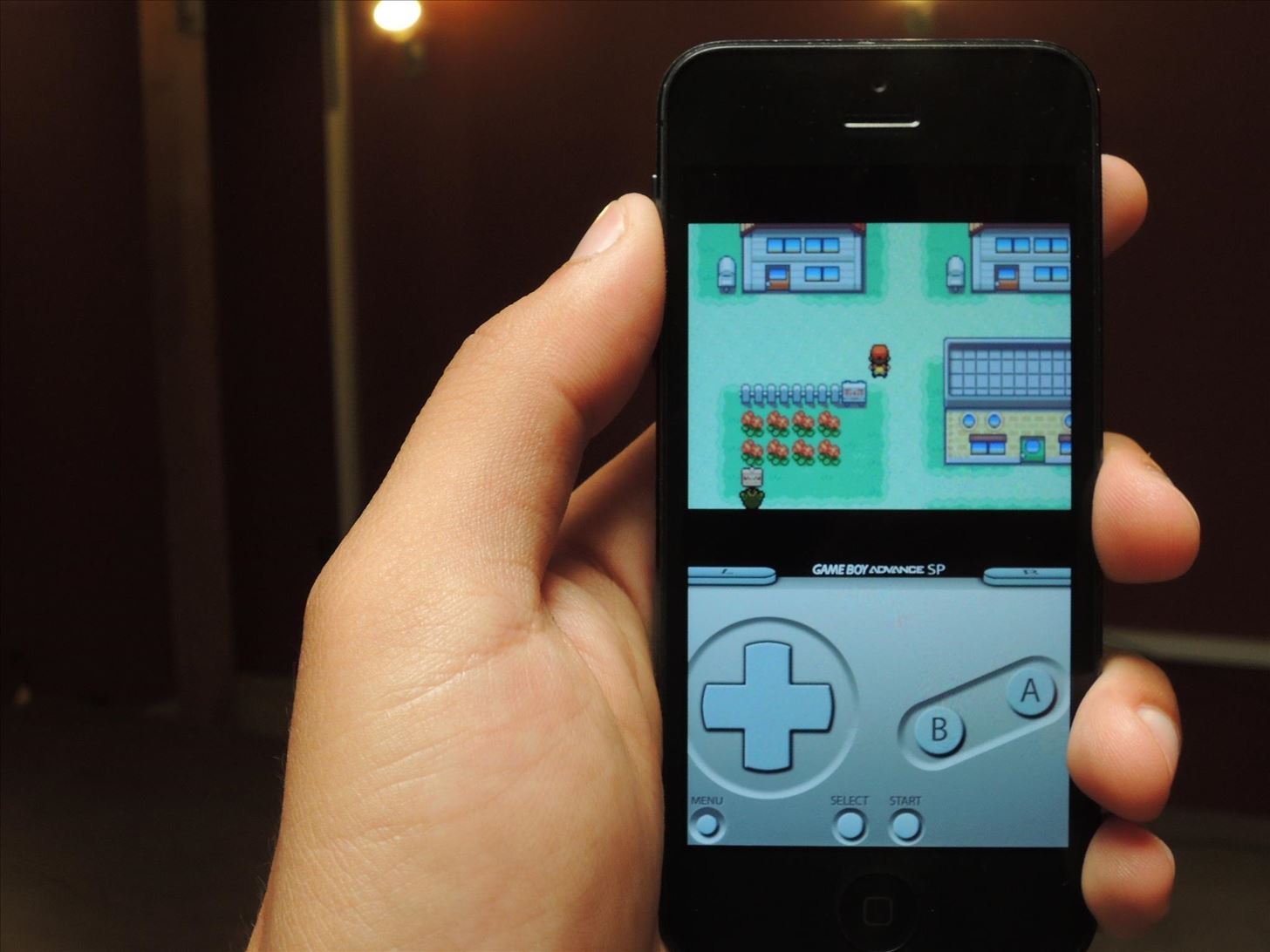
But There's an ExceptionSince they're notoriously careful with their approval process, monitoring any circumvention and nipping it quickly in the bud, I found it surprising when I was able to easily download a third-party Game Boy Advance emulator on my iPhone 5 directly from Safari without any issues—and without jailbreaking.
How Does Something Like This Happen?The person hosting the jailbreak-free GBA emulator app started by finding the emulator's open-source code on GitHub (which was purportedly based on gpSphone by ZodTTD, an avid software porting hacker whose work includes several emulators).At this point, anyone with a Mac and some basic coding skills could fire up Apple's freely available Xcode, clone the Git-repo, compile the app, and use Xcode to install it on an iPhone. But, to build and sign an .ipa file that can install on any non-jailbroken phone isn't so easy.

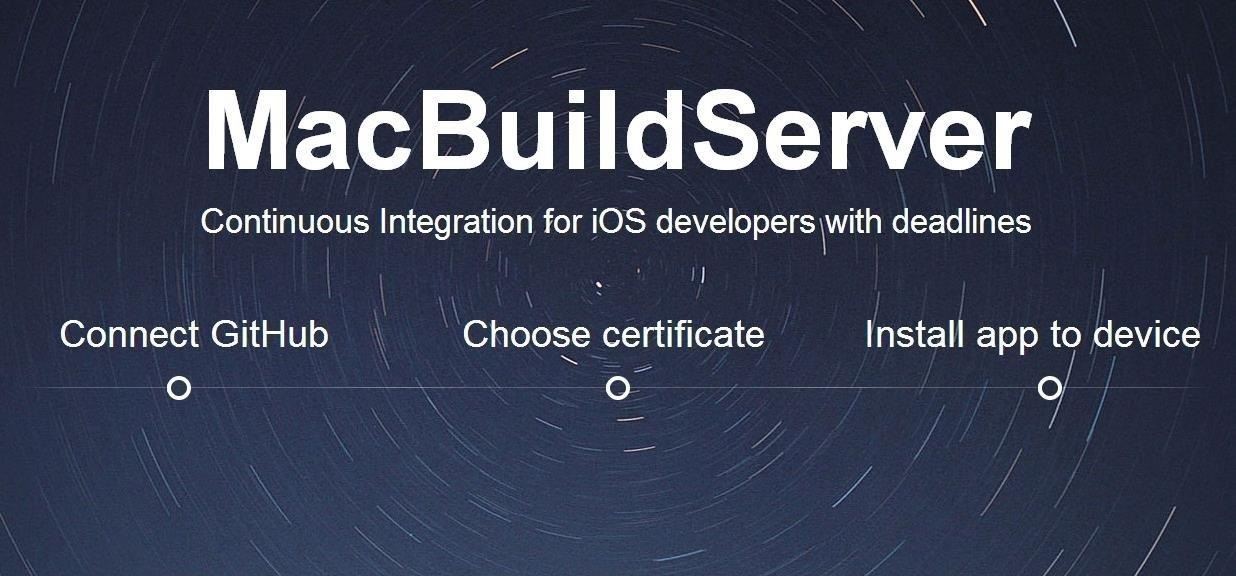
Building Open Source iOS Apps with MacBuildServerMacBuildServer, to the rescue. Our emulator hosting friend simply plugged the read-only Git URI into the incredibly easy process available on MacBuildServer, which automatically clones the Git-repo (i.e. snags a copy of the source code), builds the app, then signs it. It's just like the process you might go through with Xcode, but without any of the hassle. Image via wonderhowto.com We reached out to Sergey Dmitriev (@blackie6 on Twitter), one of MacBuildServer's co-founders, to find out more about how it works, and more specifically, how apps built with their system can be sideloaded without having to go through the iOS App Store. Image via twimg.com When asked if I would need to bring my own certificate, Sergey was very clear: "Every user of MacBuildServer should have their own certificate and sign their apps with it."However, in the case of MacBuildServer's demo page (which seems to be under heavy load... be prepared to spend about an hour on it), I was given the option to "Skip this step" without uploading my certificate. When I asked about this, Sergey replied:"We do sign the apps compiled with MacBuildServer with our own enterprise certificate just to show how easy the whole process works, this implies that you only use it to test the apps. We do not have any limits (at least we never reached one)."So technically you don't have to have your own certificate, but you better have one. :)"For the record, I do. The end result is that MacBuildServer's demo gives you a three-click process to build any open-source iOS app you can find on GitHub, and sign it with an enterprise certificate that allows jailbreak-free sideloading for your own testing purposes. Seeing as you're compiling from the source code, you are technically testing... right?
But Wait... I Thought iOS Didn't Allow App Sideloading?Stock iOS does not typically allow the side-loading of unsigned apps—the only way to currently do that is with a jailbreak. The signing process MacBuildServer uses to cleverly skirt this limitation is to have you use your own certificate, or to simply use their certificate from the iOS developer enterprise program to sign the compiled app (again, for testing purposes).

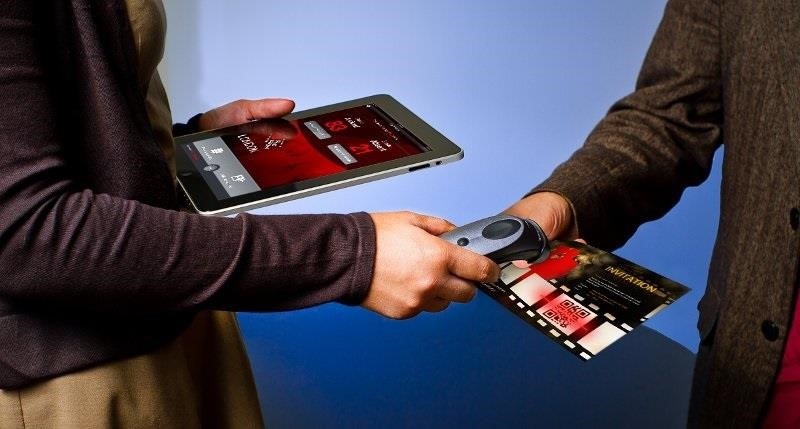
The iOS Developer Enterprise ProgramThe iOS Developer Enterprise Program was designed to allow companies to develop in-house apps for use within their organization, without publishing them on the App Store.An example of a business that would be part of this program would be an event coordinating business that uses these in-house iOS apps to check people in and perform other tasks. Image via tabtimes.com But getting into the enterprise program isn't quite as easy as the standard iOS developer program. A developer must have a legit business in order to get in—a Dun & Bradstreet (D-U-N-S) Number is required for enrollment, which appears to be a credit-checking system that verifies the trustworthiness of the business.Once in the iOS Developer Enterprise Program, it "allows you to distribute your apps to employees or members of your organization through Ad Hoc distribution."
Gaining Access to In-House AppsSo, how exactly do we get access to an enterprise signed application? To understand that, you'll have to look at the process of how in-house apps are deployed to employees/members:First step is to register for the iOS Developer Enterprise Program. Next, you'll need to prepare your app for distribution. Then you have to create an enterprise distribution provisioning profile, which authorizes any devices you want to use the app. Finally, build the app with the provisioning profile and deploy it to all of your users. The key part of the this list is the enterprise distribution provisioning profile, which allows you to send out your app to be installed on an unlimited number of iOS devices (as opposed to the typical 100-device limit set by the regular iOS Developer program allows).
The Grey Area - DistributionSince the distribution of in-house apps is restricted to your employees/organization-members, it seems that by installing a signed sideloadable app, you would technically have to consider yourself a part of the organization, so as to abide by the agreement.When it comes to distributing an open-source app like the GBA emulator using an Enterprise certificate, we get into a grey area with the enterprise agreement.It's hard to verify that people downloading the app are part of the same company or organization that signed it. It would seem that anyone an enterprise distributes one of their signed apps to would be implicitly a member of the organization they want the app distributed to. Plus, if you're helping to test an open-source project, that would seem to satisfy the requirement too.Then again, if you want to be extra safe and you know a thing or two about coding, you could help fix one of the open bugs and submit a pull request, clearly documenting your involvement with the "organization" developing the app. So, I'll just assume that's what you're doing.

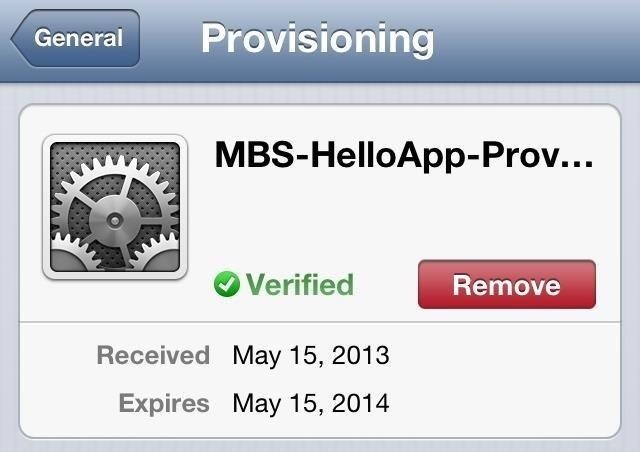
Installing Enterprise-Signed AppsEnterprise-signed apps can simply be downloaded from any website onto any iOS device, or sideloaded using iTunes. Whenever a user opens an enterprise-signed application for the first time, the provisioning certificate is validated by contacting Apple's server, which then allows the app to successfully run.You can check out the certificate that appears on your device after a download, if you go to Settings -> General -> Profile (like in the pictures below, for iOS 6 and iOS 7). Image via wonderhowto.com The validation response from the Apple server is then cached on the device for between three and seven days, after which the certificate is rechecked for validity anytime your phone is restarted or the cache response has expired.So far, my emulator is working fine. I'll check back in a few days and see if Apple shuts it down and closes the provision. Hopefully not, because the MacBuildServer is a great boon to the iOS open source community, even offering a GitHub install button for iOS projects.And besides... I'm in the process of finishing my "backup copy" of Pokemon Red.
Photo via TabTimes


As for the apps you can install, they need to be open-sourced because you will require their source code in order for this to work. The limitations are pretty severe but there is always jailbreaking if you want more control over your iPhone or iPad.
How to Sideload iOS Apps On iPhone Using Xcode 7 Without


Do you want to jailbreak your latest iOS 11 using Electra Jailbreak IPA? Read More: How to Jailbreak iOS devices using Electra IPA file [iPhone/iPad]. Conclusion: Sideload iOS Apps on Mac using Xcode 7 for free without Jailbreak. The above-given stuff will bring some ideas for sideloading the iOS apps.
Carica sideload e installa app iOS open source sul tuo iPhone


Now that you know how you can use Xcode 8 to sideload iOS apps on your non-jailbroken iPhone, or iPad running iOS 10, you should go ahead and look for your favourite apps' source code online. As always, if you face any issues with this method, do let us know in the comments section below.
How To: Sideload & Install Open Source iOS Apps on Your


Apple is widely known for keeping a tight grip on iOS, disallowing open-source and third-party downloads. While there are many reasons for this, the three most frequently referenced are quality control, malware prevention, and of course—money. The number one reason why Apple rejects apps from the
How To: Sideload open-source iOS apps without jailbreaking


[Release] Sideloader Xcode Project - Sideload apps onto your non-jailbroken device, using csbypass Release (self.jailbreak) submitted 2 years ago * by Dannyg86 Developer As promised in my previous post, regarding bypassing code signing in an iOS app that is open source, here is the xcode project and tutorial video showing you how to sideload
mobile - Side loading iPhone apps to device without


Apple just opened iOS up a little bit. It's now possible to sideload open-source apps — emulators, for example — onto an iPhone or iPad without paying $99 per year for a developer license. But the doors have just opened a crack. iOS still doesn't offer the full sideloading support Windows 10 and Android do without jailbreaking.
[Release] Sideloader Xcode Project - Sideload apps onto your


Carica sideload e installa app iOS open source sul tuo iPhone utilizzando MacBuildServer senza jailbreak Apple è ampiamente conosciuta per mantenere una stretta presa su iOS, non consentendo download open source e di terze parti.
How to Sideload Apps onto an iPhone or iPad Without Jailbreaking

How to Sideload Apps on iPhone in iOS 10 (Without Jailbreak)


Check Also: Xmodgames for iOS : Best Mod Game Center for iOS Previously there is no way to sideload iOS apps without jailbreak. Apple giving the right to developers to test their apps on their own devices by releasing Xcode 7 without having to pay an annual fee for a developer account.
Did you know how easy it is to sideload iOS apps to your iPhone?!


It turns out that it's incredibly easy to sideload iOS apps onto an iPhone or iPad. This is something more organizations need to be aware of. Learn how simple it truly is to get third-party apps onto an iOS device.
How to Sideload iOS Apps on Mac using Xcode 7 for free [No


MacBuildServer's demo gives you a three-click process to build any open-source iOS app you can find on GitHub, and sign it with an enterprise certificate that allows jailbreak-free sideloading for your own testing purposes. Disclaimer. The ideas that are presented here are not my own i found this on internet.visit the reference for more details.

How To: The Ultimate Guide to Freeing Up Space on Your iCloud Account

How To: The Ultimate Guide to Freeing Up Space on Your iCloud Account
We've already shown you how to free up internal space on your iPhone, and now it's time to tackle another problematic storage issue—your iCloud account.Having an iCloud account is great for keeping backups of your iPad, iPhone, or iPod touch, and it's also handy for freeing up much of that valuable internal storage space on your device. However, Apple only dishes out 5 GB of free iCloud storage with each account, and an iPhone backup could consume the whole amount. Even with iCloud backups disabled, your iCloud.com email account could be eating away at a lot of that space online.To keep your iCloud account from filling up, try out some of these tips, which range from managing your iCloud backups better to dealing with unneeded documents and data.
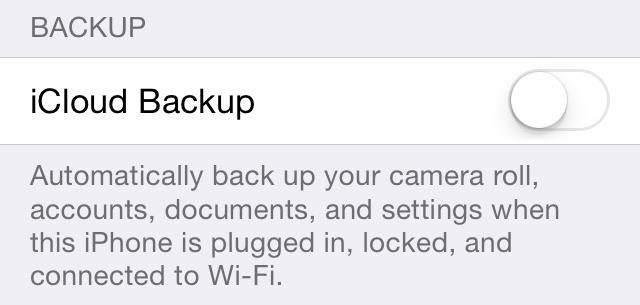
Tip #1: Disable Certain Apps from iCloud BackupThe only reason you would want to back up applications through iCloud is to keep that app's data and configuration settings in the case that you need to restore them onto your iPhone. For some apps, like Candy Crush Saga, this is necessity, since all of your game progress will be lost unless you connected to Facebook within the app.That being said, not all apps need saved settings. If you're not worried about losing any of this information, you can disable automatic iCloud backups for all apps, or you can limit which apps get backed up and which ones don't. To disable it entirely, go to Settings -> iCloud -> Storage & Backup and make sure iCloud Backup is turned off. If you want to keep this on with certain apps backed up, I recommend disabling iCloud backups for the following types of apps. Just keep in mind that you can still back up certain apps on an individual basis with iCloud Backup turned off, only data will be backed up to your iTunes account, if that is where you back up to.Large games, with long storylines that you don't see yourself playing for more than a short period of time. Apps like Audible with audiobooks that take up a lot of space. Apps with their own cloud storage like OneDrive, Evernote, Google Drive, Dropbox, etc. Cache-heavy apps such as Vine, Safari, Chrome, Instagram, and Twitter. Sure, it makes the app a little faster, but starting from scratch isn't a big deal, and all those cached thumbnails and videos take up a ton of space. To manage your app backups, select Manage Storage back in your Storage & Backups menu, then select the backup for your device. In the Info page, disable the apps that you no longer want to back up to your iCloud. Next to each app, you can view how much space they consume on iCloud.
Tip #2: Use Alternative Services for Photo BackupsAbsolutely, one hundred percent, photos and videos make up the majority of memory on iCloud. All of those selfies and pictures of food can weigh heavily on your storage, so why not use an alternative to back up your photos?
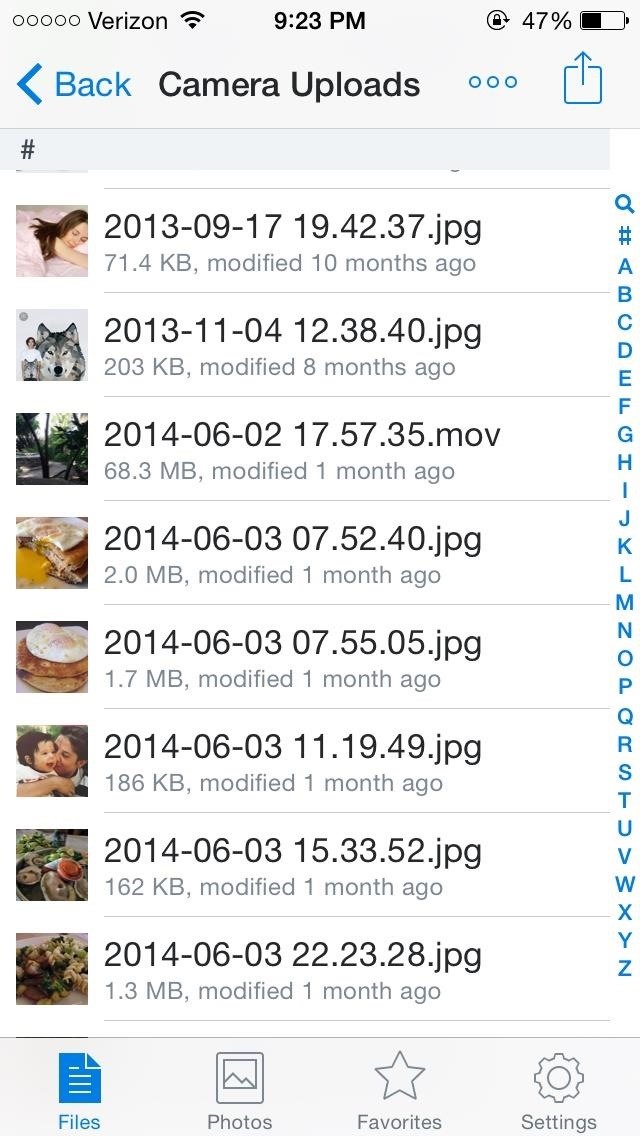
DropboxThe most popular of the bunch, Dropbox allows you to save up to 2 GB of full-resolution photos, videos, and other documents for free. In addition, you can automatically upload copies of your photos and videos to Dropbox with a built-in feature, as well as the ability to view your favorite pictures offline.Dropbox also has a dedicated photo's app called Carousel, and either of these options are a great alternative to iCloud.
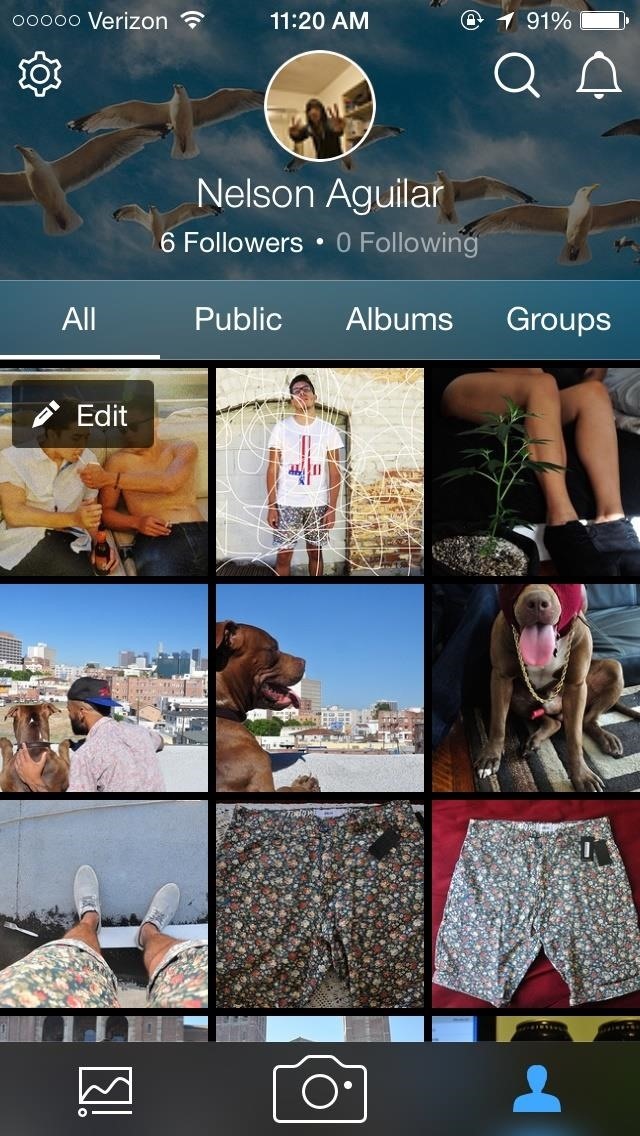
FlickrFlickr offers the most storage of any of the popular photo cloud storage apps, with a whopping 1 TB of memory. That's 2 million photos with an average size of 500K each.Similar to Dropbox, there is a built-in feature to automatically upload pictures taken with your stock iPhone camera to Flickr. With this much storage power, it's a sure bet you won't be filling up this baby any time soon.
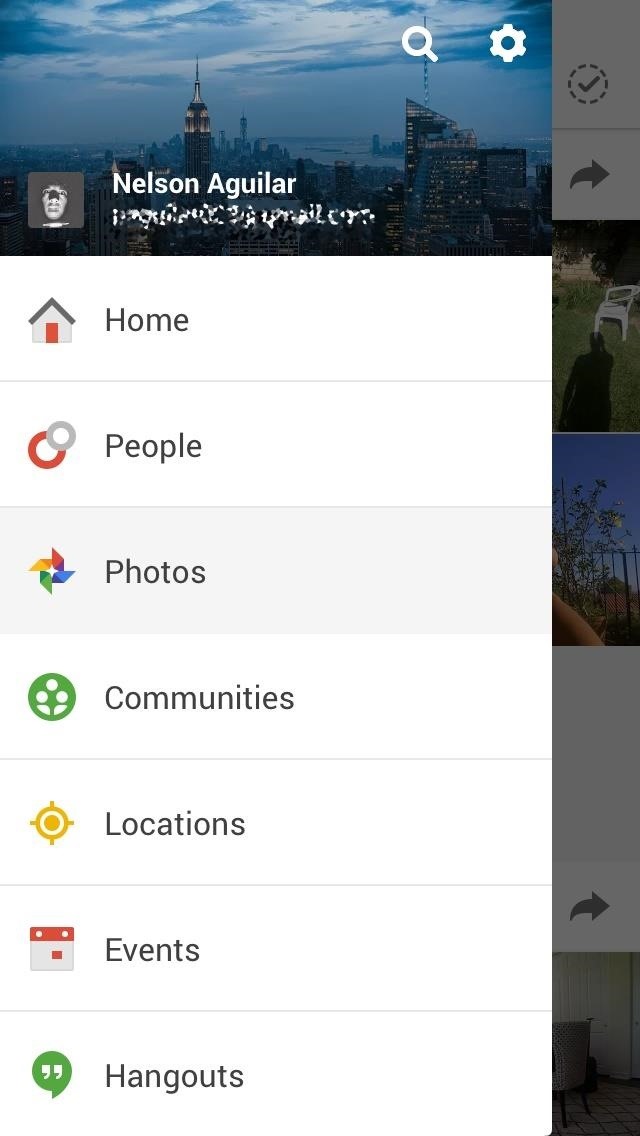
Google+While it's likely not going to replace Facebook as the king of social media, Google+ does offer 15 GB of free storage space on Google Drive, which you can access directly from Google+.Unfortunately, you can't add photos one by one, so you'll need to upload all of your photos at once. All pictures you take with your smartphone camera from then on will automatically upload to Google+. While those are three of the more popular cloud storage applications, there are many more out there in the App Store: Amazon Cloud Drive (5 GB), Shoebox (unlimited, but resizes images), and OneDrive (10 GB) are several other options you can choose from. If you have an Office 365 subscription, you can have 1 TB of free storage per Microsoft account, up to 5 TB total.And of course, you can use Facebook to automatically back up any photos that you take.If all else fails, you can always just back up your iPhone regularly to iTunes on your computer, or use Image Capture to transfer them over, where the size of the backup is only limited by the amount of storage available on your computer.
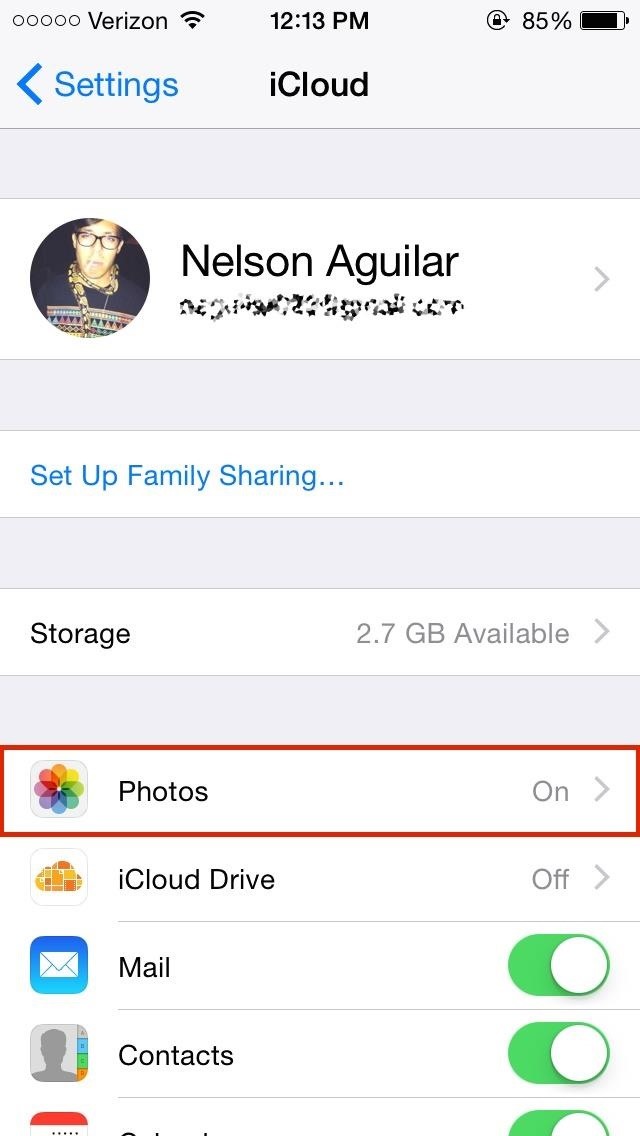
Tip #3: Disable My Photo StreamIf you're using iTunes or third-party cloud apps to back up your photos, or don't want your photos being backed up automatically period, disable My Photo Stream from Settings -> iCloud -> Photos. This will also delete all of the My Photo Stream photos from your device.If enabled, My Photo Stream will automatically upload all of the photos you take on your iPhone that appear in your Camera Roll to iCloud. Not only that, but it will sync those images across all of the other Apple devices that have iCloud enabled. It ends up wasting space not only in iCloud, but on your iPhone and other Apple devices that it syncs to.If you tend to take a lot of scandalous pictures with your iPhone, My Photo Stream is even worse, and chances are, if you activate iCloud when first setting up your iPhone, you have My Photo Stream enabled by default. So make sure to check and turn it off if you want total control over your pics and videos.
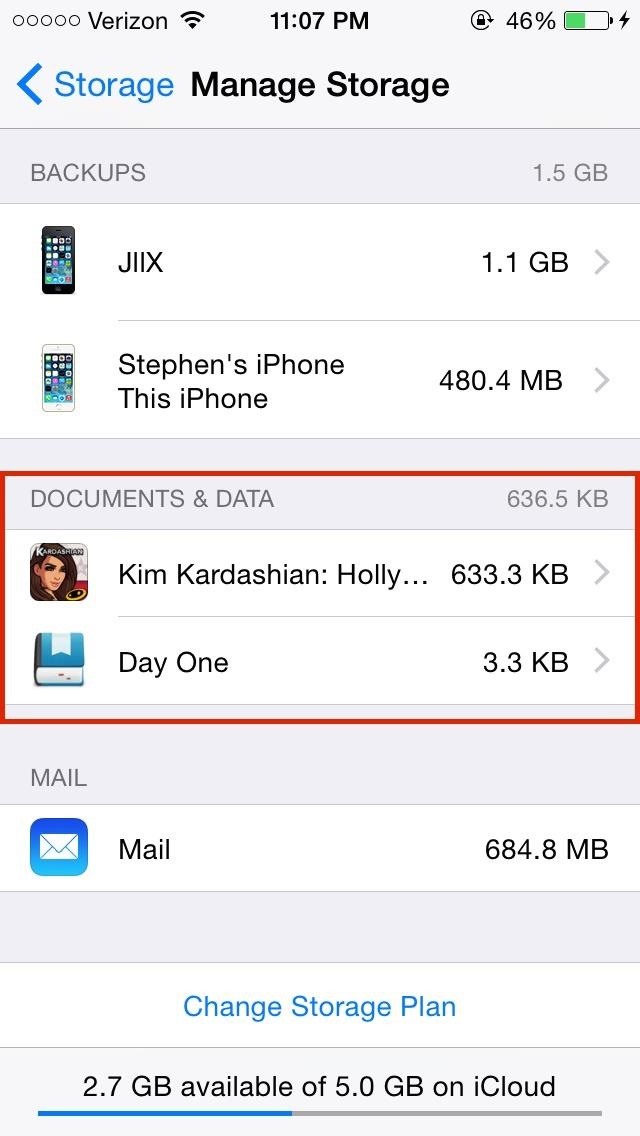
Tip #4: Get Rid of "Documents & Data" You Don't NeedIn iCloud's Manage Storage settings, you can manage Documents & Data, which is packed with data from your apps that iCloud shares between all of your Apple devices. For me, that was mostly filled with mobile game data.Even when you delete the app, iCloud keeps its data, so go in and delete what you no longer need. Tap the app you want to delete data for, tap on Edit at the top right, then select Delete All. Just make sure you don't need the data, as you can't get it back after deleting it.
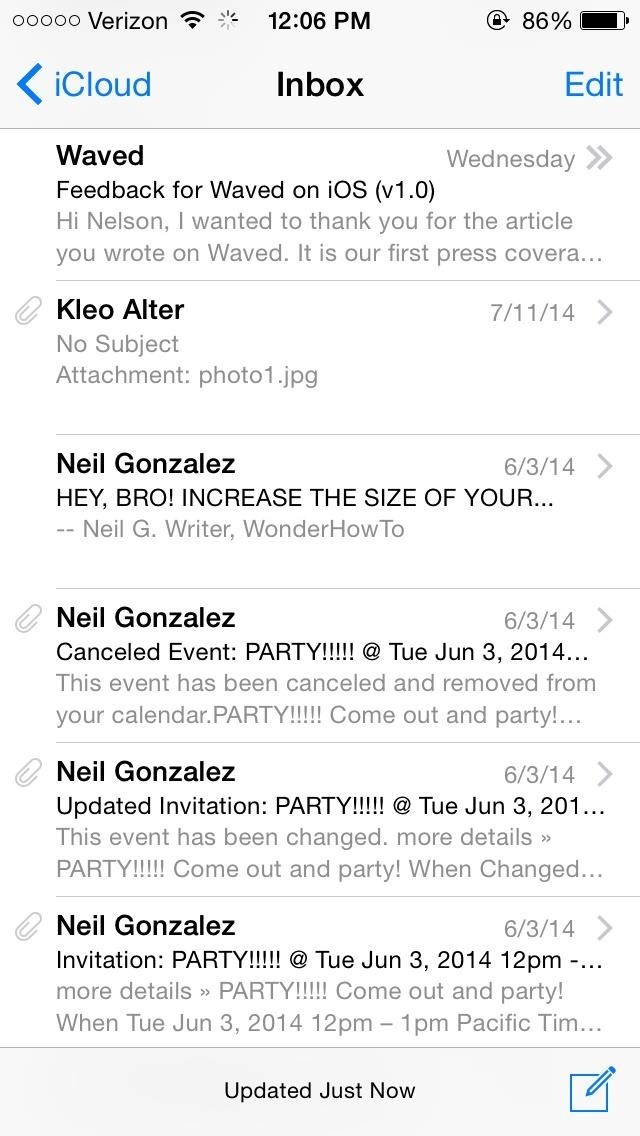
Tip #5: Clear iCloud MailYour free iCloud.com email account takes up a lot of iCloud storage if you're using it, so free up space by getting rid of read emails, especially those with large attachments such as photos and videos.Just go into your iCloud mail account and swipe right to delete any emails you no longer need. It should be noted that only your iCloud email account takes up iCloud storage space. Deleting emails from Gmail, Yahoo, or other email services will not free up any iCloud storage. You may have noticed that you can disable Mail under Settings -> iCloud, along with other things like Contacts, Calendars, Notes, etc. Disabling things from this menu on your iPhone will only prevent them from syncing with iCloud; the info itself can still be accessed online at iCloud.com.If you don't want to delete your emails, but still want to free up space in your iCloud, you can transfer all of your emails over to your computer using the Mail app, then delete them all from iCloud. You can also make copies of your bookmarks, calendars, contacts, documents, and more if you want to go that far with it.
A Free'd Up iCloudWith all of these tips combined, you should be able to free up storage on your iCloud and make sure that the memory you do have is being used for the most important things on your Apple devices. If you feel you just can't manage with 5 GB of free iCloud storage, you can purchase an additional 10 GB ($20/year), 20 GB ($40/year), or 50 GB ($100/year).Have any more tips for managing iCloud? Share them with us in the comments, on Facebook, or on Twitter.


Sony has been hard at work refining its Xperia line of flagship phones. With a 6-month release cycle, they've managed to slim bezels, increase viewing angles, and boost processing power in the 1.5-year span between the original Xperia Z and the Z2.


To make your own battery at home, all you need is two different types of metal, some lead wires, and a conductive material. Many household items can be used as the conductive material into which you place your metals — for example, saltwater, a lemon, or even dirt.

Google's Night Sight Camera Is Downright Amazing


You can compose a new email message and send a text, picture, or video message to a wireless number. Text message - Compose a new email and enter the recipient's 10-digit wireless number, followed by @txt.att.net. For example, 5551234567@txt.att.net.
Mass Text Message Service | Search & Find Quick Results
AD
offers247.net/Blackfriday/Deals
Report Ad
Discover Detailed Information On Mass Text Message Service. Get All Info Here.


Do you already have a home stereo system? Now you can play your music from your iPhone, iPad, iPod Touch, Mac or PC and have it play WIRELESSLY onto that sou
3 Ways to Connect Your iPhone to Your TV - wikiHow


Choose whether you want to delete only certain parts of your Google history. This is preferable if you use Google Now, because your cards are based on your Google history. Deleting the finance, shopping or other sections may remove the efficacy of those cards and your voice search.
How to Delete Google Search History, Accounts & Data (Guide)


Touch the Video camera icon to switch to video mode. Take pictures using the built-in camera on your Samsung Galaxy Tab S 10.5 LTE. Pictures can be sent in an email or multimedia message, or transferred to a computer or printer.
Samsung Galaxy Tab 10.1 | Interactive Experience & How To Videos


How To: Hack Your Nexus 7 into a Hybrid Android Tablet That Looks & Feels Like Both iOS & TouchWiz How To: Dual boot Windows Mobile & Android News: Amazon Will Finally Disable Lock Screen Ads on Their Discounted Phones News: 12 Android Features We Want to See in iOS 12
Hacke dein Nexus 7 in ein Hybrid-Android-Tablet, das wie iOS


The Full Capacity of Your Samsung Galaxy S8's SD Card. an hour of video that uses every pixel of resolution will take about 4GB. you need to do a little bit
Samsung Galaxy Camera Tips & Tricks for Getting the Best


Hacker News Client News. News: iOS 11.2 Beta 4 Released for iPhone with Mostly Under-the-Hood Improvements; Weerachai May 23, 2018 at 1:02 pm . นี้ก็ไม่สามารถทีจะดาวน์โหลด. Reply WiFi Chùa on the App StoreΜeu TIM Way to Install Hacking Application on Cell Remotely 4.1.0Use forensics
Daily Tech News - iOS 11.3 Beta 5 Released with Mostly Under


If you type 'smartwatch' into the search box on Amazon, amongst the Moto 360s and Sony SmartWatch 3s you'll see a load of results for cheap, budget smartwatches from manufacturers you've probably


Apply a coating of flux to the stainless steel parts you are connecting. If you are soldering brass or copper parts to the stainless steel, tin them first by heating them and applying a thin coat of solder to the area that connects to the stainless steel.
soldering - How can I solder/braze thin stainless steel wire
How To: Stream Music, Photos, & Videos on Your iPhone to Your TV

How To: Stream Music, Photos, & Videos on Your iPhone to Your TV
AllCast, from renowned developer Koushik Dutta (better known as Koush), allows users to stream personal media, such as movies, photos, and music from mobile devices to Chromecast and other streaming devices.We've covered the application in the past, but it had only been available for Android users. Now, Apple users can rejoice, as AllCast has finally made its way to the iOS App Store as a free download. AllCast for iOS is compatible with the following streaming devices:Chromecast Chrome Roku Apple TV Amazon Fire TV Xbox 360 and Xbox One Samsung, Sony, and Panasonic Smart TVs WD TV Check out the guide below to get AllCast set up on your iOS device so you can easily send damn-near all your media to your preferred streaming device. In this guide, I'll be using a Chromecast, but the process will be the same for whatever device you're using. Please enable JavaScript to watch this video.

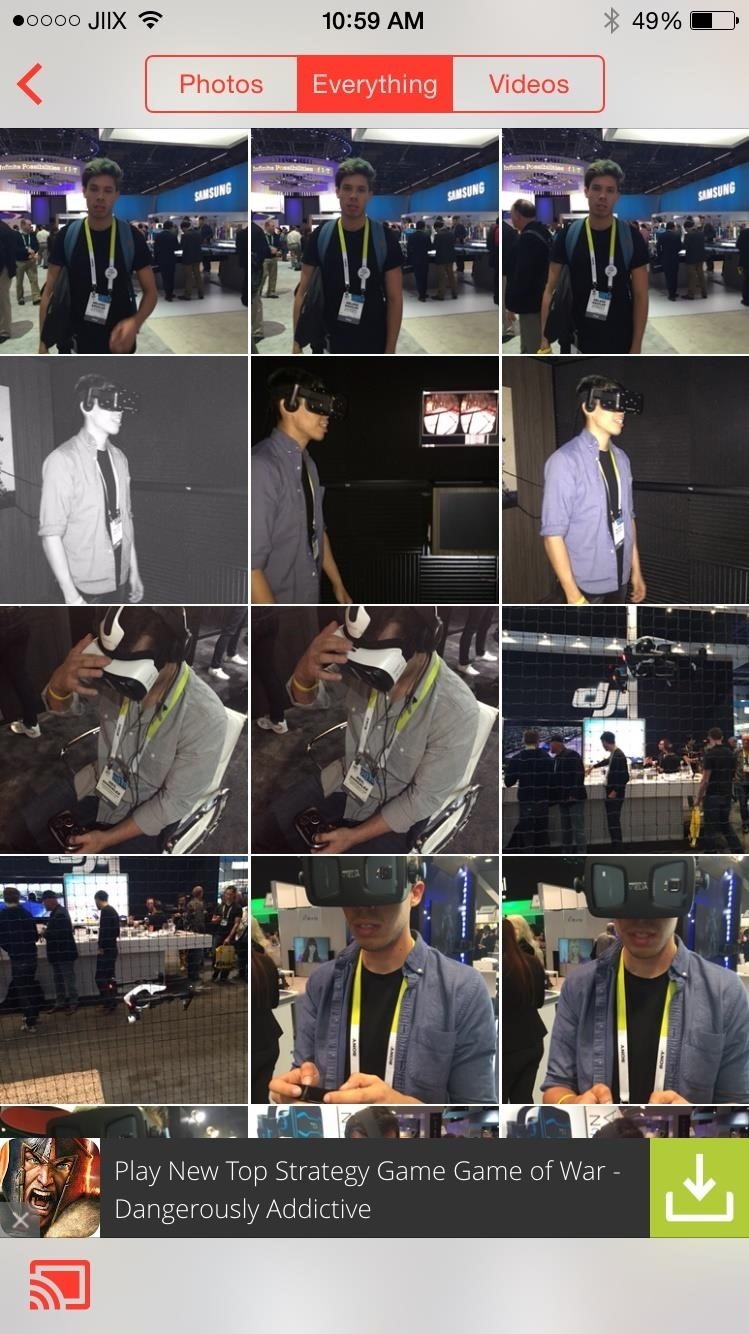
Grant Access to Photos & Connect to ChromecastWhen you first open AllCast, grant the application access to your photos. From there, choose what type of media you want to stream—photos, videos, or music. Once you figure that out, find your streaming device by tapping on the icon at the bottom-left and going through the list of connected devices.

Stream Photos & VideosAfter connecting to your streaming device, you'll be automatically taken to the "Photos" section, which includes both pictures and videos. Go through your media to select a photo or video; it won't show up on your streaming device until you select a particular media file. At the bottom of any photo you'll have the option to start a slideshow, which will show each photo for a brief moment, going in chronological order through your Camera Roll. Additionally, you can swipe in either direction on your device and you'll see the changes on your TV.

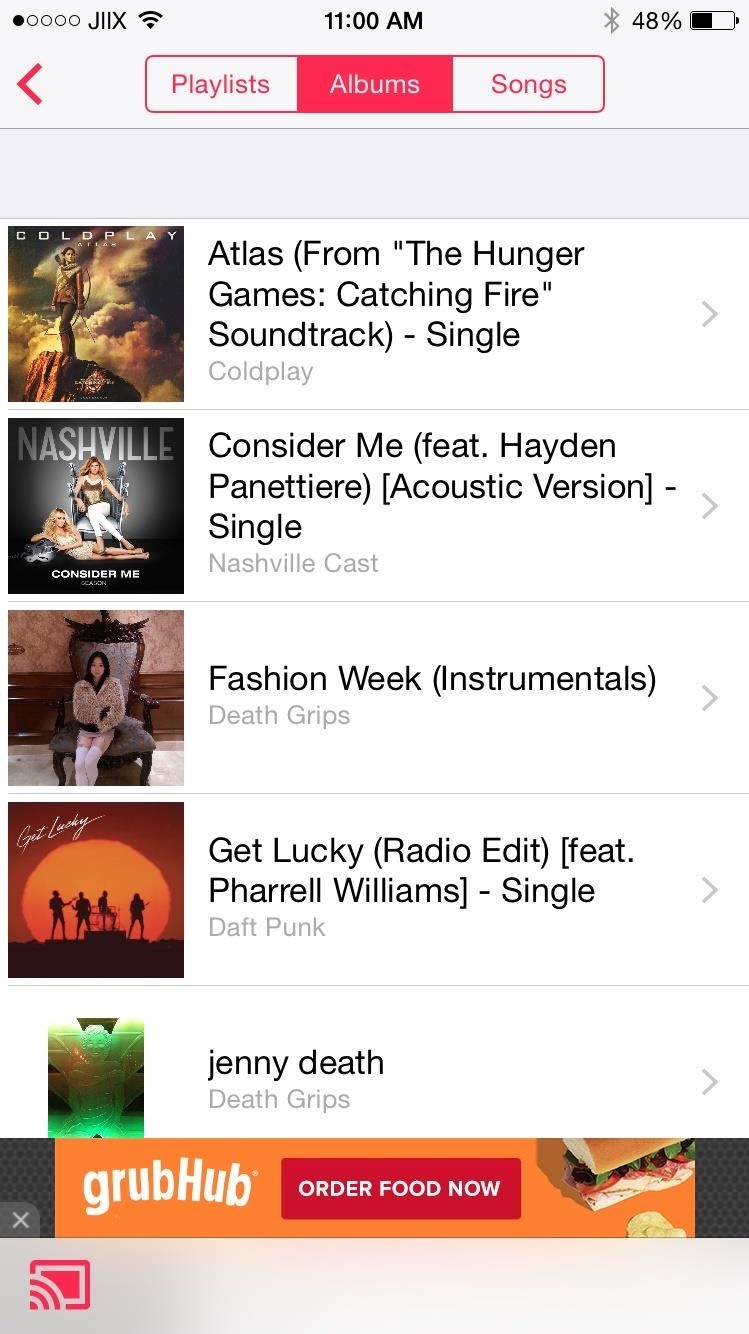
Stream MusicThrough the "Music" section, you can stream songs that are either in your device's storage or on your iCloud. Search your music through playlists, albums, and songs.On your streaming device, song information and album art (if available) will show. You can skip forward, go back, and pause music through the controls along the bottom.

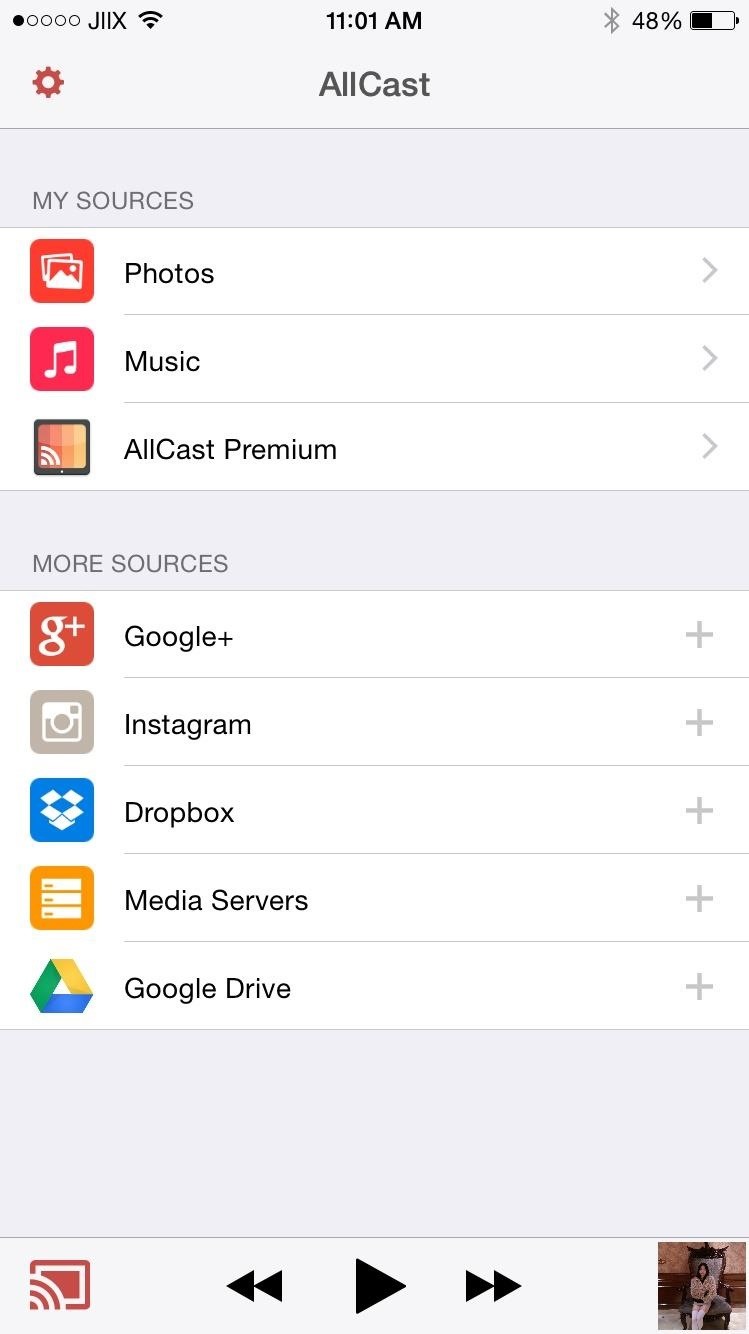
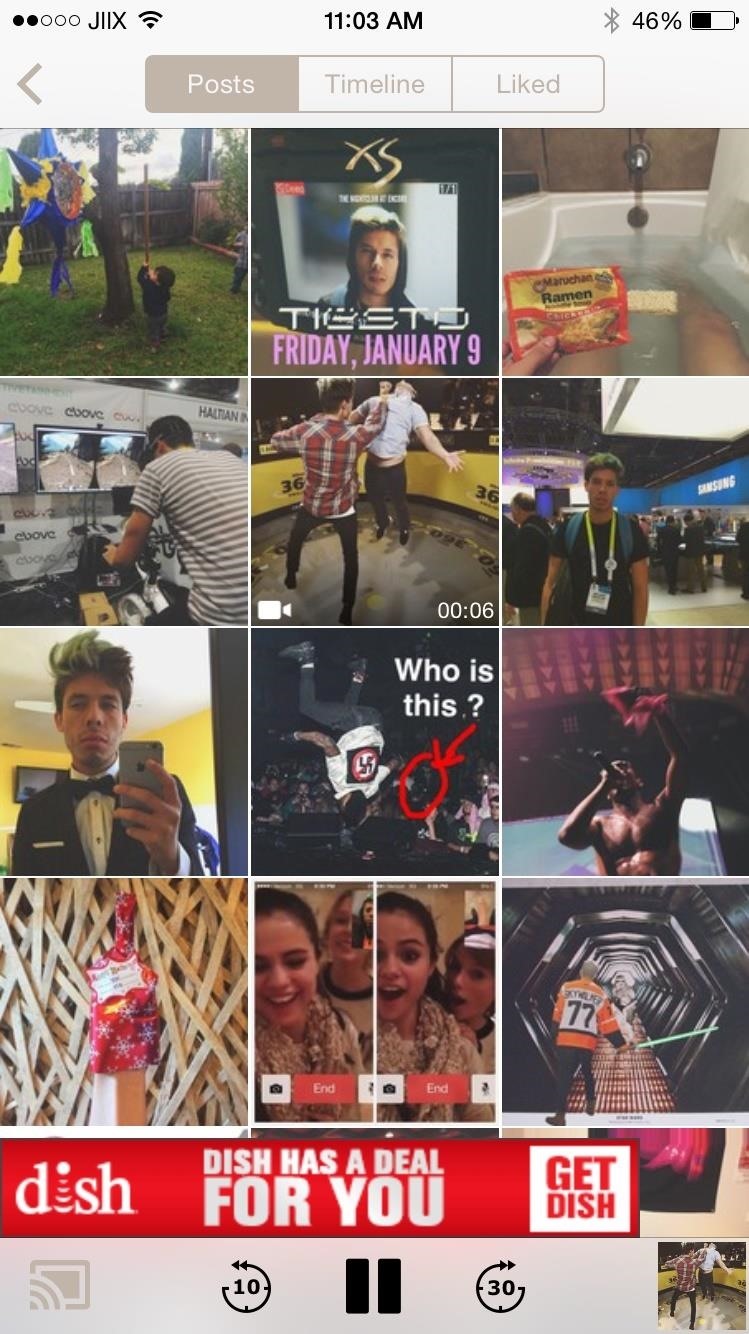
Connect Instagram, Dropbox, Drive, & Other Cloud SourcesIn the AllCast menu, you can add additional sources to stream photos, video, and music from. Under "More Sources," you can connect your accounts for Instagram, Dropbox, Google Drive, and Google+, as well as a media server.With Instagram, you can stream the posts in your timeline, your own personal posts, and any posts you've liked. I also connected my Dropbox account and was able to watch the shows and movies I had uploaded. AllCast does have a premium version of its application, available through an in-app purchase of $4.99, that will get rid of ads, splash screens, and remove any video playback limitations. With the free version, I was able to stream videos as long as 40 minutes, so I'm not sure what the limit is or if it's even being implemented at the moment, but there definitely is one. Please enable JavaScript to watch this video.
No matter what the video limit is, AllCast is a must-have app if you've got a streaming device—why wouldn't you want to view all of your personal media in high-definition on your TV.Let us know what you think of AllCast, and which streaming device you're using it with, in the comments below. And as always, share your thoughts with us on our Facebook, Google+, and Twitter feeds.


Stream Photos & Videos. After connecting to your streaming device, you'll be automatically taken to the "Photos" section, which includes both pictures and videos. Go through your media to select a photo or video; it won't show up on your streaming device until you select a particular media file.
How to Connect Your iPhone or iPad to Your TV - pcmag.com


How to Connect Your iPhone to Your TV. This wikiHow teaches you how to connect your iPhone to a TV using an adapter, along with an HDMI cable or an analog cable, or Apple TV with AirPlay.
Turn Your Phone into a Universal Media Hub to Play Your Music


Do you already have a home stereo system? Now you can play your music from your iPhone, iPad, iPod Touch, Mac or PC and have it play WIRELESSLY onto that sou
3 Ways to Connect Your iPhone to Your TV - wikiHow


How to connect your iPhone or iPod to your home stereo. itunes , audio , cable , ipod , itunes , music , stereo Add comments To connect your iPhone, iPad or iPod to your home stereo you just need a 3.5mm to RCA cable like this cable above.
How to mirror your iPhone or iPad's screen to a TV - Macworld UK


How to Stream Movies Photos and Music from iPhone to Samsung Smart Tv - Fast, Easy and Free Don't forget to give this video your "Like" :) & Subscribe for more gadgets & Tech Tips.
Stream From Your iPad or iPhone to Your TV - lifewire.com


Your Apple TV will stream a mirror of whatever is on your device's screen. (You can also just use AirPlay to stream media from the iPhone to the TV, such as music or videos you've purchased on
How to connect your iPhone or iPad to your TV | TechHive


Want to display your mobile device's videos and photos on a television? We demonstrate the best ways to connect your iPhone or iPad to a TV and mirror its screen output, including AirPlay and adapters


How to connect your iPhone or iPad to your TV you can also stream video and audio to any Apple TV you might still be able to send photos, videos, and music stored on your iPhone to the big
Stream Movies Photos and Music from iPhone to Samsung Smart

How to Stream Music, Photos, & Videos on Your iPhone to Your TV


AirPlay offers a seamless, integrated method to stream music, video, and just about anything else from your iPhone, iPod Touch, or iPad to any other iOS device, like an Apple TV or an Apple computer.
How to connect your iPhone or iPod to your home stereo


Use an HDMI cable to connect your TV to the adapter and then plug the adapter into your iOS device. Switch the input on your TV to whatever HDMI port the cable is plugged into and you'll be seeing your iPad or iPhone on the TV right away. Whatever photos, videos, or other content you see on your device will show up on your TV, too.
Play Your Music Wirelessly On ANY Home Stereo - YouTube

News: Making Art on Your iOS Device, Part 1: Drawing

News: Making Art on Your iOS Device, Part 1: Drawing
From the onset of the popularization of apps for the iDevice, users have experimented with creating original artwork on their iPhone/iPad/iPod Touch. And when famed British artist David Hockney christened the iDevice with his painterly digital drawings, the trend exploded even more. We've come a long way since then—Hockney will exhibit his extensive iPhone and iPad drawings at the Royal Ontario Museum this fall, and for the rest of us, there are now endless apps available in the categories of drawing, painting, 3D modeling, photography, and fun effects—plus useful guides for learning about and finding/viewing art. This week, we present a lengthy 6-part feature covering apps in all of these areas.Today, a roundup of incredibly useful drawing apps—as a RISD alum, graduating just before the onslaught of apps like these, I find this section perhaps the most useful. If I had had free models at my disposal, I might have skipped a figure drawing night session every now and again. ;) Anyone who draws knows practice makes perfect, so download your app of choice and get some work done on-the-go—on the plane, train, in the waiting room—whenever you have down time and an iDevice handy.

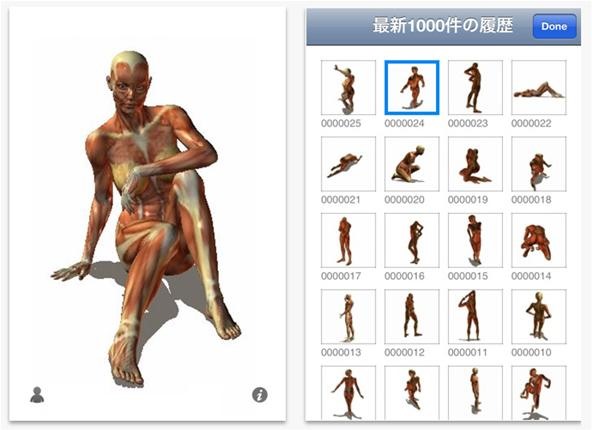
1. Random Pose ViewerAvailable in Japanese and English, Random Pose Viewer has 19,000+ free reference poses for figure drawing geared toward illustrators/manga. All poses can also be viewed for free on posemaniacs.com, where users can upload poses and donate money to the project. Cost: Free Compatible: iPhone, iPod touch, and iPad

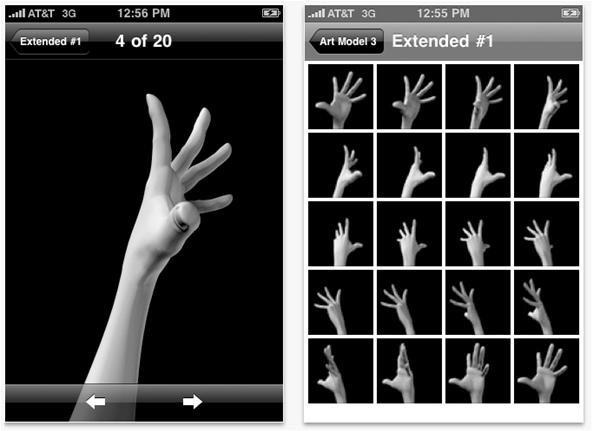
2. Art ModelThe Art Model series by EnsoMobile offers 3 apps in the categories of Classic Poses, Action Poses, and Hands. Each pose is viewable in full 360-degree rotation, with 20 photos per pose. Simply zoom and rotate the images to view additional details. Cost: $0.99 each—Art Model 1; Art Model 2; Art Model 3Compatible: iPhone, iPod touch, and iPad

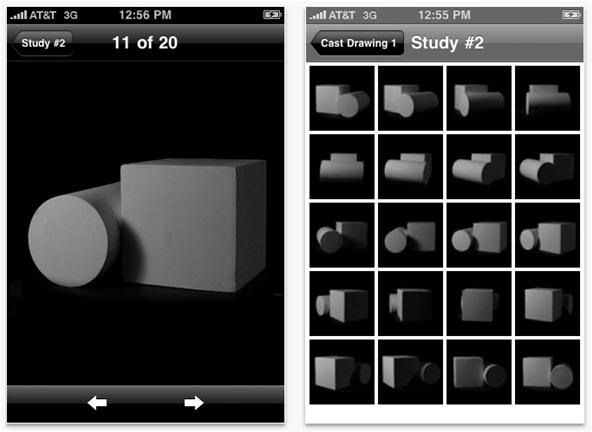
3. Cast DrawingAlso by EnsoMobile, the Cast Drawings series offers 4 apps in the categories of Basic Forms, Complex Forms, The Head, and Sculpture. "Cast Drawing" is a traditional method of drawing instruction, commonly taught in art ateliers. The artist draws directly from a cast, which allows for a perfectly still model so students can focus on capturing the different grayscale tones of shadows. Each app contains a series of 7 forms; each viewable in full 360-degree rotation, with 20 photos per form. Zoom and rotate to view details. Cost: $0.99 each—Cast Drawing 1; Cast Drawing 2; Cast Drawing 3; Cast Drawing 4Compatible: iPhone, iPod touch, and iPad

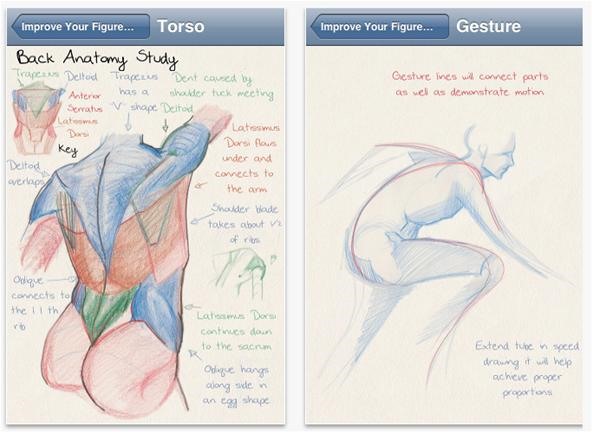
4. Improve Your Figure DrawingImprove Your Figure Drawing has nice, casual drawings with useful and interesting anatomical notes, as well as technicial tips scattered here and there. Zoom control available; organized/divided by body part.Cost: FreeCompatible: iPhone, iPod touch, and iPad

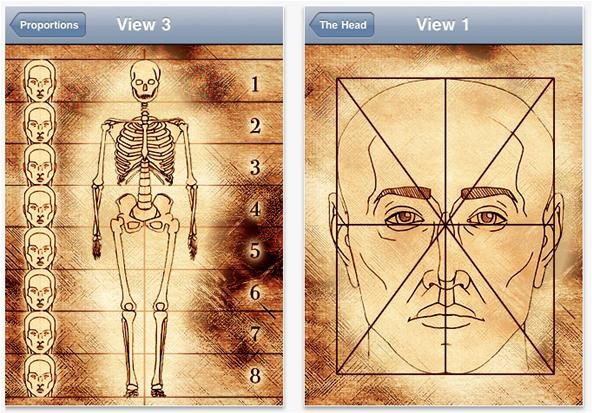
5. Anatomy for ArtistsAnatomy for Artists is a must have for any art student interested in mastering proportion/anatomical accuracy. The anatomical reference guide provides hand-drawn diagrams in the stye of Da Vinci with scalable diagrams of the following: full body (including 3 views that compare the surface anatomy to the skeleton)head in front view (including 3 views that compare the surface anatomy to the skull)head in side view (including 3 views that compare the surface anatomy to the skull)additional body partsCost: $0.99Compatible: iPhone, iPod touch, and iPad

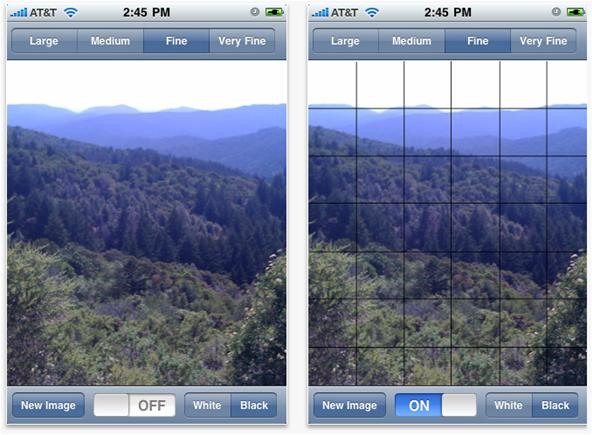
6. Art GridArt Grid is a great aid for beginners, particularly those who aren't interested in learning to draw from life. The app provides a grid line overlay to any picture you upload or snap with your iOS camera, giving a frame of reference for rendering proportion/details in their accurate placement. The app is more useful for iPad users, due to size. For more details on the basics of grid drawing, here's a rudimentary explanatory video. The app provides 4 sizes of grid lines for varying levels of detailing, and the choice of black or white grid lines, depending on the color/value of your image.Cost: $3.99Compatible: iPhone, iPod touch, and iPad

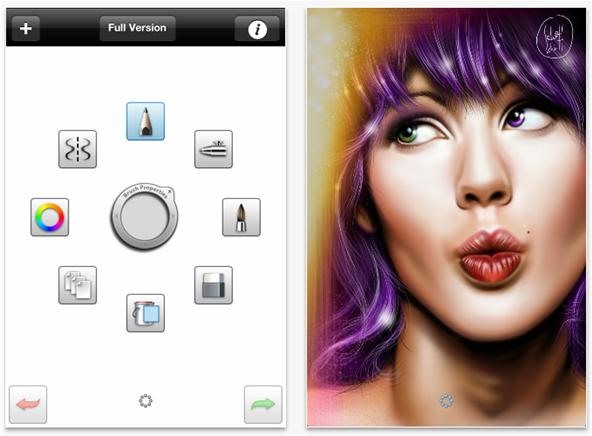
7. Sketchbook MobileXSketchBook MobileX is geared toward digital illustrators. The app is a hybrid drawing/painting tool, and offers professional-grade features. It uses the same paint engine as SketchBook Pro software, which means the same level of brushes/fluid pencils are available. Here are the specs:Full Screen work space with UI-on-demandMulti-touch navigation with a 2500% zoomCanvas size: 320x480 (960x640 on iPhone 4)Up to 3 layers you can merge and toggle visibility10 levels of undo and redoFlood fill / Synthetic pressure sensitivity (brush fade-off) / Smooth brush strokingDynamic symmetric drawingColor Wheel and Customizable Color SwatchesCheck out work samples at the SketchBook Mobil Flickr group. Available for Android as well.Cost: Free**Tune in tomorrow for Part 2, Painting. Did we leave out a drawing app you recommend? Please list in the comment section below.


Every time I use Rapidshare, MegaUpload and other hosters for downloading important files, I'm stuck with lots of issues. Not to mention - slow download speed, downloading limits and lots of troubles.
How to search and download files from MediaFire - Quora


News: iOS 11.4.1 Beta 4 Released for iPhones, Includes Only 'Bug Fixes' & Unknown Improvements News: Apple's iOS 12.1.3 Public Beta 2 for iPhone Released to Software Testers News: Apple Releases iOS 12.1 Beta 1 to Public Software Testers, Reintroduces Group FaceTime to iPhones
Apple Releases iOS 12.3 Beta 5 for iPhone to Developers


Yes, we will not be able to receive new text messages any more, unless we delete some old texts. Then many people may complain that they don't want to delete any SMS message on their LG device. So how should we handle this? In this situation, a great suggestion is put forward, which is to transfer text messages from LG to computer.
LG Cosmos Transfer Files Pics and Ringtones to PC | HubPages


The iPod touch fourth generation and later models should work with most Bluetooth headsets, but earlier iPod Touch models do not support one of the most common Bluetooth headset profiles. A
Which Bluetooth Devices Work With an iPod Touch - It


How to root Android Devices Easy No PC How to Directly Record Your Android Lollipop Screen Without Root and For Free! The Easiest Way To Recover Deleted Or Lost Data From Your Android
How to Record a Video of Your Screen on Android | Apptamin


How To: Hack WiFi Passwords for Free Wireless Internet on Your PS3 WiFi Prank: Use the iOS Exploit to Keep iPhone Users Off the Internet How To: Save Battery Power by Pairing Wi-Fi Connections with Cell Tower Signals on Your Galaxy Note 3
How to Get Free Wi-Fi on All of Your Mobile Devices with


It will help you to download videos from youtube to your computer, and also help you put them on your iTunes and iPod. This is the fastest (and easiest) way. 1. download the video (it will automatically be saved to your PC) 2. convert the video to mp3 3. drag the mp3 into iTunes, then sync with your ipod.
How to Fix No Audio after Downloading YouTube Videos on Mac


With few voice commands, you can stream your favorite music from Google Play Music to Google Home. If you already have your local music on Google Play Music, Google home can find those tracks and stream for you. To start to upload Local Music to Google Play, first of all, make sure you have a Google Play Music account.
How to Refresh Your Google Play Music Library and Find Your


Super Bowl LII still is a week away, but fans still can get their football fix Sunday. The NFL's best players will battle it out in 2018 Pro Bowl at Camping World Stadium in Orlando, Fla.
2018 Pro Bowl live stream: Watch online, TV channel, time


How to Install Facebook Lite App on Your Mobile Phone 2019


Four New Ways to Chill Computer Chips A plastic fan blows air across the metal. As you can guess, these systems can be bulky, noisy, and power hungry. of these technologies is whether the
How Can I Quiet a Noisy Computer Fan? - lifehacker.com

Skip navigation
How to enable the hidden Dark Mode on Facebook Messenger


To remove the solder, you will need to use a de-soldering tool, like the de-soldering braid mentioned before. There are other de-soldering tools like a "sucker" that sucks up heated solder by means of air pressure, but that method is not covered here. To use a de-soldering braid, first lay the braid on top of the joint to be removed.
How to Solder: An Illustrated DIY Guide to Making Your Own


Keep in mind that if you have already upgraded you Mac to MacOS Sierra public beta, it will be tricky to downgrade back to OS X El Capitan. It is always best to keep a backup of everything because if you do decide to downgrade then you would need to do a fresh install of OS X El Capitan on your Mac.
How to Preview Web Page in Safari in Mac OS X El Capitan