News: As FTC Cracks Down, Instagram Will Start Letting You Know Who's Getting Paid to Post

News: As FTC Cracks Down, Instagram Will Start Letting You Know Who's Getting Paid to Post

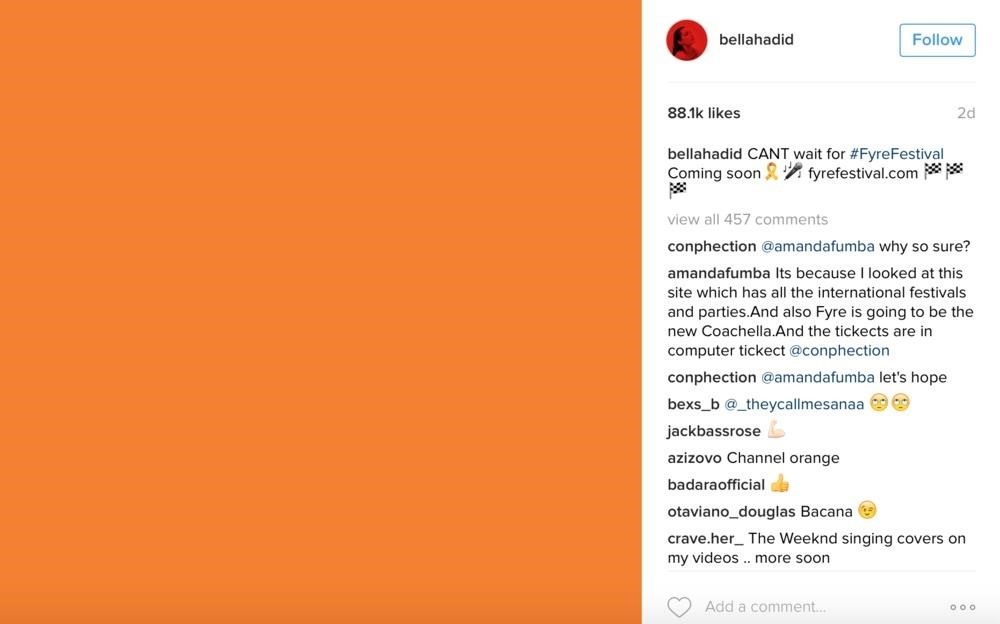
Get ready IG influencers, the Instagram promotional world as you know it is about to change.Instagram is one of the top places for influencers to make money with product promotion. So, of course, it is to be expected that these IG dominators would run into their fair share of disasters. Especially since over 90% of celebrities and influencers on Instagram don't follow FTC guidelines.As we reported earlier, the FTC issued a warning for those on Instagram who use posts to promote products without the required hashtags. Now, Instagram is taking that warning a step further with its new feature that lets you know who, exactly, is being paid to post.Don't Miss: How Not to Get Caught After Double-Tapping on an Ex's Old Photo on InstagramYou might be wondering why, all of the sudden, Instagram is emphasizing on proper sponsored posting. Since Instagram arrived in 2010, Instagram was never one to make sure users were posting ads according to FTC standards. The difference now is a little event known as the Fyre Festival, which quickly became Instagram's worst case of social media advertising gone wrong.The Fyre Festival was supposed to be an exclusive music festival that would take place on a luxurious, exclusive island in the Bahamas owned by Pablo Escobar. Blink-182, Major Lazer, and Migos were just some of the musical acts that were promised to headline the event.People paid thousands of dollars for a festival that was to be like nothing like anyone had ever seen. In fact, it was so exclusive that no one had ever even heard of it. Until 400 of Instagram's top influencers, including Kylie Jenner and Bella Hadid, started to make posts hyping it up and encouraging their followers to go, even indicating that they would be there themselves. Deleted IG post from Bella Hadid regarding the event. Image via Fashion Law Don't Miss: What's the Meaning of Thirst Trap?Nowhere did anyone of these IG celebrities state that they were being paid to push out word of the festival. Or that they received around $250,000 to post about a festival that they were not planning on attending. The festival ended up being a major scam that thousands partook in due to the Instagram advertising. Instead of musical fun, concert-goers were stranded on an island with folding chairs, dirt fields, soggy tents, and no food.So yeah, Instagram is looking to make sure nothing like that ever happens again.While it wasn't Instagram's fault, this new feature is meant to help users decipher who's real and who's paid to ease some of the backlashes they've received from the festival and other sponsored content. The new feature will allow users to see a "paid partnership with…" subhead on posts as well as stories.Instagram also sees this as a more reliable way to check on advertisers, rather than forcing influencers to use those ugly hashtags like #ad and #sponsored. Images by @songofstyle/Instagram (1, 2) The FTC requires those hashtags to be in plain view, and Instagram hopes to provide a fix for that with the paid partnership subhead. Still, even with this update, it's entirely possible for 'grammers to slip products into their posts without mentioning that it's sponsorship. Instagram and the FTC might be getting strict, but they don't seem to have a solid plan to catch them. Not yet anyway.For now, Instagram is rolling this new feature out with the knowledge that it's going to be a while before all sponsorship issues are ironed out. But it's a start that is going to save your captions from total hashtag killers.The new feature is not released globally yet, but will be tested with creators and media companies including Aimee Song (@songofstyle) and Buzzfeed's Tasty.Don't Miss: How to Dominate the IG Explore Page & Increase Your Traffic at the Same TimeFollow Gadget Hacks on Facebook, Twitter, Google+, and YouTube Follow WonderHowTo on Facebook, Twitter, Pinterest, and Google+
Cover image by YashilG/Pixabay


How To: Customize Your iPhone with a New Default Font from Disney, the Simpsons, & Many More How To: Set Different Downtime Schedules on Your iPhone for Each Day of the Week How To: The Cool New Features in iOS 7.1 for iPad, iPhone, & iPod Touch
How to Change the Default Font in Excel 2010 - WonderHowTo


How to block a program from accessing the Internet on Windows 10. This can be done through the Windows built-in Firewall. Steps are as follows. Step 1: Open Control Panel, and go to the Windows Firewall. Make sure you've turned on Windows Firewall in Windows 10. If not, turn it on.
How to Test Your Firewall - Lifewire


How to Hide Text Previews for Every App Notification on iOS 11's Lock Screen page to find Show Preview settings for that specific app. option to remove notifications history from popping
How to customize notifications on iPhone and iPad | iMore


You can in Google Earth AND you can delete your results and start a new search (which you could never do in Maps) without destroying your map. You make a lot tweaks to a KMZ you can't make in My Maps. You can do "tour" along your route. You can change the width of your track. When done, save the file and import it back into My Maps.
How to Stop Google From Tracking Your Location | WIRED


See how to set up multiple inboxes within Gmail and use filters and labels to have mail sent to different addresses automatically sorted (and mail sorted using other criteria too, like subject, or containing certain words).
Efficiently Manage Your Gmail with the Multiple Inboxes Lab


Download Free Video Downloader for Firefox. Help you download videos from web sites. it's free, safe, fast and easy to use.Help you download videos from web sites. it's free, safe, fast and easy to use.
Download Firefox — Free Web Browser — Mozilla


Apple's scheduled to show off the first look of iOS 13 at WWDC 2019 on June 3, but what will the new operating system hold for iPhone? Rumors suggest that many features initially planned for iOS 12 will show up in iOS 13, codenamed "Yukon," and dark mode will be the big ticket item this […]
Flipboard: News: Features We Want in iOS 13 for iPhone


How To: Control Which Apps Boot During Startup on Your Nexus 4 or Nexus 5 How To: Mimic Apple's Status Bar Look on Your Nexus 4 or 5 How To: Turn Your Nexus 4 or Nexus 5 into an LG G2 Clone How To: Turn Your Nexus 4 into an Android/iOS Hybrid


How to Make Dance Music. One of the great things about the advance of technology is the ability to make electronic music. You no longer need to master an instrument to make some pretty cool tunes.


How to Create 8-Bit Art & Animations. Let's 8-Bit Art was created by Android developer CraZy Decigames and is pretty impressive for an app that's still in beta. It's targeting artists, animators, and game designers looking for a more mobile way to create 8-bit animations and artwork, but anyone can have fun with it (even me).
[Overlay][No root][v2] Pixel Home-Button Ani… | Samsung Galaxy S8


Nowadays, you can still play the classic arcade Pac-man game straight off the browser with Google Search. Just type in the term "Pacman" to get the option to play the game. This Google Easter Egg Game is available on both desktop and mobile.
How to unlock the Google Play Games Easter egg - CNET


If you've got an iPad, iPhone or iPod Touch using the iOS 7 or iOS 7.1 software here's how you can close down each of those apps when you're not using them. It now works very similar to how Android devices do it. Back in iOS 6 you had to double-tap the home button and then you could see which of the apps you currently had running.


In case you hadn't heard, Google is now a legit cell service provider. Google Fi has its pluses and minuses, but the biggest upside is in the pricing. Depending on how much data you typically use, there's a good chance you could save a lot of money without sacrificing coverage by switching to Fi.
Here's How Much Money You Could Save by Switching to Google


News: Snapdragon 660 Benchmarked Not Far Below the Galaxy S8+ News: The Oppo Find 7 Phone Will Make You Feel Like a Magician Market Reality: North Secures More Funding, Google Unveils New Glass, & McGraw-Hill Takes AR to School
Apple's Lawsuit Against Qualcomm May Have Backfired, as


Sometimes there is a part of a circuit that you need but it's on a huge circuit board. This is one technique to cut it out. Take out the PCB part that is necessary.
Cutting PCB board - YouTube

How To: This Extreme Trick Lets You Salvage the LCD from Your Broken Phone Screen

How To: This Extreme Trick Lets You Salvage the LCD from Your Broken Phone Screen
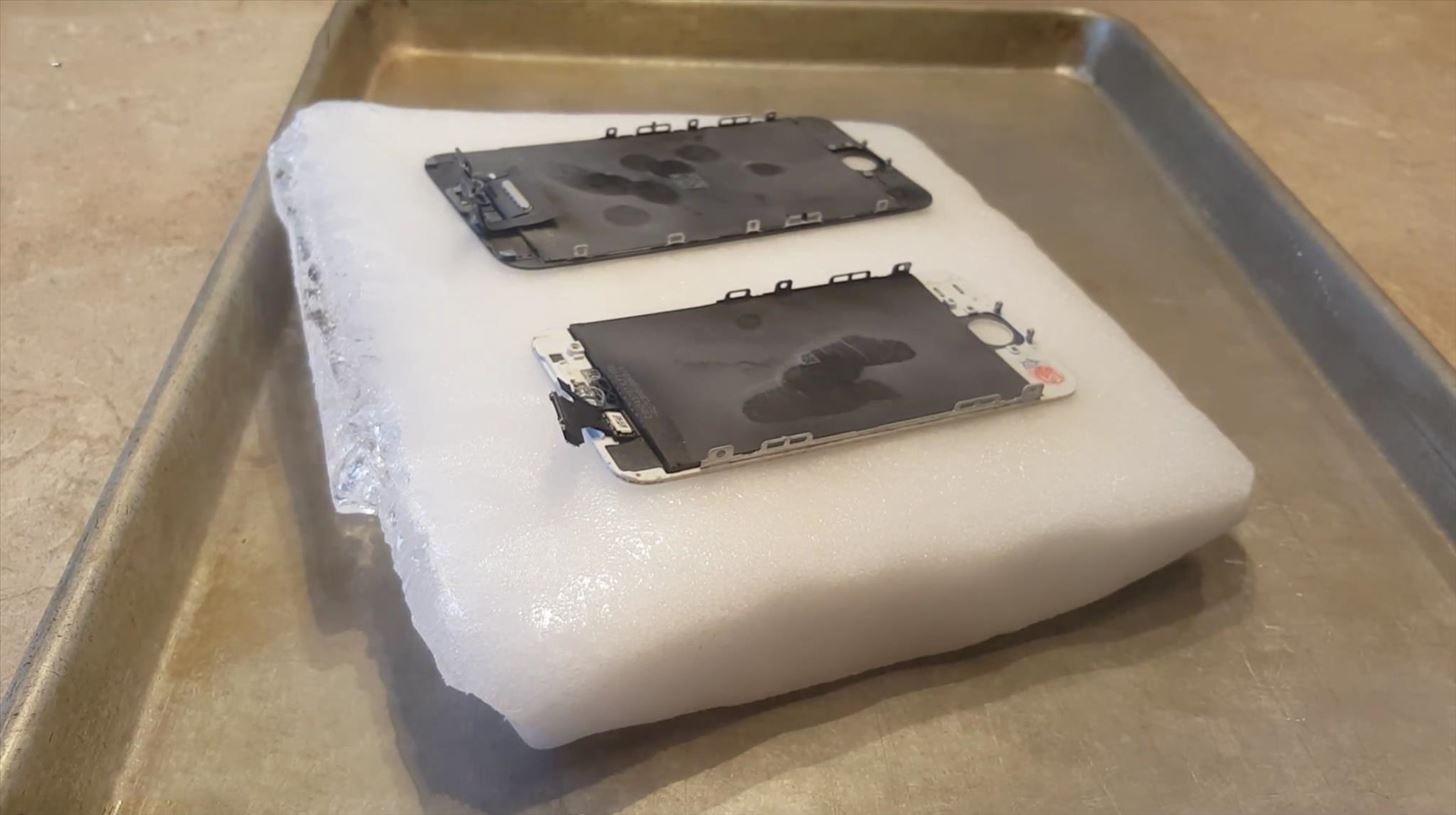
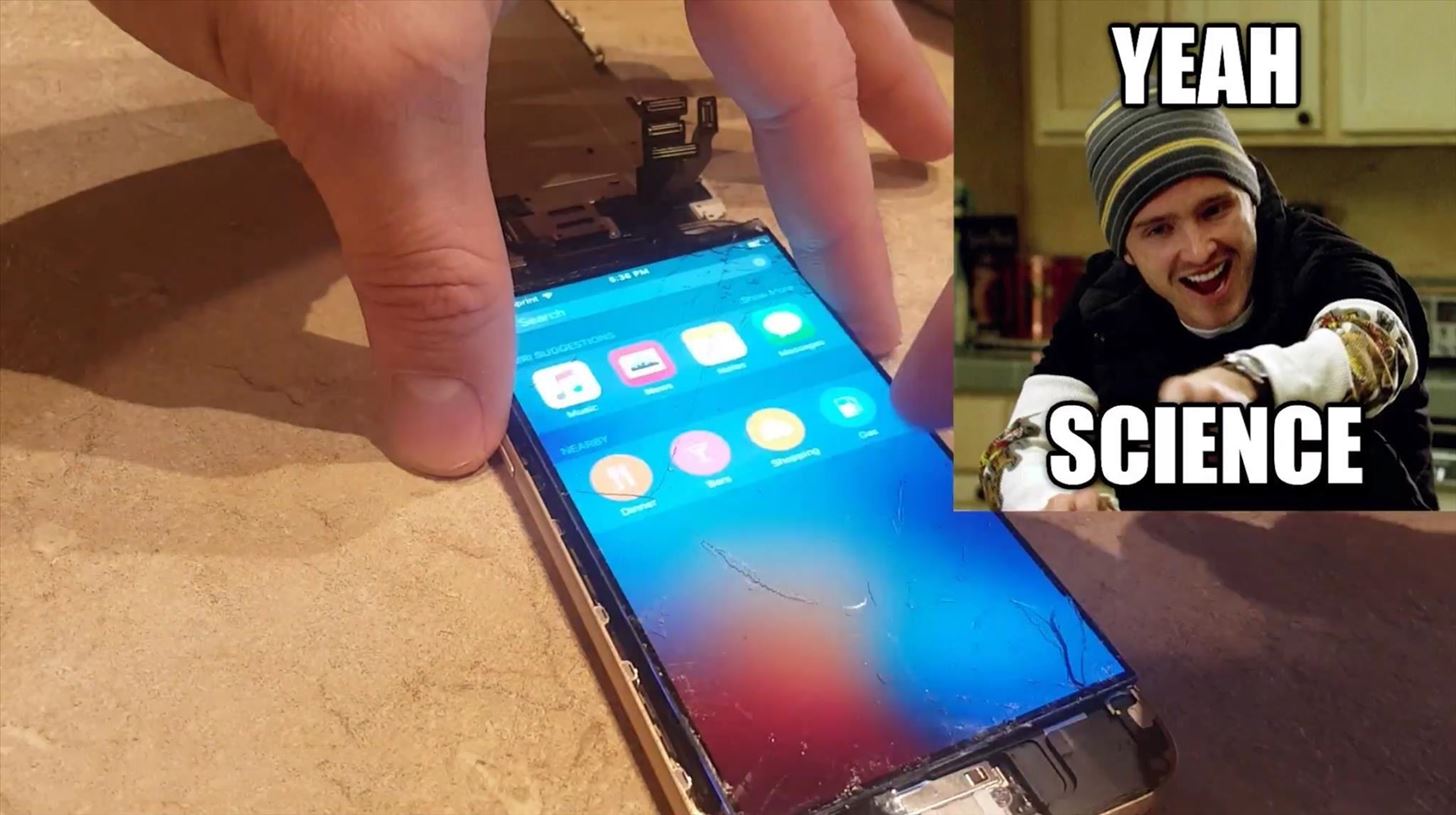
So you dropped your smartphone and the screen cracked. Again. Just the thought of sending it out for repair or buying a new phone is driving you mad.But if it's only the glass that is cracked, and you're a DIY-type with experience disassembling and reassembling gadgets, you can replace the glass and salvage your LCD screen with a couple simple tools—and a block of dry ice—courtesy of JerryRigEverything's tutorial.
WarningsThe methods in this tutorial are advanced, and novices should understand that it is VERY EASY to damage your phone, even if you are careful. Understand that this method could take lots of practice to get the hang of, and that you could damage your screen beyond repair. Be sure to handle dry ice only with gloves on. It sounds counter-intuitive, but dry ice is so cold that it can burn you. This method will not work on Samsung devices, because of the glue they use.

What You'll Needblock of dry ice from your local grocery store (not a foam or gel pack) gloves for handling the dry ice cracked glass smartphone screen, removed from rest of phone replacement glass for afterwards (again, make sure it's your model or it won't fit) paper card or similar object to help pry glass off

Step 1: Place Screen on Dry IceTake the dry ice out of its packaging and place on a safe surface. Take the disassembled phone screen and place it glass-side down on the dry ice. Leave the screen on the dry ice for 5-10 minutes, occasionally using light presses on the back to make sure the whole screen is touching the dry ice. You want the screen to be uniformly cooled before proceeding to the next step.

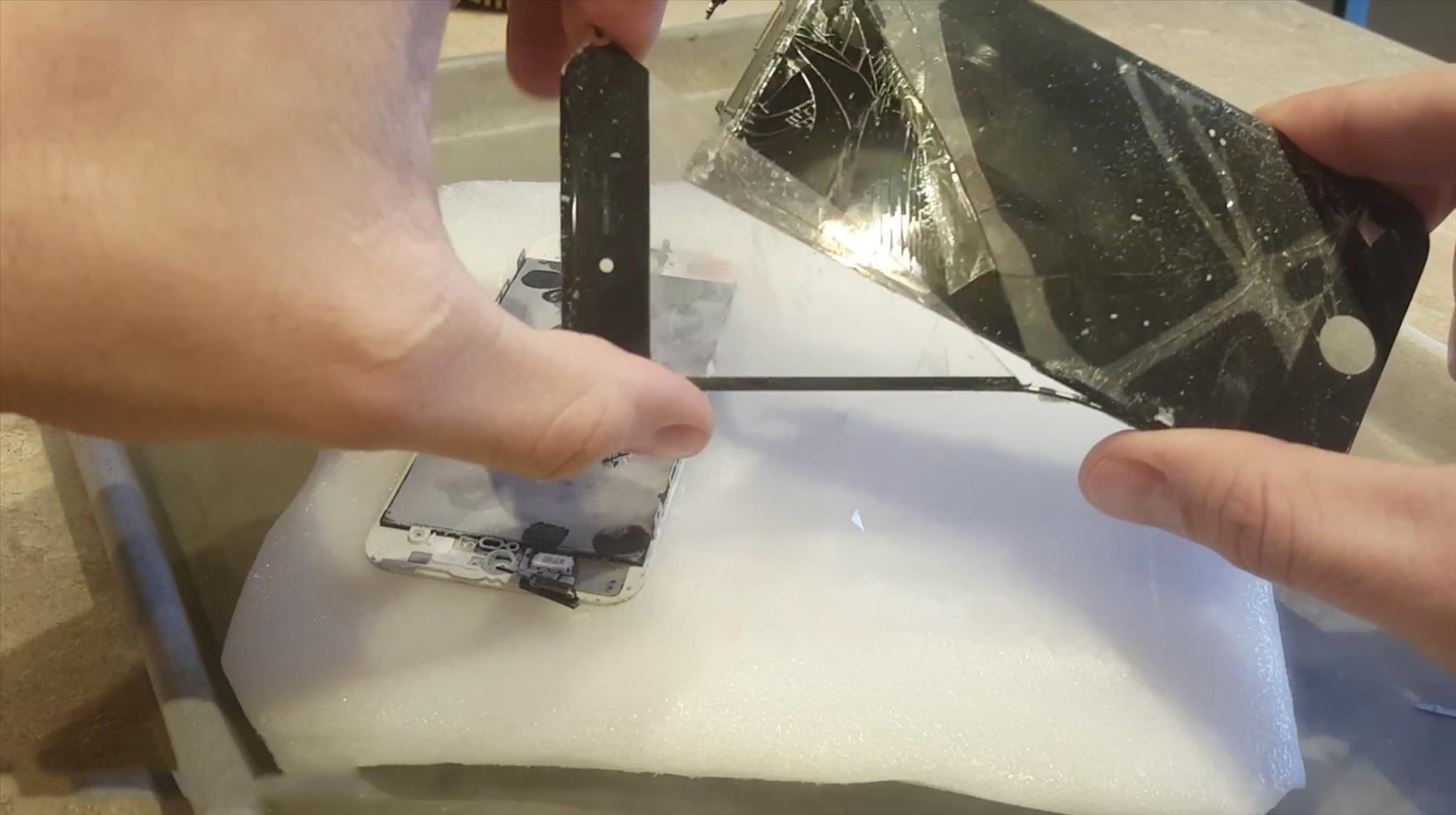
Step 2: Wiggle the Glass Off the LCDOnce the screen is completely frozen, pick it up and very delicately wiggle the glass until you're able to crack part of it off. At this point, the glass will be about as fragile as an eggshell. Again, be extremely careful so you don't wind up damaging the LCD screen underneath. Carefully pull away the first cracked piece of glass.

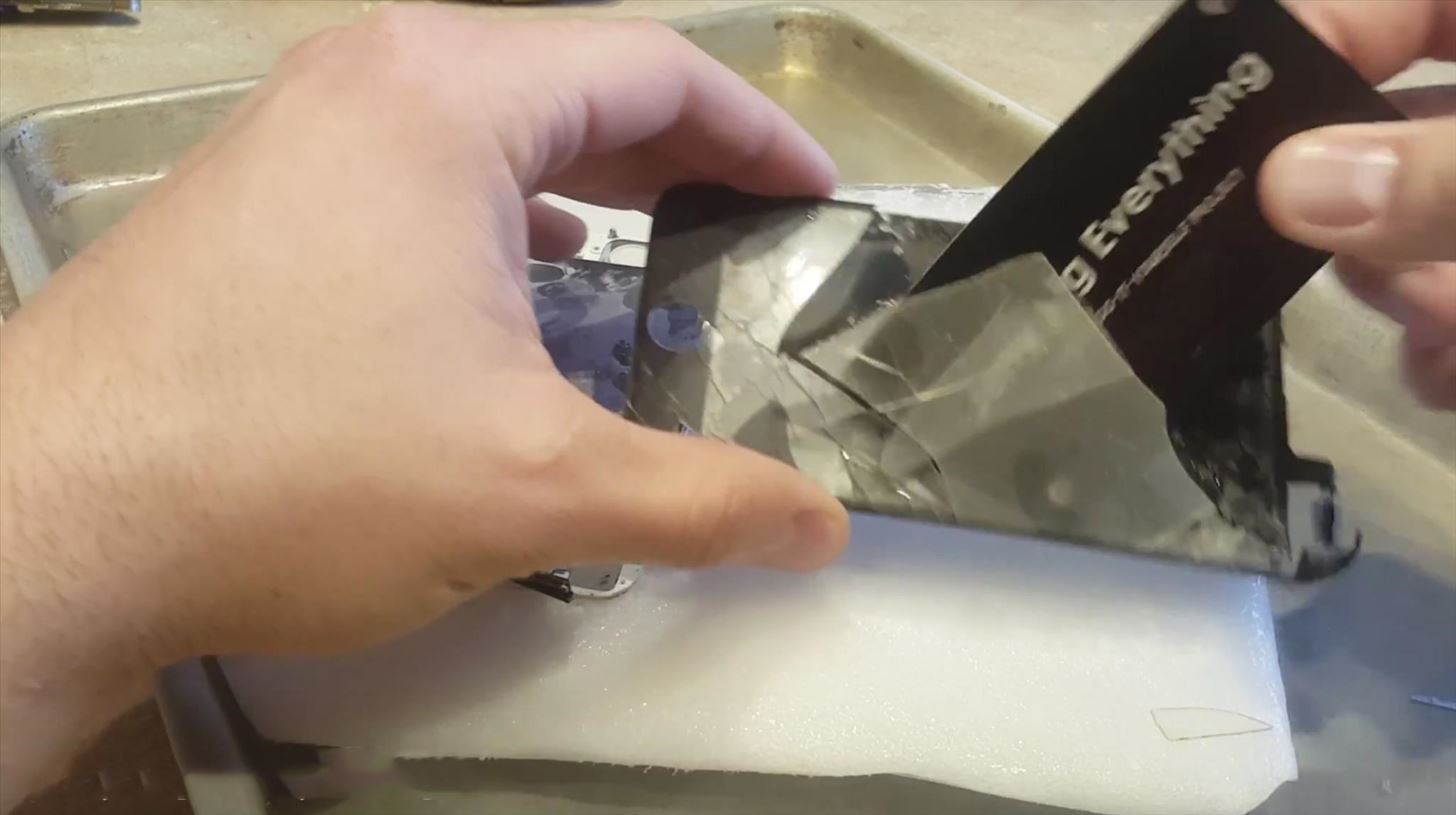
Step 3: Loosen Stuck Pieces with a CardOnce you've got a piece of the screen off, you're going to need a flexible—but not too flimsy—tool to pry off more of the glass. Think something like a playing card or business card.What you want to do is gently slide the card under the glass so that you can dislodge pieces in the middle that are still a little stuck.

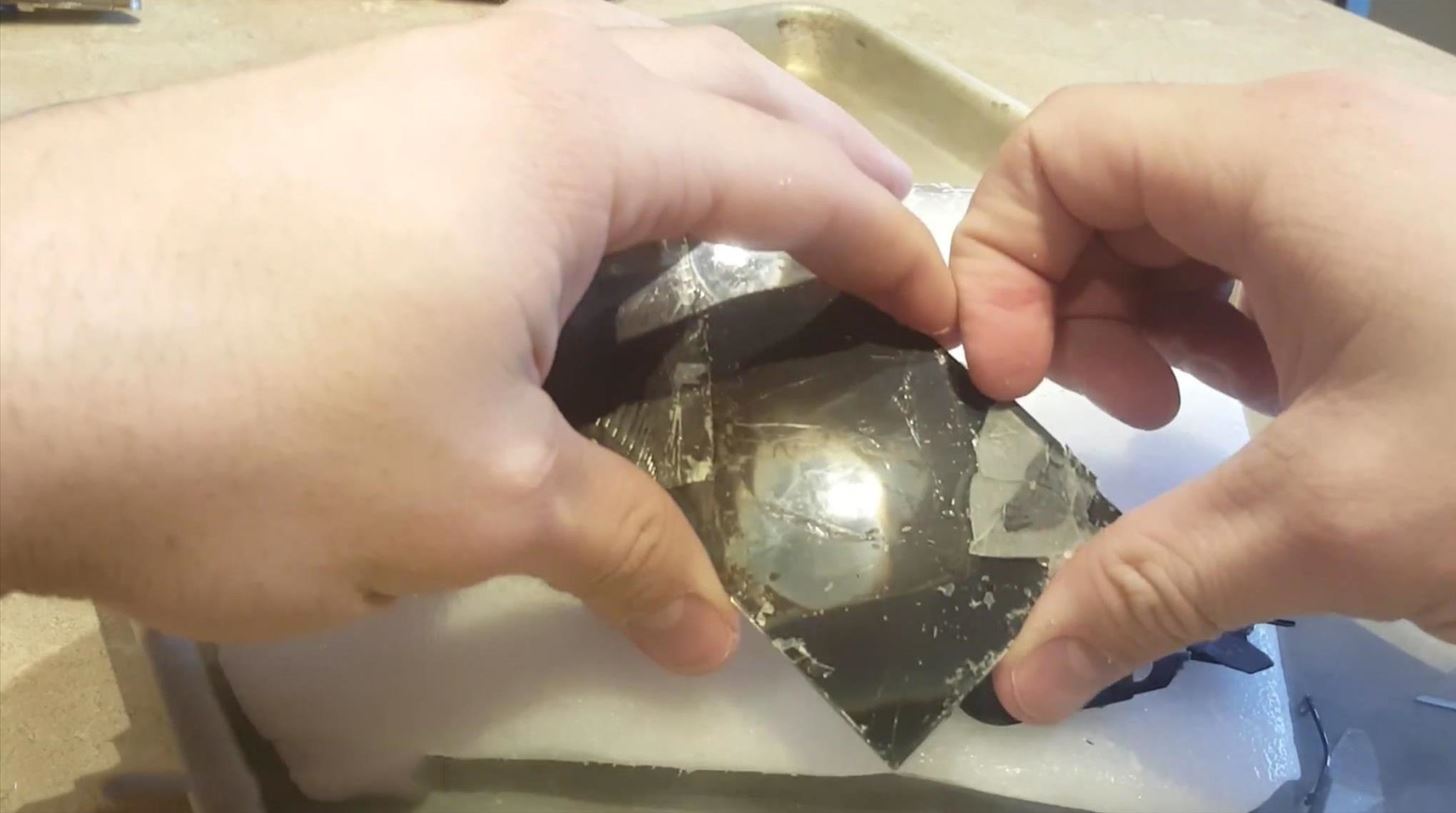
Step 4: Use Your Hands to Get the Rest OffOnce you get most of the big pieces off, you can use your fingers to pick off the tinier bits that are still on there.

Step 5: Add Your Replacement GlassAnd that's it. There will still be glue residue on the LCD screen, but other than that it should be perfectly functional. You'll need to clean off the LCD and glue the replacement glass (again, search for your model) onto it, then reattach that assembly to the phone, but then it should be as good as new. Your LCD screen should be fully functional after you remove the glass, as long as you're careful. For more help with this last step, check out JerryRigEverything's followup. Please enable JavaScript to watch this video.
One last time, you run a big risk of doing irreparable damage to your screen using this method, so be careful. If you're interested in trying this, it's a good idea to test it out on an old device that you don't mind damaging.Since this how-to has been filled with danger and disclaimers, let's end things on a lighter note, with a little dry dry ice humor. No. No you won't. Image via AZ Quotes I'm here all week, folks!


How To Make a Laser Communicator [Tutorial] - YouTube


Enable Kids Mode On A Samsung Galaxy Tab 3 7.0 Kids Mode is a pretty cool feature that Samsung loaded onto the Samsung Galaxy S5. It's a great way to make sure, if you have kids, that they can use your device safely without accidently affecting any of your settings or data.
How to make your Android device safer for your kids


The Galaxy S8 Oreo Beta has been out for just over a week now. Over that time, we've taken a look at some of the best new features and improvements. One area of smartphone software that never gets much love in updates is the lock screen. Samsung changes that in the Oreo beta, bringing new
Galaxy S8 Oreo Update: You Can Now Make Lock Screen

How to Create Google Now Reminders Straight from Google


It's actually hard to imagine being able to use a computer without copy and paste. The iPhone (and iPad and iPod Touch) also has a copy and paste feature, but without an Edit menu at the top of every app like on macOS or Windows, it can be hard to find. This article shows you how to use copy and paste on the iPhone and other iOS devices.
How to Copy Files to and from Your iPhone - Make Tech Easier


Tip #4: When wiring LED light bar relays or switches, fuse all positive side wires such as from the positive battery terminal to the light bar switch. The fuse rating should not correspond to the wire size but instead to the maximum current expected on that wire.
How to Wire an LED Light Bar Properly (Project Night Light


Every Android phone has a voice command feature , Though its not widely used by people , but it is surely a great way to interact with your phone and yes it does makes controlling your Android phone easier and saves your time . We have tried and tested 14 of the most useful voice commands that you can use with your android phone .
How to use voice commands on your Android phone - CNET


YouTube can be the perfect place to find a free full-length movie, especially if you know how to find it. Searching through millions of results is not an easy task, but we'll show you how to do it
45 classic movies you can watch for free on YouTube right now

How to Adjust Contrast & Hue Levels on Your LG G3 for a More


If you'd like to disable lock screen security while connected to a Bluetooth device, such as headphones or smart watches, use these two options. Additionally, cell towers can be set as a trusted environment, so that lock screen security will be disabled any time you're connected to your local tower.
How to Delete the Wallpaper on the Lock Screen of an iPhone


16MP main camera with a 5MP sidekick for depth info The Realme 3 Pro is equipped with a 16MP main camera and a 5MP secondary module for depth detection. The primary cam uses the Sony IMX519 sensor

How To: Improve Battery Life on Your iPhone in iOS 11

How To: Improve Battery Life on Your iPhone in iOS 11
The new iOS 11 was just released by Apple, and you can install it right now. Overall, it's got some great features, but how does it fare battery-wise on your iPhone? And how can you increase daily battery life for more juice and less charging every day?No matter the iOS version, if there's one thing I'm constantly thinking about during the day, it's my iPhone's battery. And I'm sure it's a big concern for you, too. You never want to see it get too low, especially when you know you're nowhere near a charging port. (Stuck on the subway, anyone?)The internet is congested with conflicting tips and tricks to maximize daily battery life, so it's a little messy trying to figure out what's what, especially now that there's iOS 11 with the possibility of new battery-draining features to fix. To help you sort through the chaos, we've compiled the best of the best to make it as easy as possible to boost your iPhone's everyday battery life.UPDATE: How to Improve Battery Life on Your iPhone Running iOS 12 While we're focusing on improving how long your iPhone battery lasts every day on iOS 11, most of these tips can be applied to the iPad and iPod touch as well, along with older iOS versions.
1. Wait a Few DaysIf you just updated your iPhone to iOS 11, give it a few days to fully reindex and cache everything before you start freaking out. Things should normalize after a day or two, or even less time, so just give it a little time. If that doesn't do the trick for you or you want to dive right into tweaking your settings, then keep on reading to see what you can do.Don't Miss: Battery Saving Tips Specifically for the iPhone 8 & 8 Plus
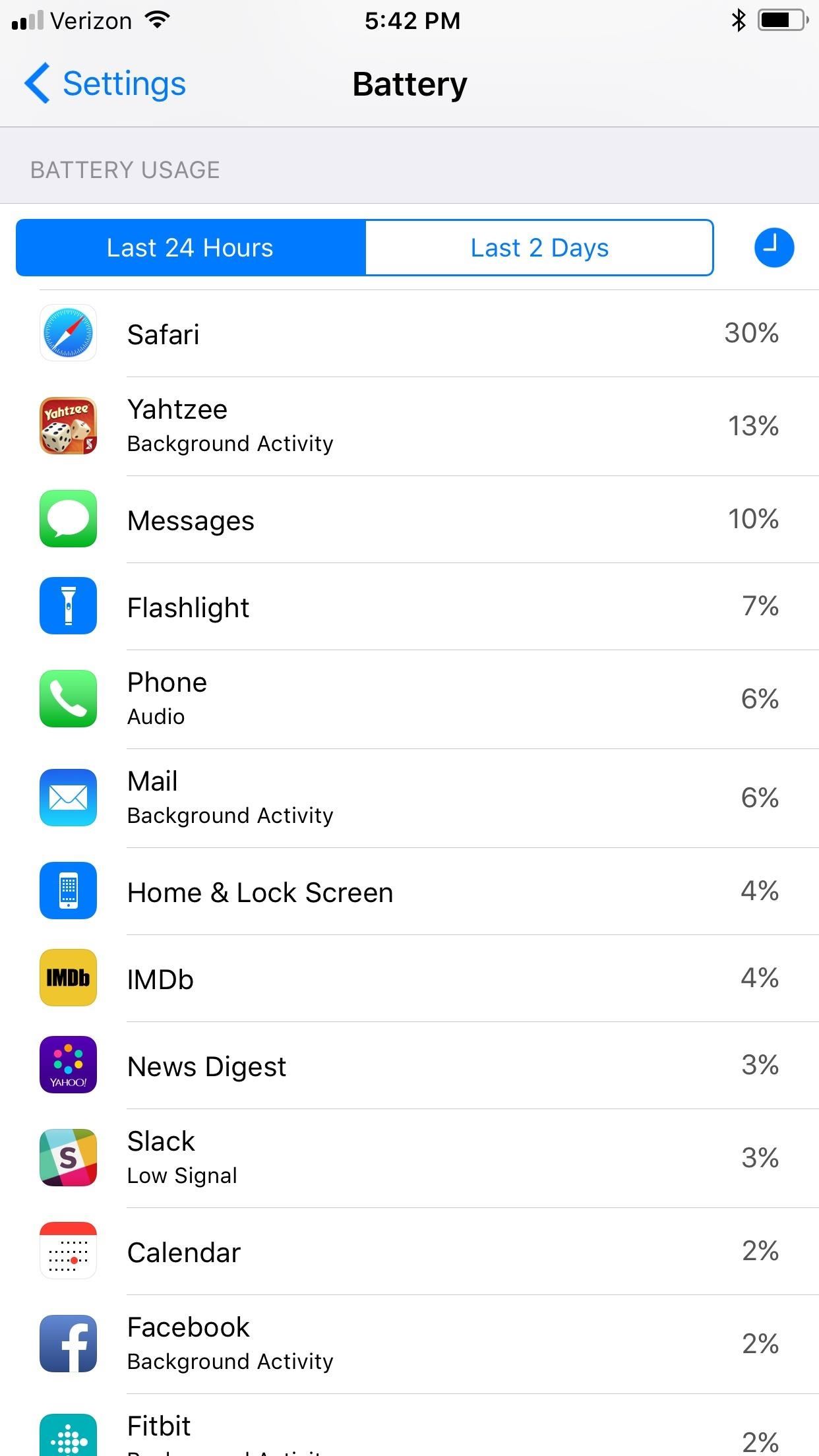
2. Check Battery UsageThe first step in treating your battery problem is to see where the problem may be stemming, so head to Settings –> Battery. You should be able to see what apps have been draining your iPhone's battery life over the last 24 hours, as well as another period of time (usually seven days).If you tap on any of the apps in the list, or if you tap the clock icon in the top-right corner next to the time tabs, you will see how much time each app has been used on the screen, as well has how much time the app has spent working in the background.Don't Miss: How to Check Your iPhone's Battery Health in iOS 11 If your app appears to spend an unusually long time in the background ...
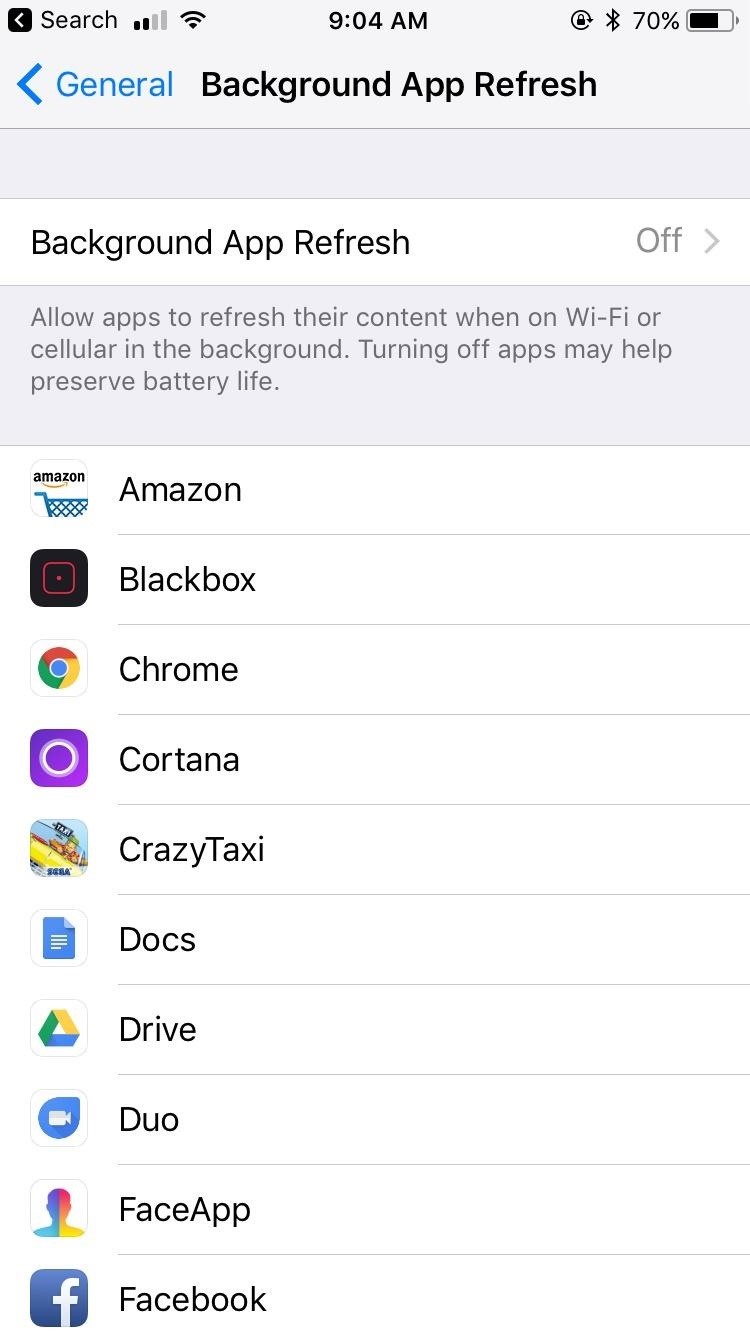
3. Disable Background App RefreshBackground app refresh allows your apps to continue to work in the background while you focus on other tasks. It can be useful, but it drains your battery. To improve daily battery life, disable this feature.You can find it by heading to Settings –> General –> Background App Refresh. You can disable background app refresh for certain applications that show heavy background activity, or you can disable all background activity. I'd stick with the former option for troublesome apps only.
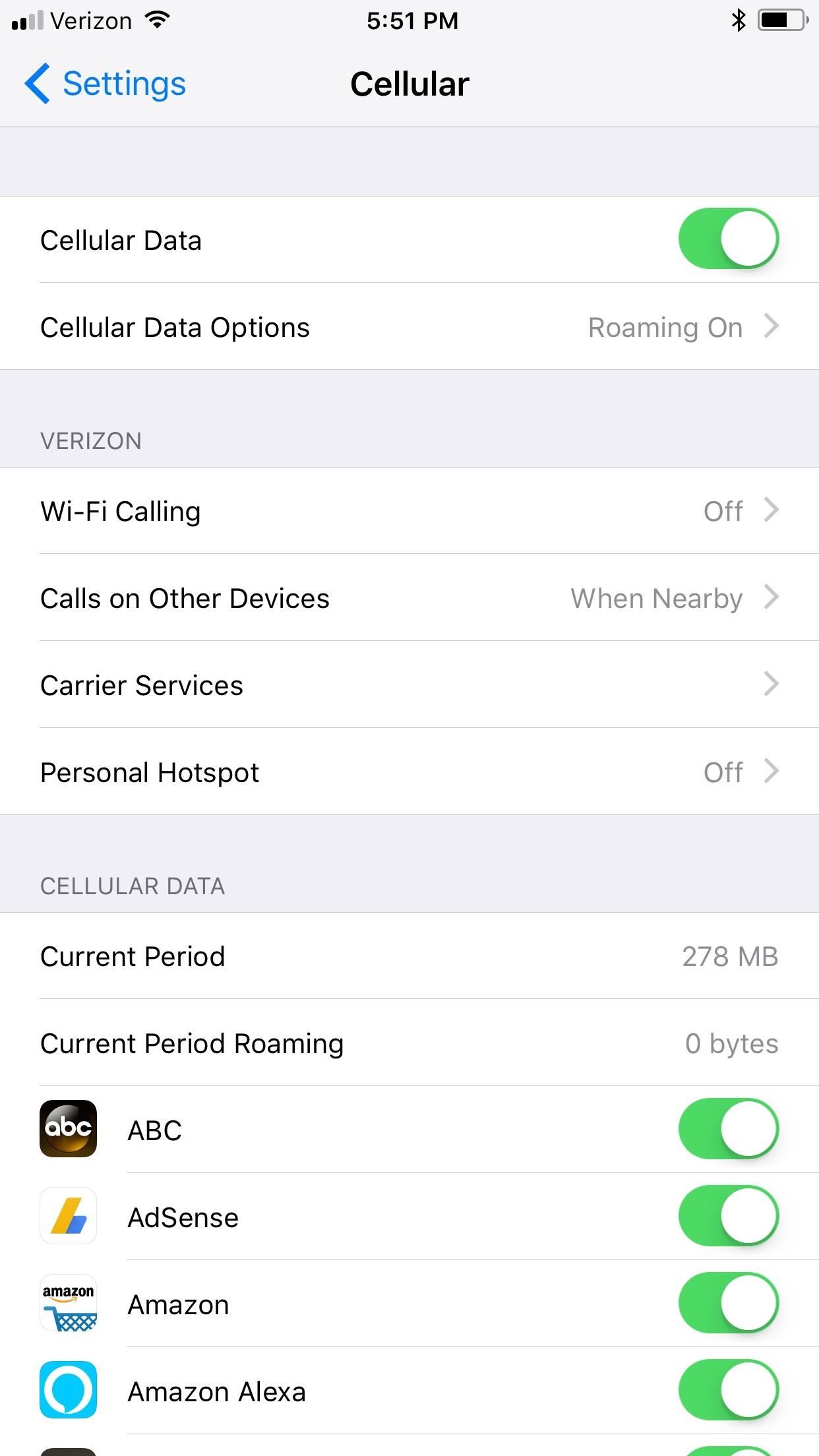
4. Disable Cellular Data While on Wi-FiIf you are connected to Wi-Fi, you don't need your iPhone to search for data as well. There are two ways to turn off data in iOS 11. First, you can just tap on the new Cellular Data control in the Control Center. When youready to get back on, just tap no it again.More Info: How to Turn Off Connectivity Settings in iOS 11's Control Center Second, you can go to Cellular, then disable Cellular Data at the top of the page. Just remember to turn it back on when you leave Wi-Fi. And don't worry about missing important phone calls — this option has nothing to do with making or receiving calls. If you can't stand the idea of Facebook not updating all the time, you can choose to disable cellular data on an individual app basis from the Cellular settings as well. Speaking of Wi-Fi ...
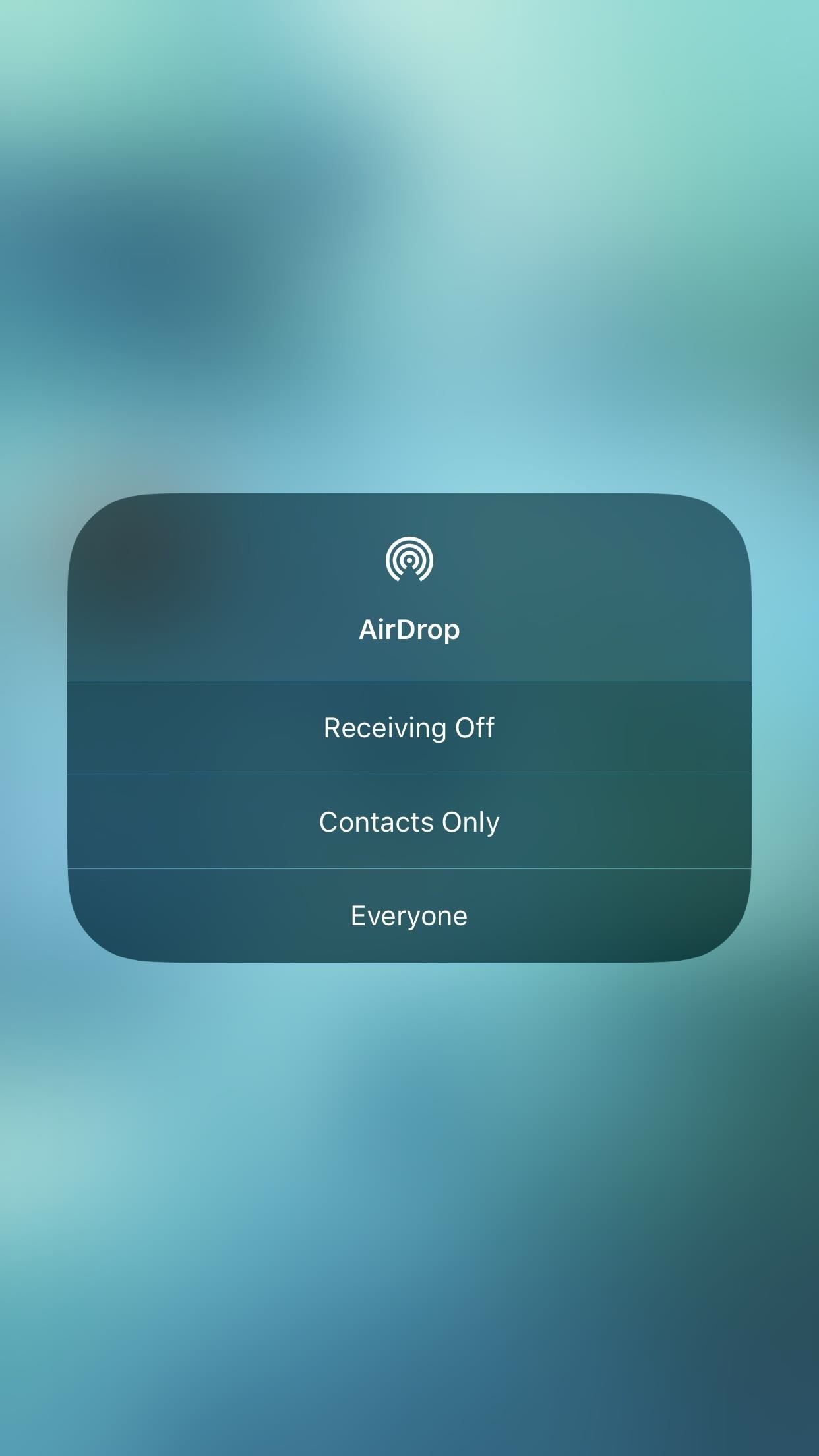
5. Disable Wi-Fi, Bluetooth & Airdrop When Not NeededYou're not always connected to these features, but when they are powered on, they're looking to connect. That means battery drain, and we want to increase battery life.When you don't need these connections turned on, you can go to the Settings app and tap on either Bluetooth or Wi-Fi to find the off switch for those features. For AirDrop, just swipe up from the bottom of your iPhone's screen to view the Control Center, long-press or 3D Touch on the connectivity pane, tap on AirDrop, then set to "Receiving Off." Note that tapping on the Bluetooth or Wi-Fi controls here will not turn them off.More Info: What the Bluetooth/Wi-Fi Symbols Mean in the Control Center
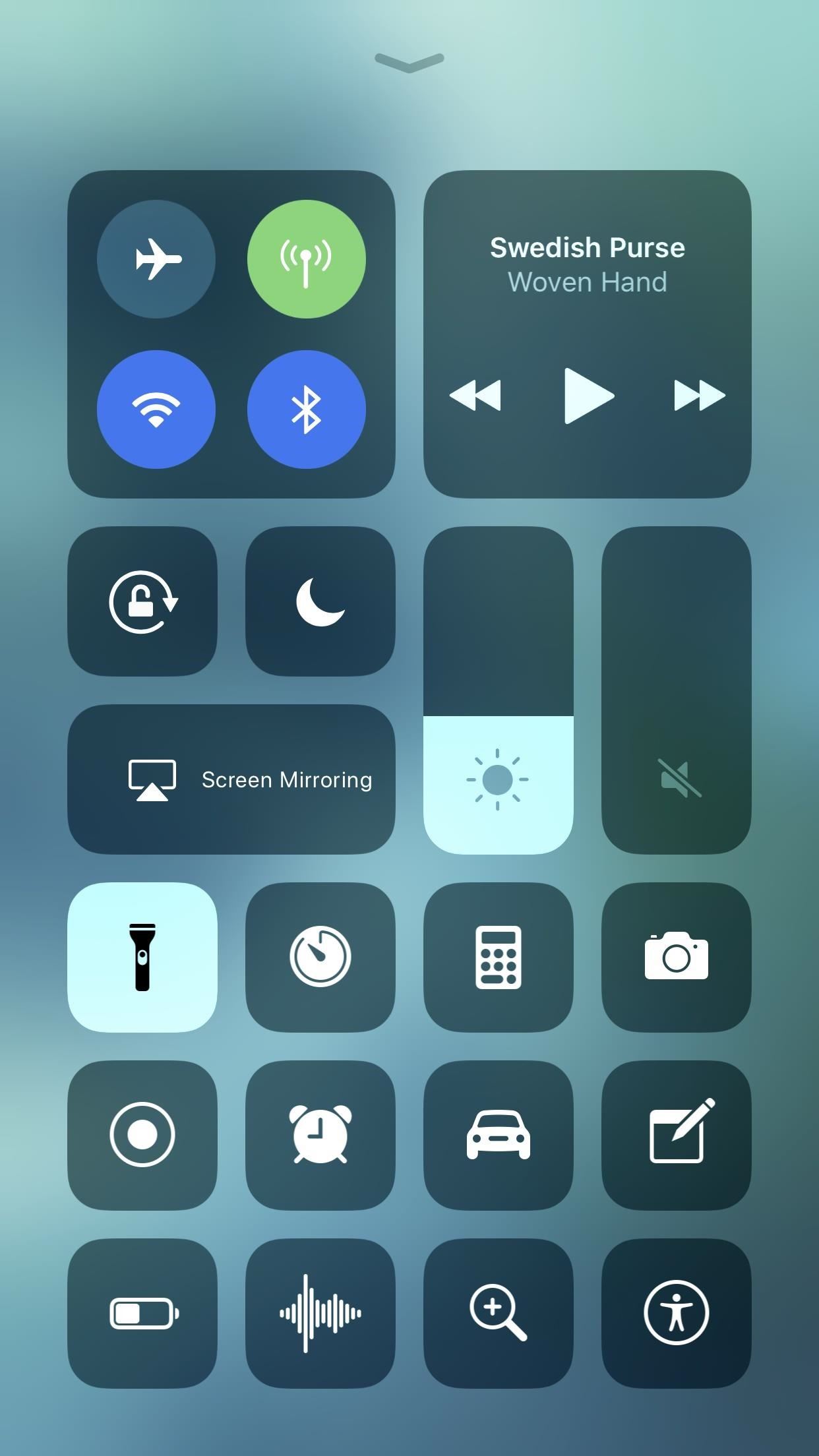
6. Set Your Flashlight to LowIf you had a 3D Touch device before, you could always set the flashlight's power to low, which helps keep power drain down to a minimum when using the flashlight. Now, in iOS 11, those without 3D Touch can just long-press to access these settings, and the lowest setting is even lower than before now that there are 4 notches, which means even less drain on your battery. Plus, it remembers your preference!
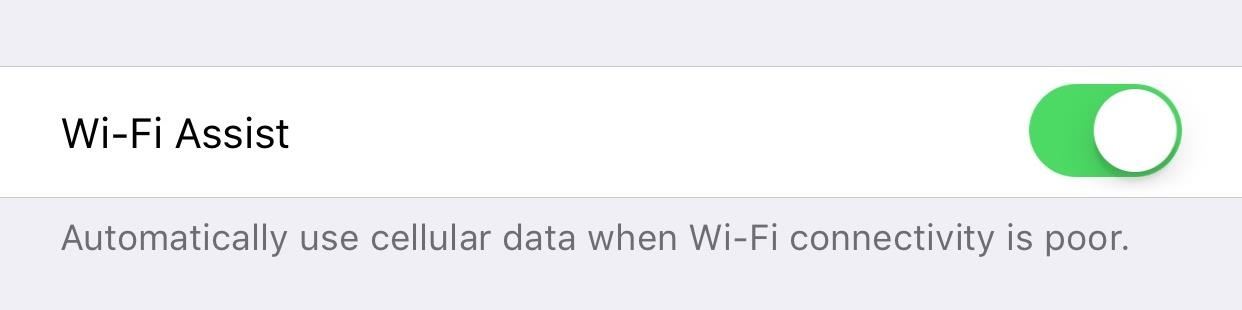
7. Turn Wi-Fi Assist OnAnother Wi-Fi tip is to actually activate a setting rather than disable it. Wi-Fi Assist will automatically push to cellular when your Wi-Fi connection is weak. This will save your iPhone's battery from having to attempt to connect to poor signals.To enable this feature, head to Cellular, then scroll all the way to the bottom of the page passing all of the individual apps to Wi-Fi Assist. Simply turn it on if it isn't already.
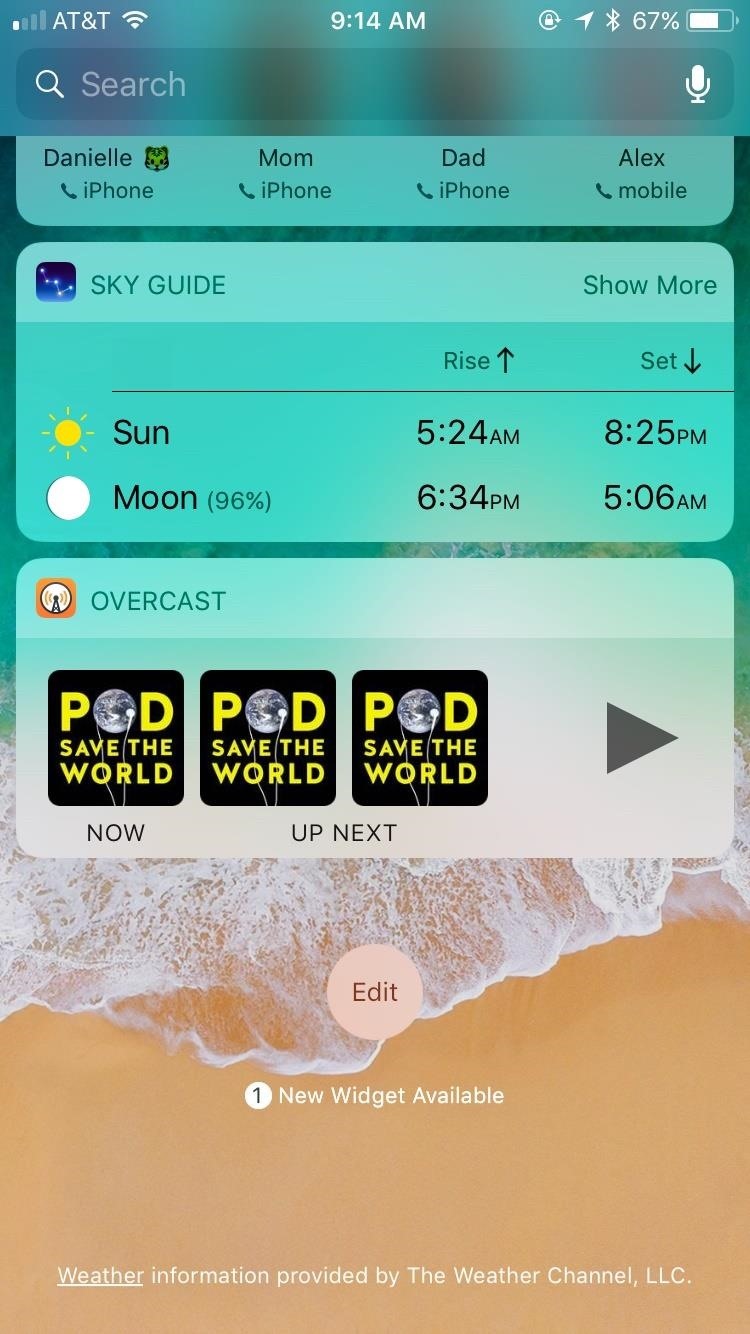
8. Turn Off WidgetsWidgets are a fun and convenient way to preview app information without having to actually launch those apps. However, it will use up precious battery life, especially the applications that use location services such as Weather and Maps.To disable any or all widgets on your iPhone, swipe to the right to activate the Today View on your home or lock screen. Scroll to the bottom of the page, then tap Edit. Click the red minus button next to each app's Widget you'd like to remove from the Today View. If you'd like to undo any action you make here, simply scroll down to the app you'd like to see, and click the green plus button to add it back.
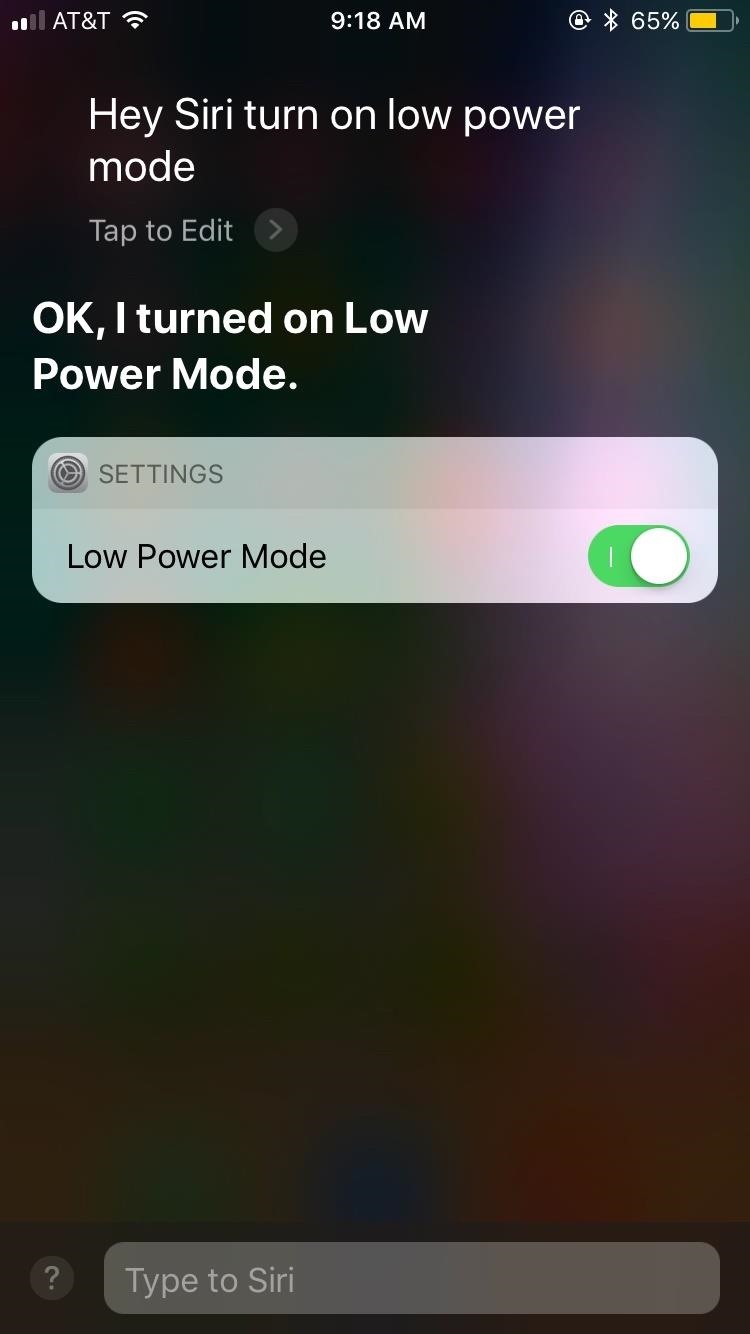
9. Enable Low Power ModeLow Power Mode may be one of Apple's best iOS inclusions in recent years. This feature will disable battery draining activities — some you can't even typically disable yourself — to extend your battery life when you need it.You can actually say "Turn on Low Power Mode" to Siri to quickly activate the feature, or you can enable the new toggle in the Control Center to quickly turn it on and off from there. Otherwise, you can do it the old-fashioned way ... go to Battery –> Low Power Mode to enable the feature yourself.
10. Place Your iPhone Face DownThere seem to be two camps of iPhone users; those who place their iPhones on their backs, and those who put them on their fronts. It turns out one of these methods is better than the other since Apple has included a battery saving feature in iOS for users placing their phones face down.When the iPhone display is against a surface, notifications will not activate the display since you won't be able to see them. That means your display doesn't need to be on as much, boosting battery life. If you still want to be alert, you could turn on LED alerts, but that can also drain your battery.
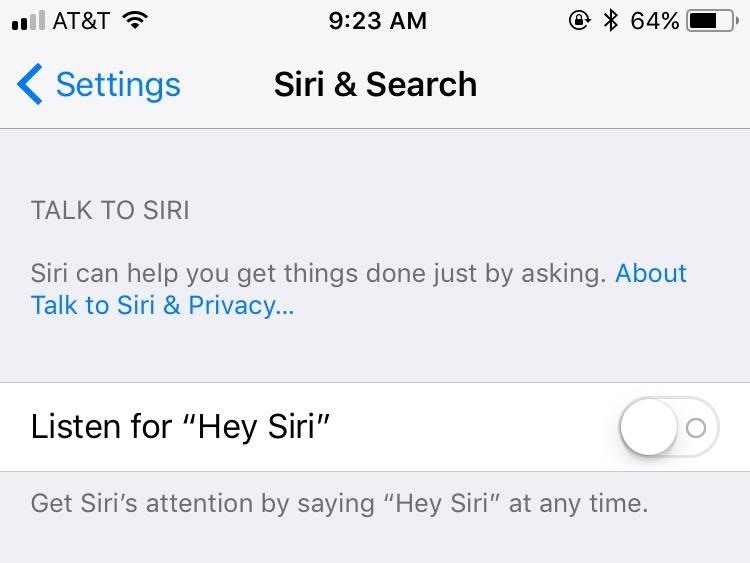
11. Turn "Hey Siri" Off"Hey Siri" can be an asset for times when you can't use your hands to activate your iOS assistant. However, "Hey Siri" uses up your battery since it is always listening for you to request the feature. If you don't use "Hey Siri," or you feel it's worth it to improve your battery life, head to Settings –> Siri & Search, then toggle Listen for "Hey Siri" off.Don't Miss: How to Automatically Answer Phone Calls on Your iPhone in iOS 11
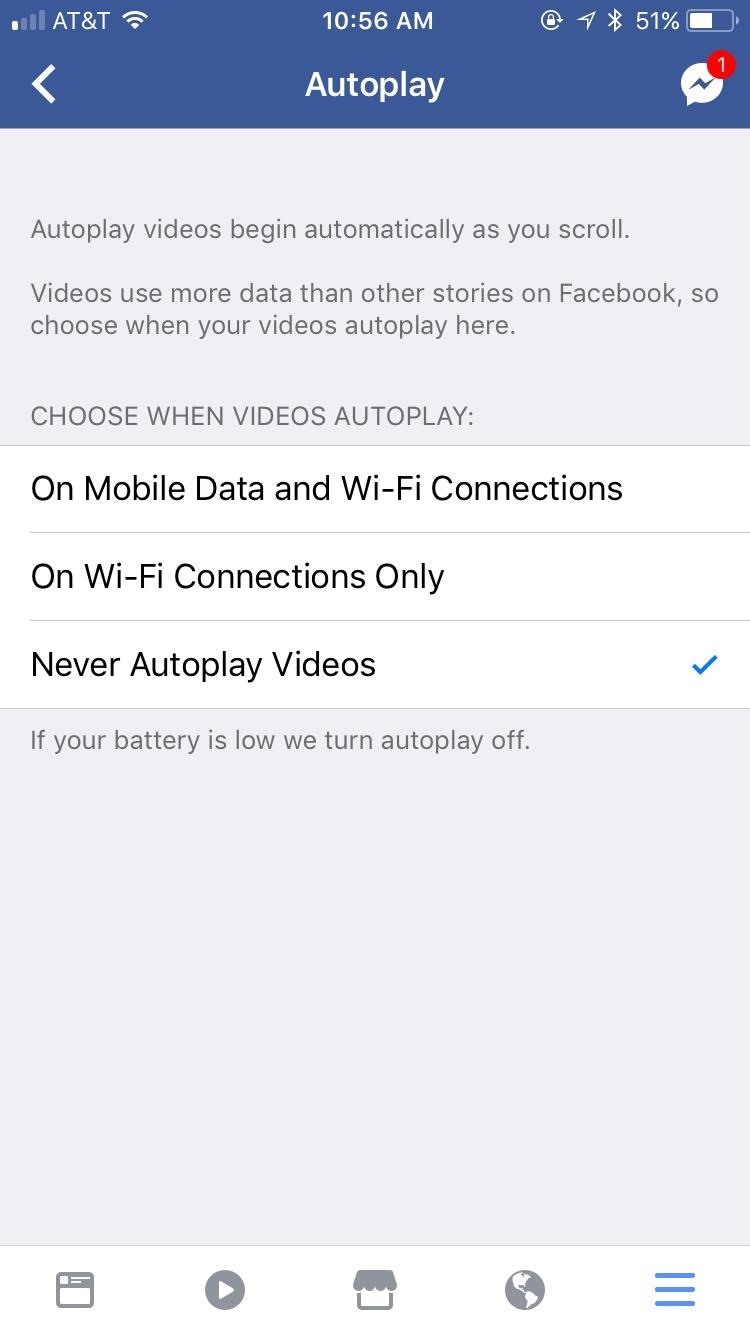
12. Disable Auto-Playing Videos for Specific AppsThis one will be good for both your battery life and your cellular data. Facebook and Twitter are notorious for allowing videos to play automatically when scrolling through your news feeds. This eats your battery and is a bit ridiculous unless you want to watch every video you see down your feed.For Facebook, you need to open the app, then go to the Menu tab. Tap on Settings –> Account Settings –> Videos and Photos, tap on Autoplay, and select Never Autoplay Videos. On Twitter, tap on your profile icon, then Settings and privacy –> Data usage –> Video autoplay. Select Never to maximize battery life while using Twitter.
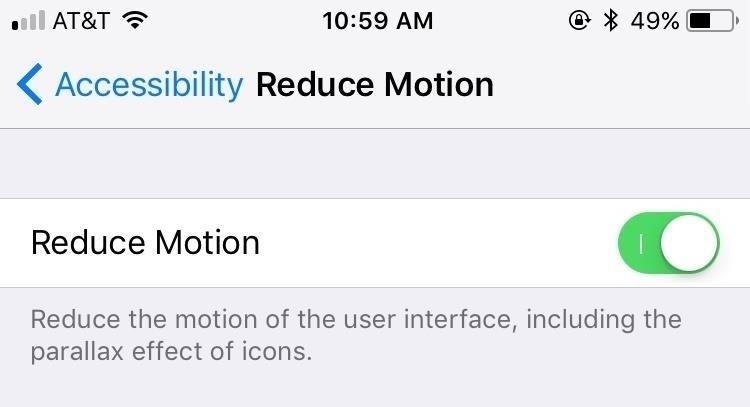
13. Reduce MotioniOS packs in unique motion features to make the experience feel fluid, such as app-launching animations and parallax effects on the home screen. The truth is this motion has an effect on your battery life. To deactivate it, head to Settings –> General –> Accessibility –> Reduce Motion, then enable it.
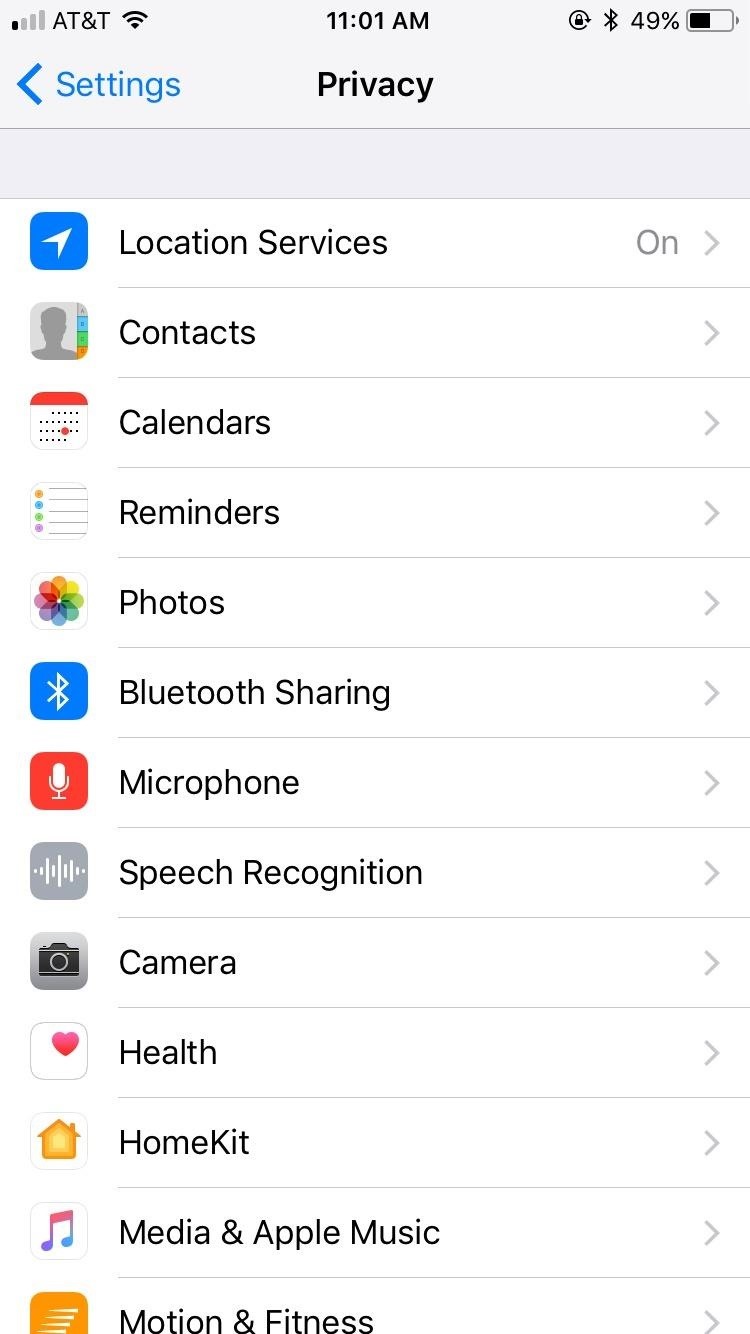
14. Enable Location Services Only In-App (Or Not at All)Location Services are great for helping you find where you are and what's around you, but not so great for your battery life. Some applications will by default use your location even when you aren't using the app. For battery-life maximizers, this is bad news. Our recommendation is to enable Location Services only while actively using the application, or, in the case that you never want the app to use your location, deactivate location services for that app entirely.To decide for yourself, head to Settings –> Privacy –> Location Services. From here you can completely disable Location Services, but that won't be useful to many users since you will not be able to use Maps or other apps that require your location. Go through your apps individually and make the choice that works best for you.Don't Miss: The 6 Best New Features for Maps in iOS 11 for iPhone

15. Disable Auto-BrightnessYou've been able to control the brightness of your display from Control Center for quite a few iOS iterations now. There isn't a ton of use to Auto-Brightness, and most of the time it gets it wrong and weighs on your battery. Jump over to Settings –> General –> Accessibility –> Display Accommodations, then toggle off Auto-Brightness. (Previously, this option was available in Settings –> Display & Brightness).More Info: How to Turn Your iPhone's Auto-Brightness Off in iOS 11 Images by Justin Meyers/Gadget Hacks
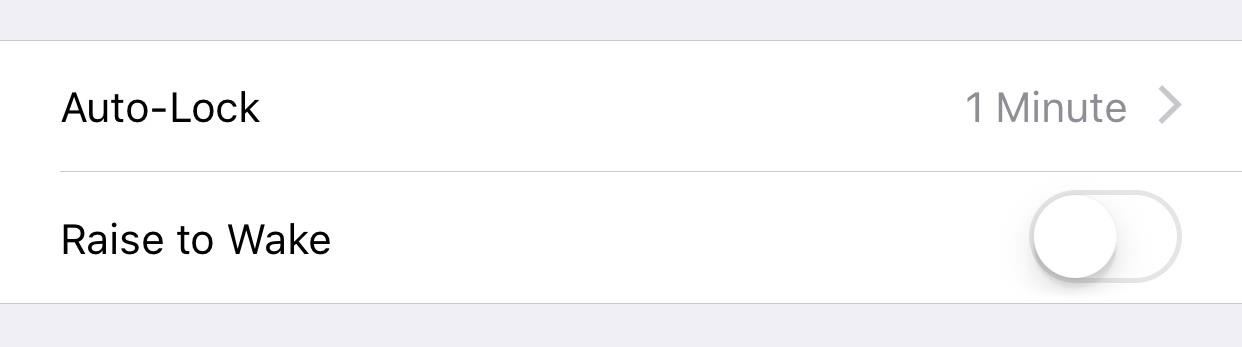
16. Disable 'Raise to Wake'This is a feature that appeared first in iOS 10 for newer iPhone models. It's actually a nice feature, but it's always turning the display on when you least want it to. Each time it's accidentally triggered, it's draining some battery, so just disable it. Head to Settings –> Display & Brightness, then toggle Raise to Wake off.Don't Miss: How to Stop Your iPhone's Screen from Randomly Turning On
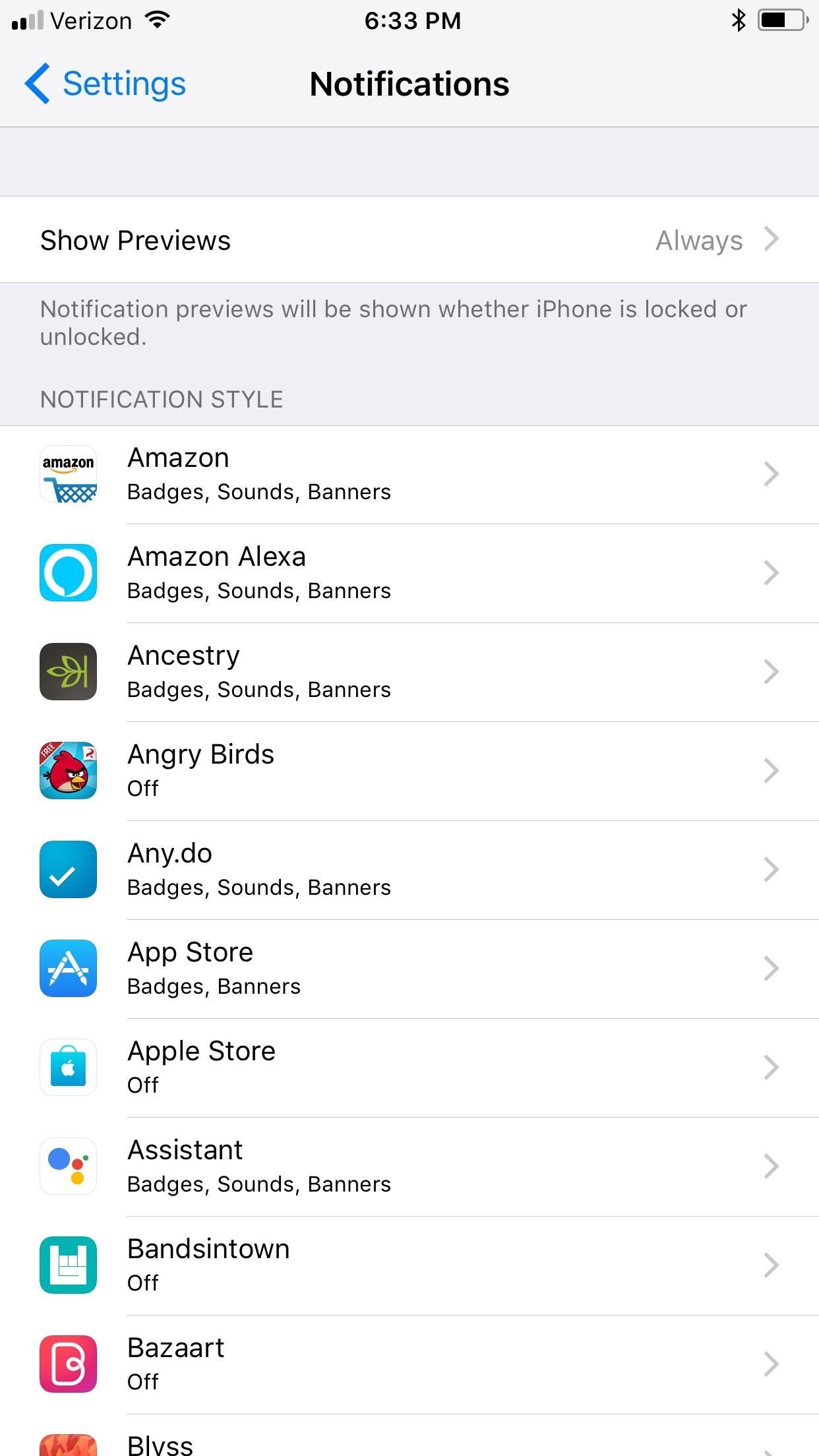
17. Disable Notifications for Certain AppsWe're all annoyed whenever an app requests notifications. But what's more annoying is that these notifications are taking away valuable battery life. Go to Settings –> Notifications to browse all of your apps and see which have notifications enabled. When you find one you'd like to turn off, simply tap on it, then toggle off Allow Notifications to disable notifications.Don't Miss: How to Set Persistent Notifications for Apps in iOS 11 & Higher
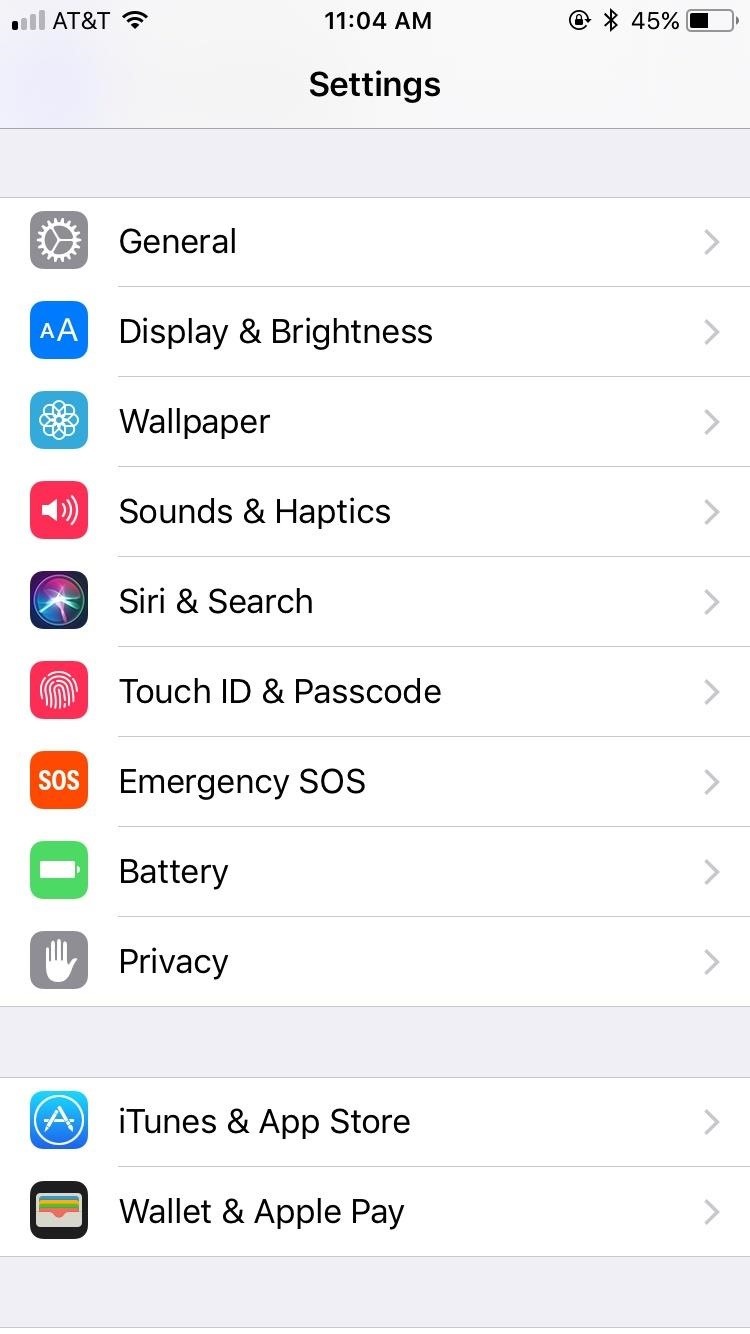
18. Disable Siri SuggestionsSiri Suggestions are helpful when you go to search for an app and Siri already has it presented for you (it's one of the things Siri does pretty well). But it's not good for maximizing battery life. To turn this feature off, head to Settings –> Siri & Search, then scroll down to the Siri Suggestions section. Here, you can choose to disable all Suggestions in Search, all Suggestions in Look Up, or do these on an app-by-app basis.Don't Miss: The 5 Best New Siri Features in iOS 11 for iPhone
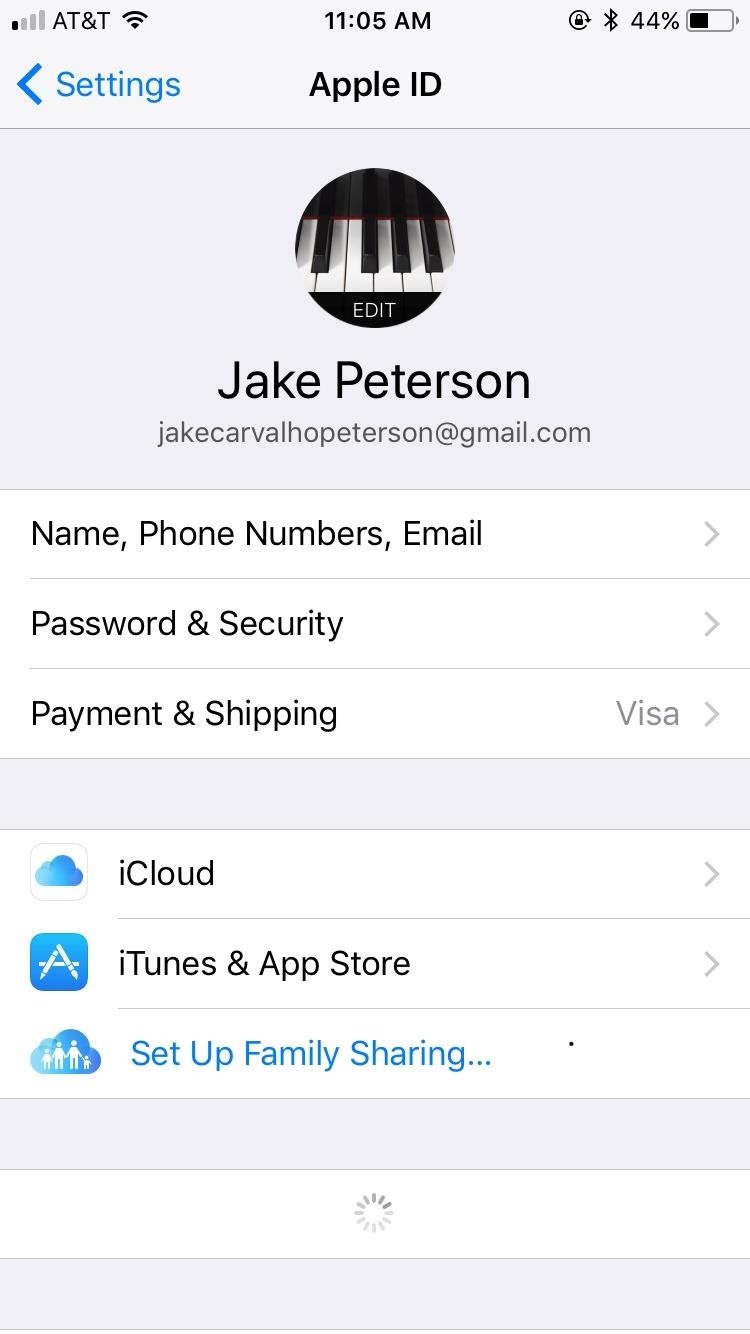
19. Disable Certain iCloud PreferencesIf you only have one iOS device, you may not feel the need to use iCloud for certain applications. Tap your name at the top of the Settings page, then tap iCloud. Deselect any applications and settings that do not apply to you. This will save you battery since your phone will not be trying to upload your data to the cloud throughout the day.
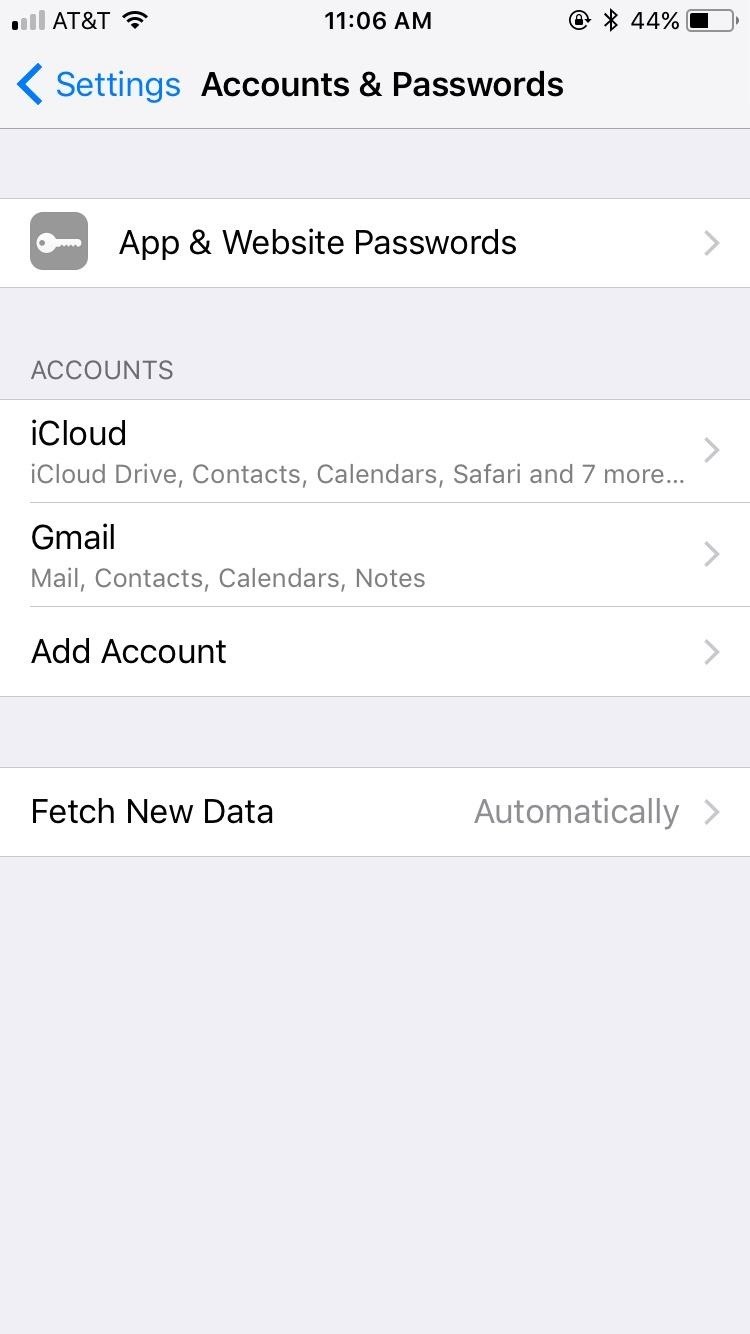
20. Set Your Device to Fetch Data Less FrequentlyThe more your iPhone has to "fetch" email data, the more battery it uses. To boost battery life, go to Settings –> Accounts & Passwords –> Fetch New Data. You will be able to choose here how often you'd like your phone to fetch data. The less frequently it has to fetch, the better your battery life will be.
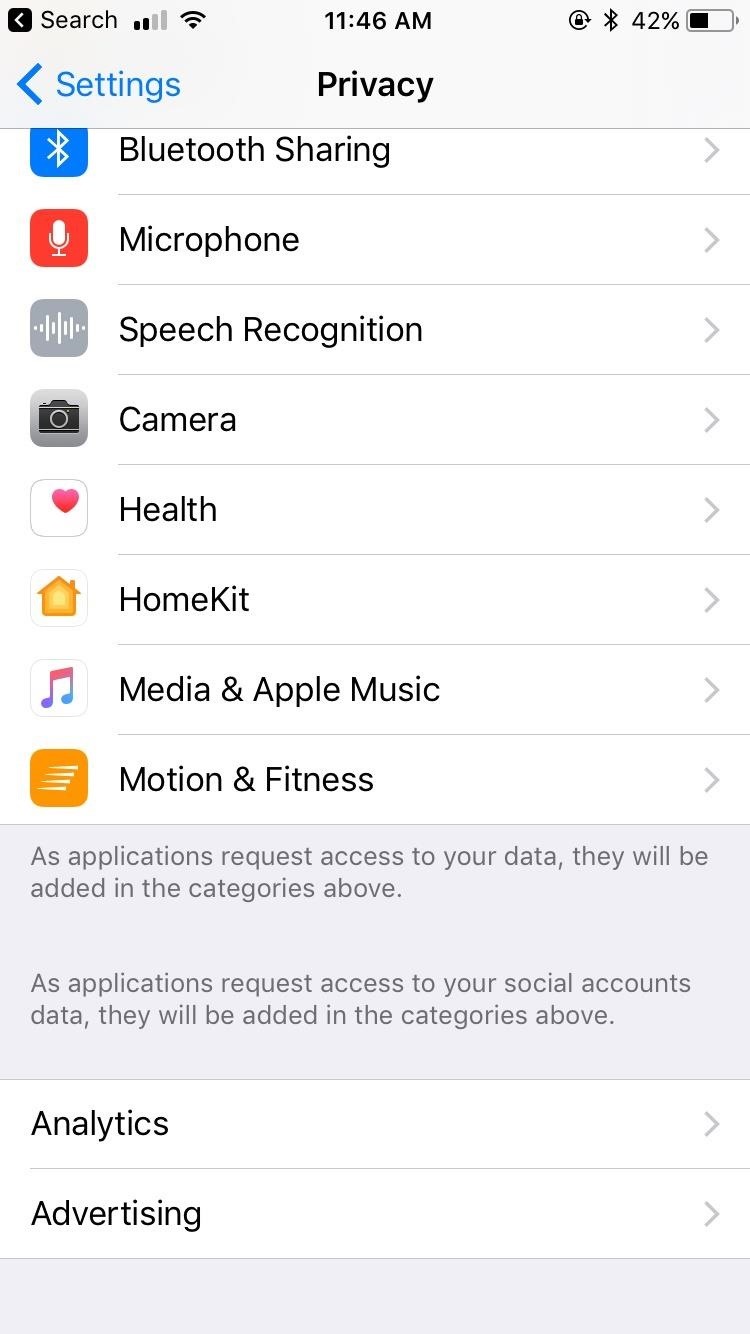
21. Don't Send Data to AppleApple wants you to send them diagnostic and other data from your iPhone, especially in betas, which in turn uses your battery. To disable this feature, go to Settings –> Privacy –> Analytics, and disable Share iPhone Analytics (if you have an Apple Watch, this will show up as Share iPhone & Watch Analytics).
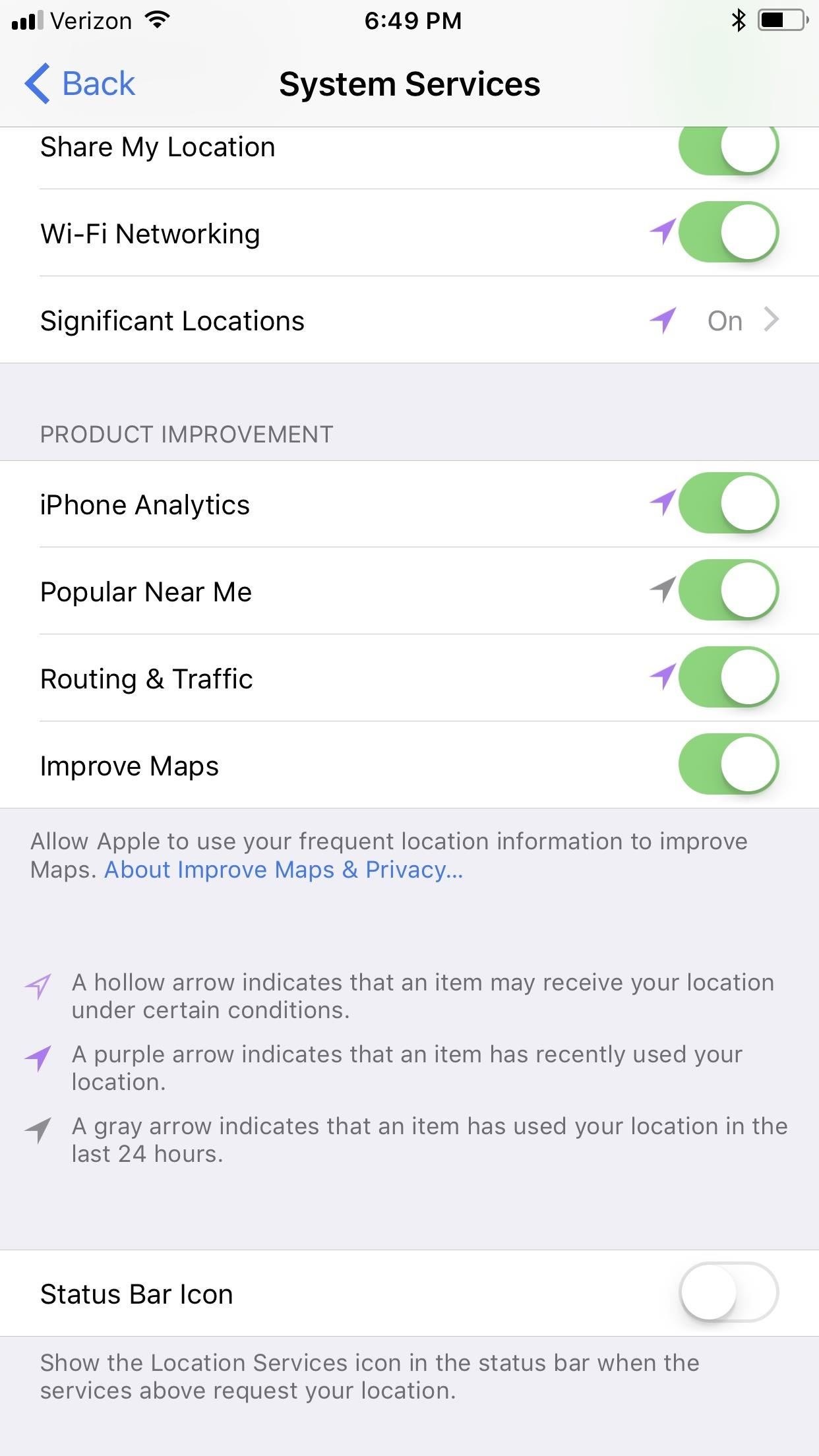
22. Toggle Off Significant LocationsThis deeply hidden setting allows your iPhone to record your most frequently visited locations in order to provide better location services in applications. (It used to be called "Frequent Locations.") To maximize your battery life, turn this feature off by going to Settings –> Privacy –> Locations Services –> System Services –> Frequent Locations, then disable it.
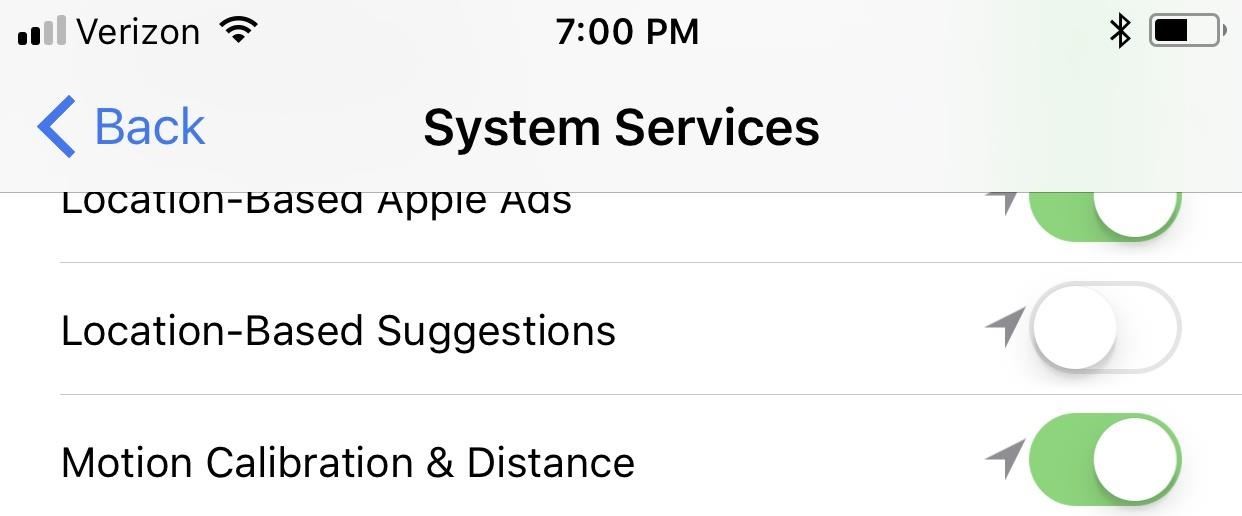
23. Disable Suggested Apps for Lock Screen & App SwitcherIf you've ever noticed a tiny icon at the bottom of your lock screen or in the app switcher, then you have this feature turned on. Your iPhone will track your location and present you with an app it feels would be useful for you to open. If this convenience isn't worth the battery usage to you, go to Settings –> Privacy –> Location Services –> System Services again, then deactivate Location-Based Suggestions.
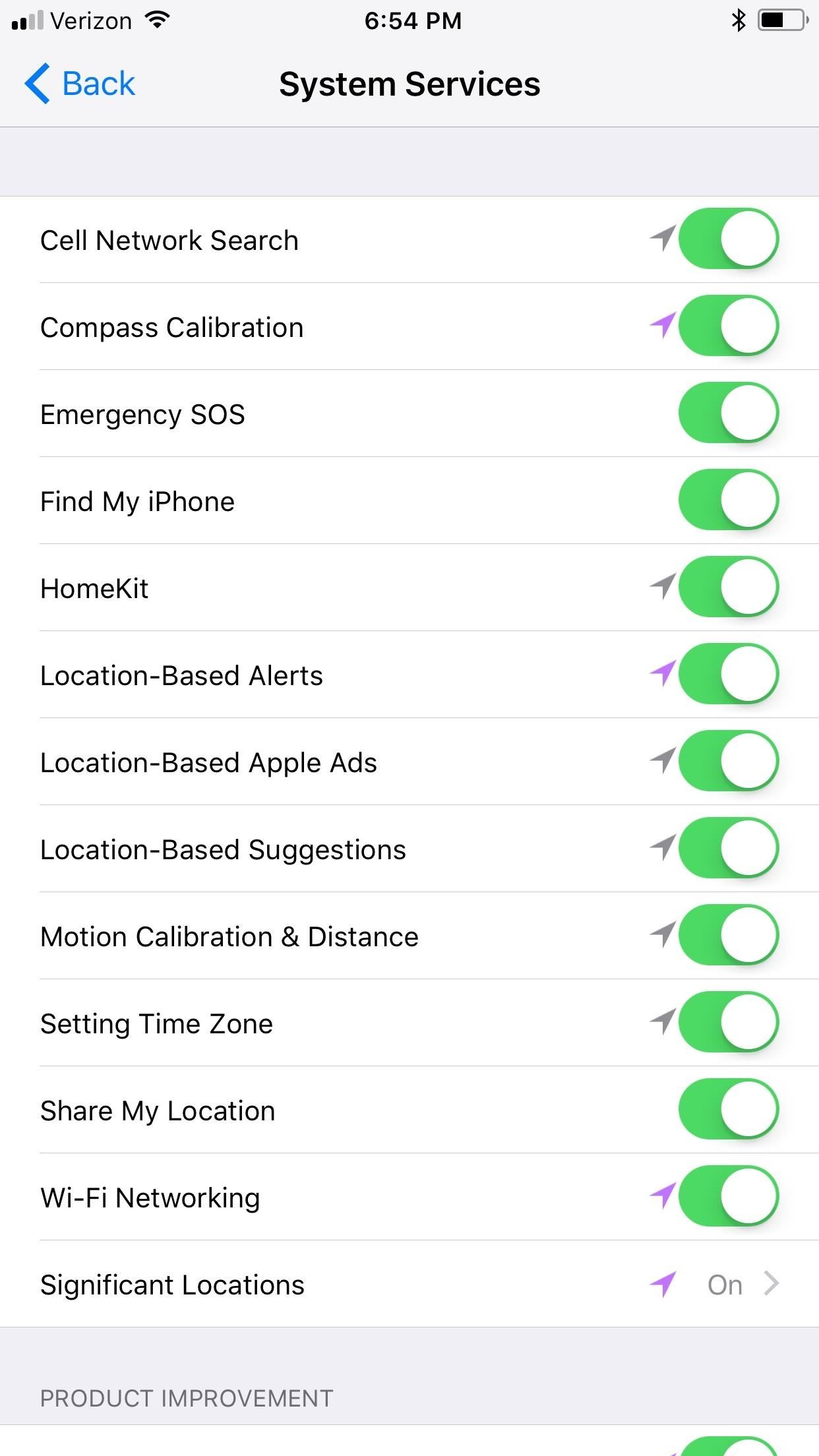
24. Actually, Toggle Off All Those Location SettingsAs you could probably tell when on the System Services page above, there are a lot of services that use your location data. Some of these aren't necessary, so toggle them off. Some of the other ones you could live without include Emergency SOS, Location-Based Alerts, Location-Based Apple Ads, Share My Location," iPhone Analytics, Popular Near Me, and maybe even Improve Maps.Don't Miss: How to Use the Emergency SOS Shortcut on Your iPhone in iOS 11
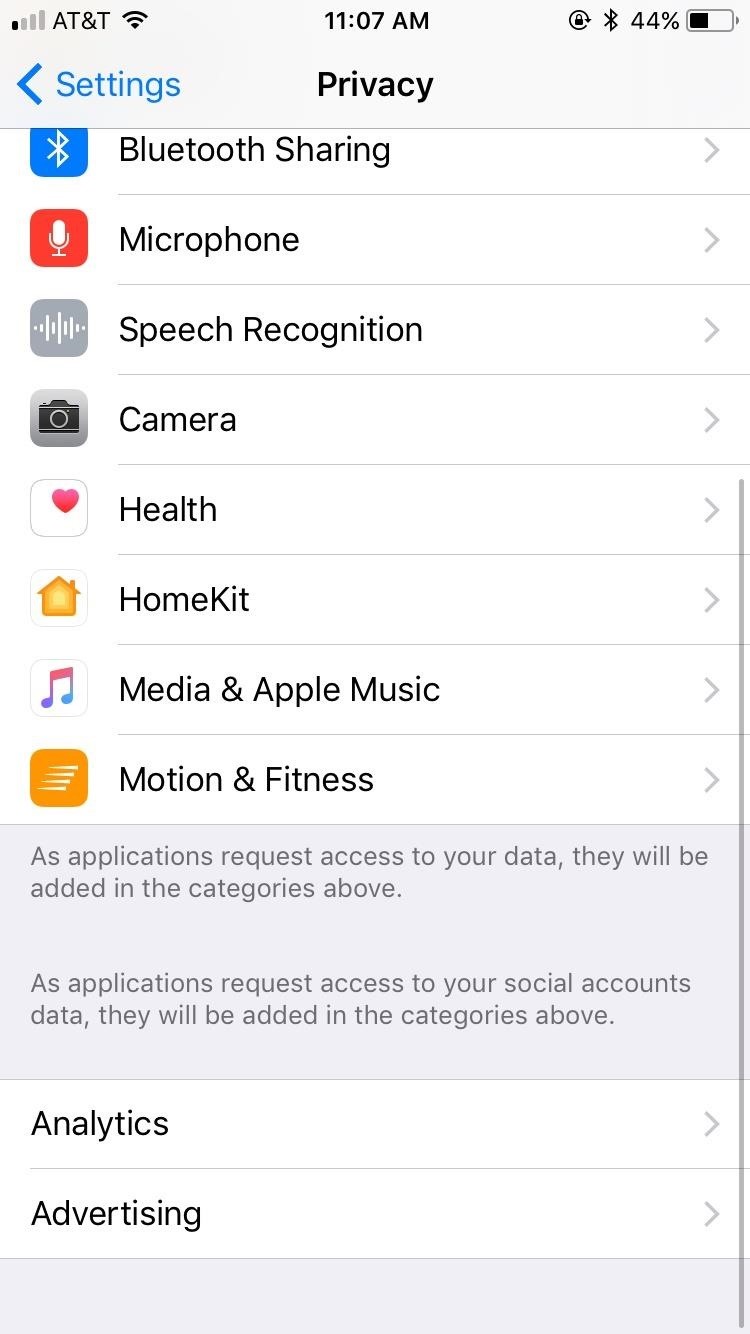
25. Enable 'Limit Ad Tracking'This is one feature you actually want to be turned on. When activated, your iPhone will limit how much it is tracked and analyzed for location-based advertising. Go to Settings –> Privacy –> Advertising, then enable Limit Ad Tracking.
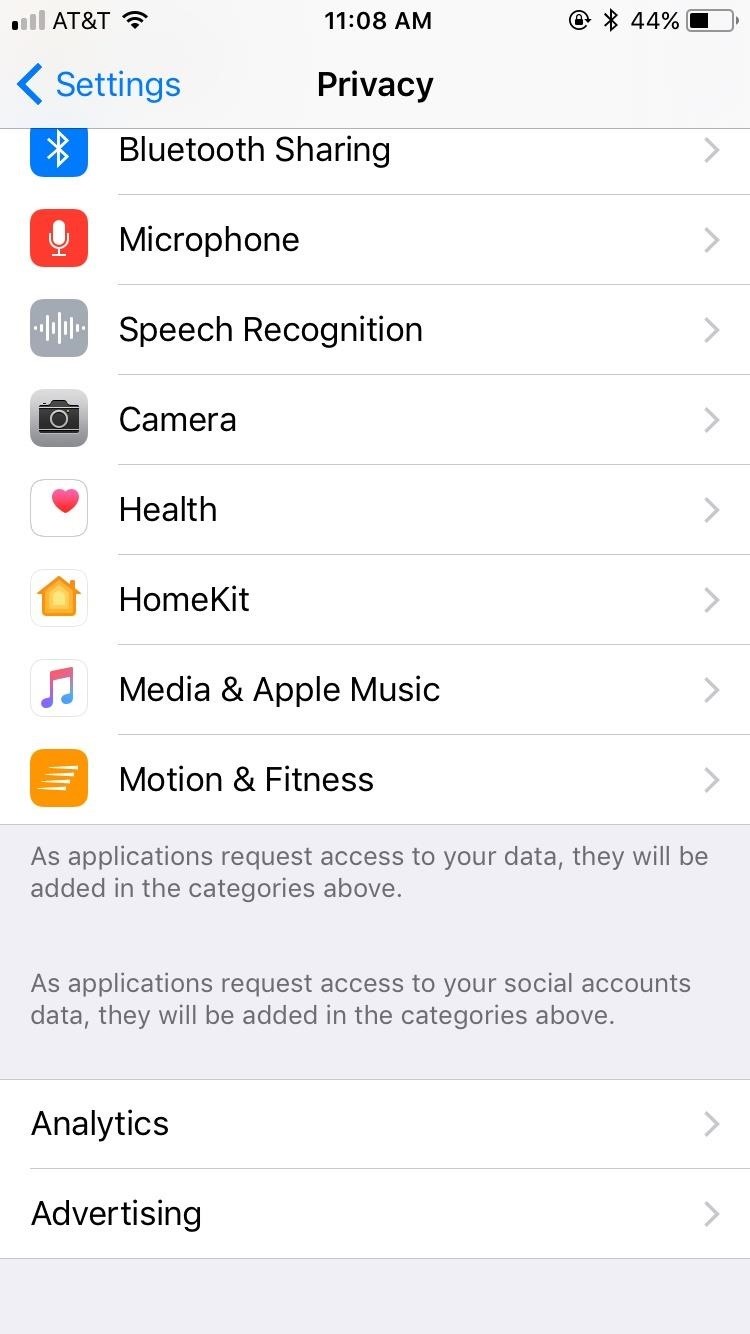
26. Disable Fitness TrackingYour iPhone can help track your fitness throughout the day, but this comes with a battery cost. To disable the fitness tracking, go to Settings –> Privacy –> Motion & Fitness, and deactivate Fitness Tracking. If you have a Fitbit or another tracker, you don't need this enabled anyway.
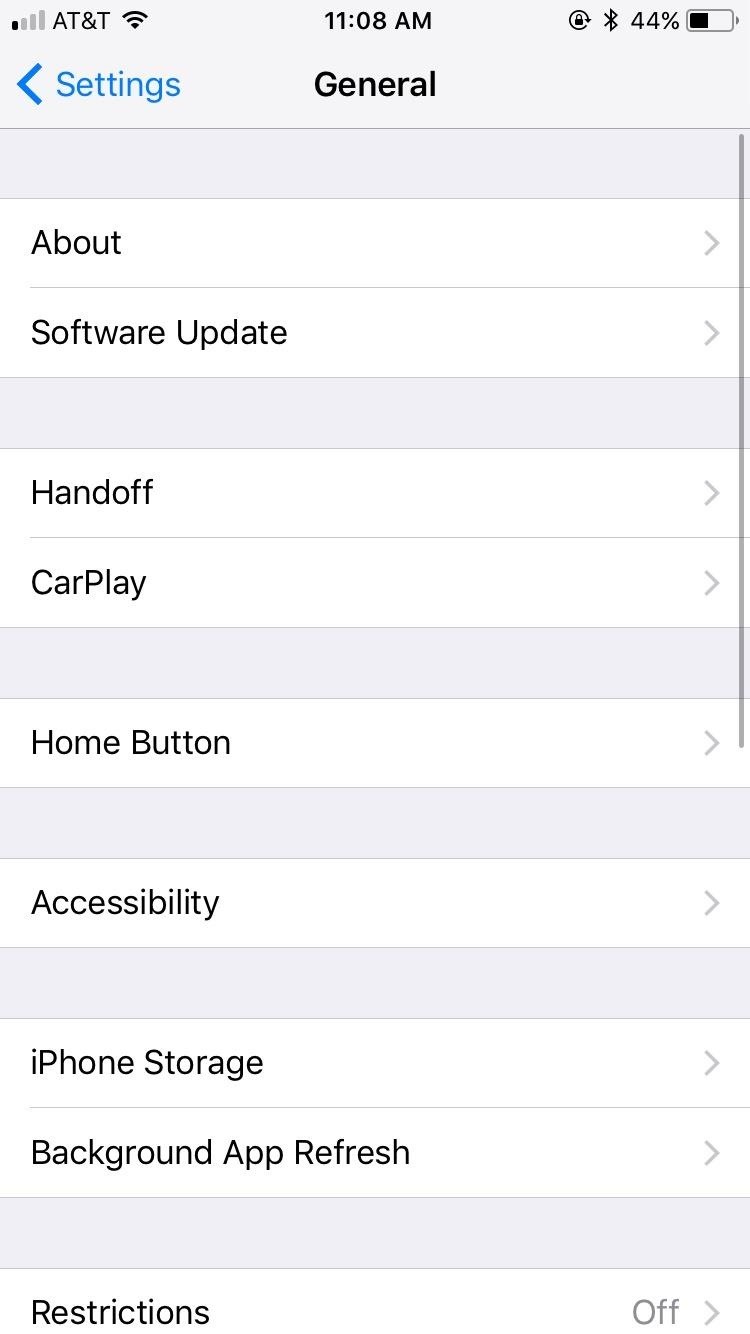
27. Disable HandoffHandoff can be very useful when moving between Apple devices. If you only have an iPhone, or you don't work across devices, this feature won't be of use to you but could still hurt your battery life. Disable it by from Settings –> General –> Handoff.
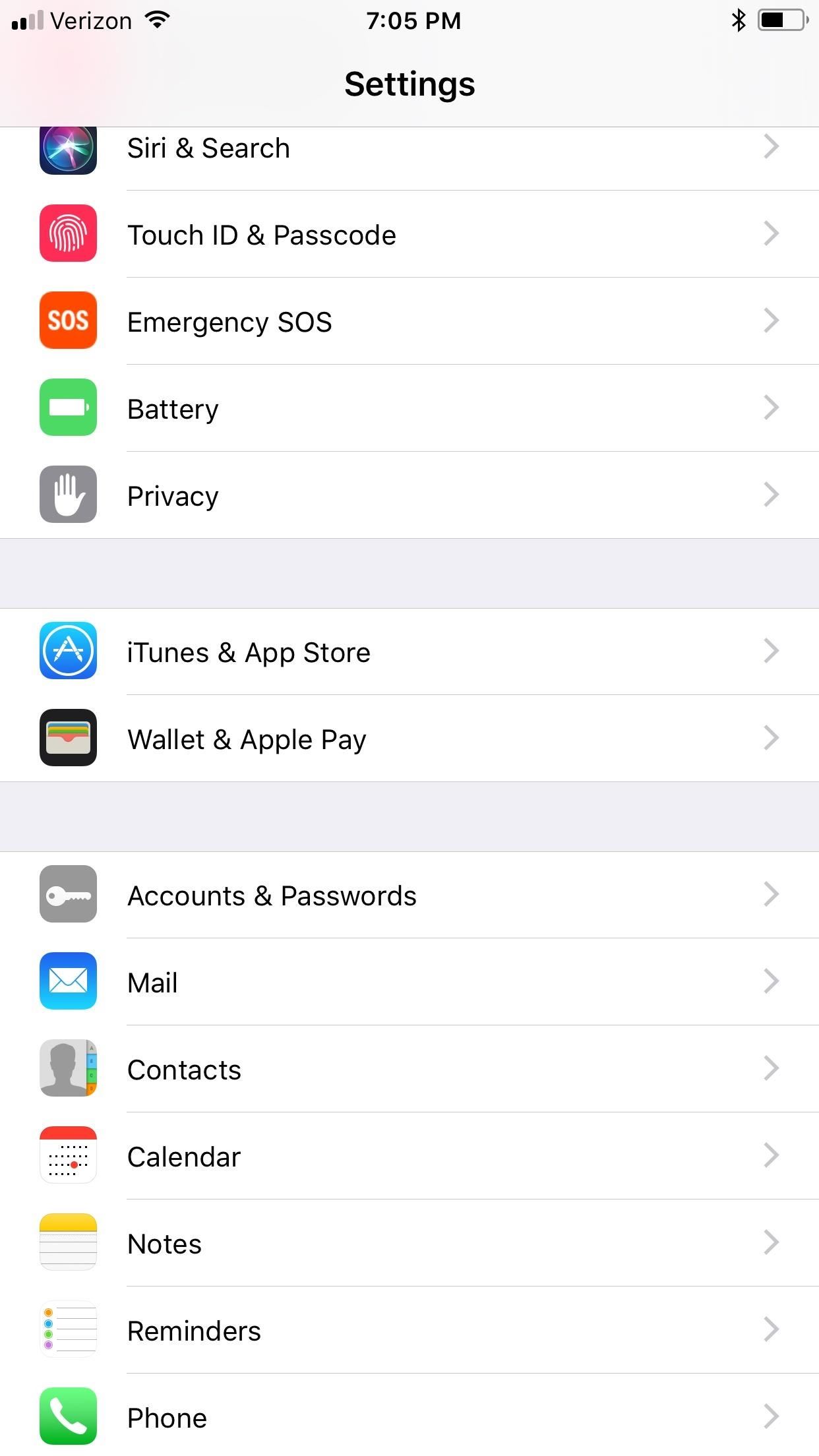
28. Toggle Off Some App Store SettingsIf you install an app on your iPad it can automatically download to your iPhone, too. This, of course, can happen when you're low on battery power, so it's better to just set this to manual so you can download them when you have enough juice to do so.Go to Settings –> iTunes & App Stores, then toggle off Apps from the list. We also suggest toggling off Updates, especially if you have a lot of apps on your iPhone, and toggling off Use Cellular Data if you decide to keep Music and Books & Audiobooks on, since Wi-Fi will use less power.Don't Miss: How to Disable Annoying Rating & Review Popups for Apps If we find any more battery-draining tips for iOS 11, we'll be sure to add them to this list. See something that we didn't mention? Make sure to tell us in the comments below.Don't Miss: 100+ Coolest New iOS 12 Features You Didn't Know About for iPhoneFollow Gadget Hacks on Facebook, Twitter, YouTube, and Flipboard Sign up for Gadget Hacks' daily newsletter or weekly Android and iOS updates Follow WonderHowTo on Facebook, Twitter, Pinterest, and Flipboard
Cover photo by Justin Meyers/Gadget Hacks; Screenshots by Jake Peterson/Gadget Hacks (unless noted otherwise)


News: Create a Fire Mixtape with Your Friends Using Spotify's Group Playlists How To: Remove Annoying Ads from Your Spotify Tunes How To: Stream Spotify Music to Chromecast from Your Android or iPhone
How to Turn Pandora Likes into a Spotify Playlist « Digiwonk


Buy a DSLR just for the video? You're not alone. In this video tutorial from renowned DSLR cinematographer Philip Bloom and the staff of Vimeo, we receive some tips on how to set up a DSLR like the Canon 7D, T2i (550D) or 5D Mark II for shooting video.
Top Apps to Control Canon, Nikon dSLR with Android Tablet, Phone
geeknizer.com/control-canon-nikon-dslr-with-android/
dSLR Controller Apps for Canon 5. DSLR Controller (Canon) Full control of your Canon EOS DSLR from your phone or tablet through USB ! DSLR Controller is the first and only app that allows you to fully control your Canon EOS DSLR from your Android device with only a USB cable.
Fujifilm Camera Remote app for iOS gets new UI, additional


I am making a project on LED flash to music using Arduino Uno board. Look Reference: Make LEDs Flash to Music Using Arduino Now, my question is, How can I adjust the tune of lights or what program I should write for tunning.
The 5 Stages of an Electronic Music Producer (and How to


Unlocking your Android phone's bootloader is the first step to rooting and flashing custom ROMs. And, contrary to popular belief, it's actually fully supported on many phones. Here's how to unlock your bootloader the official way.
List of Phones with Unlockable Bootloaders « Android

Ringtones: how to get and use them | Verizon Wireless


Clear All Cache and Free Up Disk Space in Windows 7/8/10 Bijay Pokharel , 2 years ago 0 4 min read 78 Clearing the cache on your computer is (usually) a quick and easy way to help speed it up.
How to Free Up Disk Space and Clear All Caches in Windows 8

How to Pimp your toy helicopter with a spy camera « Hacks


Report Ad
Find temporary files and clean your disk space with TreeSize Pro. Get Free Trial


BlackBerry KeyOne tips and tricks: Type and swipe the BlackBerry keyboard settings, choose "Key press feedback" and then toggle the "Sound" switch on. You can also choose to have a pop


So how do you get more cloud storage without paying a dime? Start using Flickr. That may sound insane, since Flickr is an image-only site, but a few days ago it was redesigned and with it came 1 TB of free storage for basic users. That means you can upload more than half a million high-res photos—for free.
How to download your photos from Flickr - The Verge


I'm looking into creating a python script that will kill some of the common processes within Windows such as some anti-virus processes, and cmd.exe (including explorer.exe to check if it works).
Writing Python Script « Null Byte :: WonderHowTo


Take a look at this instructional video and learn how to build your own miniature computer numerical control (CNC) machine. A CNC machine acts as a controller that reads G Code instructions for machine tools such as drills and printers.
S1-M2: Slide Mechanism and Concept - Build Your CNC


Report Ad
Check Out Cricket Blackberry on eBay. Fill Your Cart With Color Today!

The Latest Google Pixel Phone Leaks Show It All « Android
How To: Solve Level 21 in the iPad game Bubble Ball two different ways

How To: Solve Level 21 in the iPad game Bubble Ball two different ways
Can you believe this popular new iPad or iPhone game was designed and created by a thirteen year old? There are two separate ways to solve the final puzzle in the game Bubble Ball, and this video shows you both. Please enable JavaScript to watch this video.Please enable JavaScript to watch this video.(1) Part 1 of 2 - How to Solve Level 21 in the iPad game Bubble Ball two different ways, (2) Part 2 of 2 - How to Solve Level 21 in the iPad game Bubble Ball two different ways


This Video will show you how to send free SMS from Gmail account to your phone without using any programming language! NOTE: I forgot to tell you guyz you need to login in your gmail account
How to send SMS from Gmail - 2014 - YouTube


News: HoloLens' First Update Adds Voice Commands, Multitasking, & Much More How To: There's a Hidden Feature in Nougat That Gives Your Android Phone or Tablet a Desktop-Like Experience News: This Hack Turns Your iPad into a Multi-Window Multitasking Powerhouse for $10
How to Run the Same App Side by Side in Nougat's Multi-Window

Google's Security Report Shows a Clear Pattern Among Malware

Android's Built-In Scanner Only Catches 15% of Malicious Apps


Not every mod you add to your Android will revolutionize the way you use it, but many of them can make things a little more simple and convenient for you on a regular basis, like sliding across the status bar to adjust brightness or swiping the screen to put your display to sleep.


It's time to see how Apple will upgrade the quality of life for iPhone and iPad users with iOS 13. Last year's iOS 12 focused on under-the-hood improvements that helped the OS run smoothly on older devices, while also streamlining notifications and adding tools to measure screen-time management.
News: Apple's iOS 11.3 Update Arrives for All With AR


Samsung's latest Android tablet is a direct competitor to Apple's iPad Pro line that holds its own. As you begin to set up and use your new tablet, keep some of these tips and tricks in mind.
Samsung Galaxy Tab 10.1 For Dummies Cheat Sheet


How To: Keep Root, Custom Recovery, & Disabled Encryption When Updating Your Nexus 6 How To: Unroot Your Galaxy S5 or Other Android Device How To: Add Your Own Custom Screensaver Images to Your Kindle Lock Screen How To: Unroot a Motorola Droid phone and restore it to stock settings
How to Root Your Nexus 5—An Easy Guide for First-Timers

5 Things You Should Check Now to Improve PHP Web - DZone


App Locale . App Locale allows user to set language on a per-app basis ## Note root and Xposed Framework required ## Credits The Xposed
Set Locale and Language | APK Download For Android


how to make your own live wallpaper in this video i will teach you anyone can make or create a live wallpaper without any extra skill full skills in this video i will teach you how you can make
How to Create Your Own Android Live Wallpaper App | DroidViews

10 best news apps for Android! (Updated 2019 - Android

How To: Don't Wait for GoogleGet Night Mode Right Now on Android Nougat

How To: Don't Wait for GoogleGet Night Mode Right Now on Android Nougat
It's now common knowledge that the blue light emitted by phone screens makes it harder to get a good night's sleep. Apple's Night Shift in iOS and its steamrolled predecessor, f.lux (still available for desktop computers), are attempts to combat these harmful effects by limiting the amount of blue light from the screen at certain times of day (nighttime, say). For Android users who installed the Developer Preview build of Android 7.0 Nougat, the included "Night Mode" feature was all set to do the same for them.Unfortunately, for whatever reason, Night Mode was conspicuously absent from the final build of Android Nougat. People were understandably upset... and probably sleepy as well. Some even took to reporting the lack of Night Mode on the AOSP issue tracker as a "bug" in the new update. Now, one of these reports has been officially closed with its "status marked as FutureRelease." We'll just have to wait and see if that means that Google plans on reinstating Night Mode in a future update.But if you don't feel like waiting even one more sleepless night, there's a way to enable Night Mode right now on Android Nougat. You don't even have to be rooted, either. It's just a simple matter of knowing where to look and what to do. Check out the full step-by-step guide below to unlock this cool feature right now.Don't Miss: How to Enable the Hidden 'Night Mode' Setting on Android 7.0 NougatFollow Gadget Hacks on Facebook, Twitter, Google+, and YouTube Follow Android Hacks on Facebook, Twitter, and Pinterest Follow WonderHowTo on Facebook, Twitter, Pinterest, and Google+
Cover photo by Dallas Thomas/Gadget Hacks

Face Ended Your Call? Lock Your iPhone During Conversations


The minimum power needed for a laser light show in a dark, medium-sized room (like a hotel ballroom) is about 500 milliwatts to 1 watt. Somewhere between 5 and 20 watts is typical for indoor use. In large arenas and outdoors, 10 to 80 watts is common.
DIY Laser Show: The best laser effect ever! - YouTube


3 Ways to Hard Reset Android Without Volume Buttons Smartphones are very popular and have become an important part of our lives and it is especially Android devices that take the crown for being the most used smartphone devices in the world.
24 hidden Android settings you should know about | Popular


News: Hidden Web Browser Found in New Nook Touch Reader How To: Add Extra Storage Space to Your Microsoft Surface That Your Apps Can Actually Use How To: Add a photo to individual contacts on the Samsung Galaxy Tab How To: Connect a Bluetooth Mouse and Keyboard to your iPad (or iPhone
Nook Touch has a hidden web browser | The Digital Reader


This means that the majority of custom boot animations don't work for the GS5. But, after flashing a single ZIP, you can use the more common "bootanimation.zip" files on your GS5.
How To Remove Carrier Boot Animation On Galaxy S4 - Dory Labs


How To: Get Dark Mode in Slack on Your iPhone or Android Phone How To: Get Dark Mode on Instagram for Less Stress on Your Eyes When Browsing Pics & Videos News: Facebook Is Making It Easier to Post AR Content in Its News Feed How To: Enable Dark Mode on Overcast for iPhone
Enable Dark Mode in Your Favorite Apps « Gadget Hacks


just in: #android 4.4.4 rolls for #Xperia Z, ZL, ZR & Tablet Z - brings fixes, battery, wifi & email improvements and more #SonyXperia — Sony Xperia News (@SonyMobileNews) September 9, 2014
Transform Your Android into a Sony Xperia Z3 « HTC One


iOS 11 public beta came out recently. You probably already know that. If anything, the firmware is currently running on your iPhone or iPad. Surprisingly, there are multiple new features that Apple didn't mention at their WWDC 2017 event.


Ovaj nevini kalkulator je doista tajna App sigurno za Android Povjerenje može biti osjetljivo pitanje općenito, a često je potrebno i kod dijeljenja osobnih podataka - osobito kada predajete naše telefone drugima.
How to Lock Specific Apps & Hide Secret Photos - Android


Theftie is a comprehensive solution for locating and wiping your phone remotely when it goes missing, much more so that Android Device Manager. I have this installed as my only rescue solution on my phones, and I'm sure you'll find its features as useful as I did.
The Best Way to Wipe Data & Completely Delete Your Data on


Vinegar is most commonly used ingredient in food and food products. Vinegar is also referred as 4% Acetic acid. The principle of this experiment is based on the fact that; "When two different
How to make Ice Cube Tray Vinegar Battery - Hypothesis and

This Google App Makes Sure Your Device Runs Smooth All the Time


News: Use Android's Airdrop-Like Nearby Service to Share Things More Easily How To: Customize Skip Length in Your iPhone's Podcasts App How To: Raw Cyrus from Spill.com How To: Make and distribute a successful podcast
Is There Software Similar to Wifikill, That Kills Nearby


With this DIY parabolic microphone from the folks over at GBPPR, you can listen in from a distance and do your sleuthing without ever leaving the couch. Image via sourcedns.com A parabolic microphone uses a parabolic reflector to focus sound waves onto a receiver.

How To: Use QR or quick-response bar codes with your cell phone

How To: Use QR or quick-response bar codes with your cell phone
Have you seen odd, square codes on some specific merchandise? These are called QR codes, or quick-response codes, and they are a type of bar code which your smartphone can read and then take you to a particular website, give you coupons or even a business card. Here's how you can get the most out of QR codes.


QR is short for Quick Response. QR codes are read by using an application on your cell phone. Once the code is scanned by your phone, you are taken to the website that is embedded in the QR code.
QR | What is a Quick Response barcode & how to create or read one


A QR or Quick Response code is a two-dimensional barcode. These are often used for adding web links to a printed page. When you scan such a QR bar code using a webcam or mobile phone camera, the QR reader application takes you to a Web site, a YouTube video or some other web content.
Learn How to Scan QR Codes on Your Phone - Lifewire

How to Read QR Codes With a Smartphone | PCWorld


How to use a barcode reader app to scan a QR (quick response) code and go to a website address (URL) with a Samsung Vibrant (Galaxy S) mobile phone.
How Do I Use/Scan QR Codes?- QR Code Reader, Quick Response


Learning About QR Codes - Visit here for help on what a QR code is, and how you can get involved and start using them too. George Fox University: About QR Codes - Visit here to discover what QR codes are and what you'll need to start using them, to download a reader to your phone if it is compatible, and to scan your first QR code to
How to scan QR codes with an Android phone | AndroidPIT


This wikiHow teaches you how to use a phone, tablet, or computer camera to scan a QR code. QR codes are black-and-white squares similar to bar codes that store information such as links, phone numbers, images, and so on.
How do smartphones read qr codes - answers.com


You can use most QR-code apps for reading bar codes, too, which can be convenient for in-store price checks. Scanning a product's bar code with RedLaser will bring up an item description, as
How to use a QR code barcode reader with a mobile phone - YouTube


Mobile How to scan Windows 10 QR codes with your phone. This summer's Windows 10 update will add QR codes to the Blue Screen of Death. Smart idea or just more frustration?
[QR Code] How To Use QR Codes - YouTube


Advertising is probably the most common use of QR codes. Brands can add a QR code to a billboard or magazine, for example, that sends users to its website or a coupon or landing page. For the user, this takes away the hassle of typing in a long URL, or jotting it down on paper.


Here's how to scan QR codes with an Android phone. What are QR codes? QR is an acronym for Quick Response. It's a smarter version of the ubiquitous barcode, and it was originally developed in
How to scan Windows 10 QR codes with your phone - CNET


For more information on QR codes, mobile & internet marketing, please visit the site above. Basic QR Code Usage The most basic (and popular use) of QR codes is to display website information (a
2 Clear and Easy Ways to Scan a QR Code - wikiHow

How To: Figure Out Your Total Calorie Burn in Apple's Health App

How To: Figure Out Your Total Calorie Burn in Apple's Health App

If you transition to an Apple Watch from another wearable like Fitbit, you might be a bit confused by the new calorie burn counter. Instead of ending your day with thousands of calories burned, your watch says you've burned just hundreds. Could it be you're less active with your Apple Watch? Probably not. It's more likely because of the different way the watch counts your calories.Apple measures calorie burn on its Apple Watch differently than other wearables. The counter you see as your Move goal isn't your overall calorie burn for the day. Instead, it's what Apple calls "active energy." What is active energy, and how can you use it to figure out your day's total calorie burn?Don't Miss: How to Cheat Your Apple Watch Rings Using the Health App
Active Energy vs. Resting EnergyActive energy is appropriately named; These are the calories tracked when either exercising or during periods of activity. When you set a workout, the calories burned during that workout are added to your Move ring as active energy. Similarly, the watch measures calories burned as you move throughout the day, which are also added to the Move ring.Resting energy, on the other hand, are the calories you burn just by being alive; These calories are tallied during periods of inactivity. Sitting in the car, lying in bed, plopped in front of the computer — all these motionless activities count towards your overall resting energy.On other wearables, like Fitbit, these two types of calories are combined into one, easy-to-read number. But because Apple places such an emphasis on moving, the Move ring is only representative of the day's active energy. So, how do you find the total number of calories you burned in a given day?On Amazon: Deals on Apple Watches

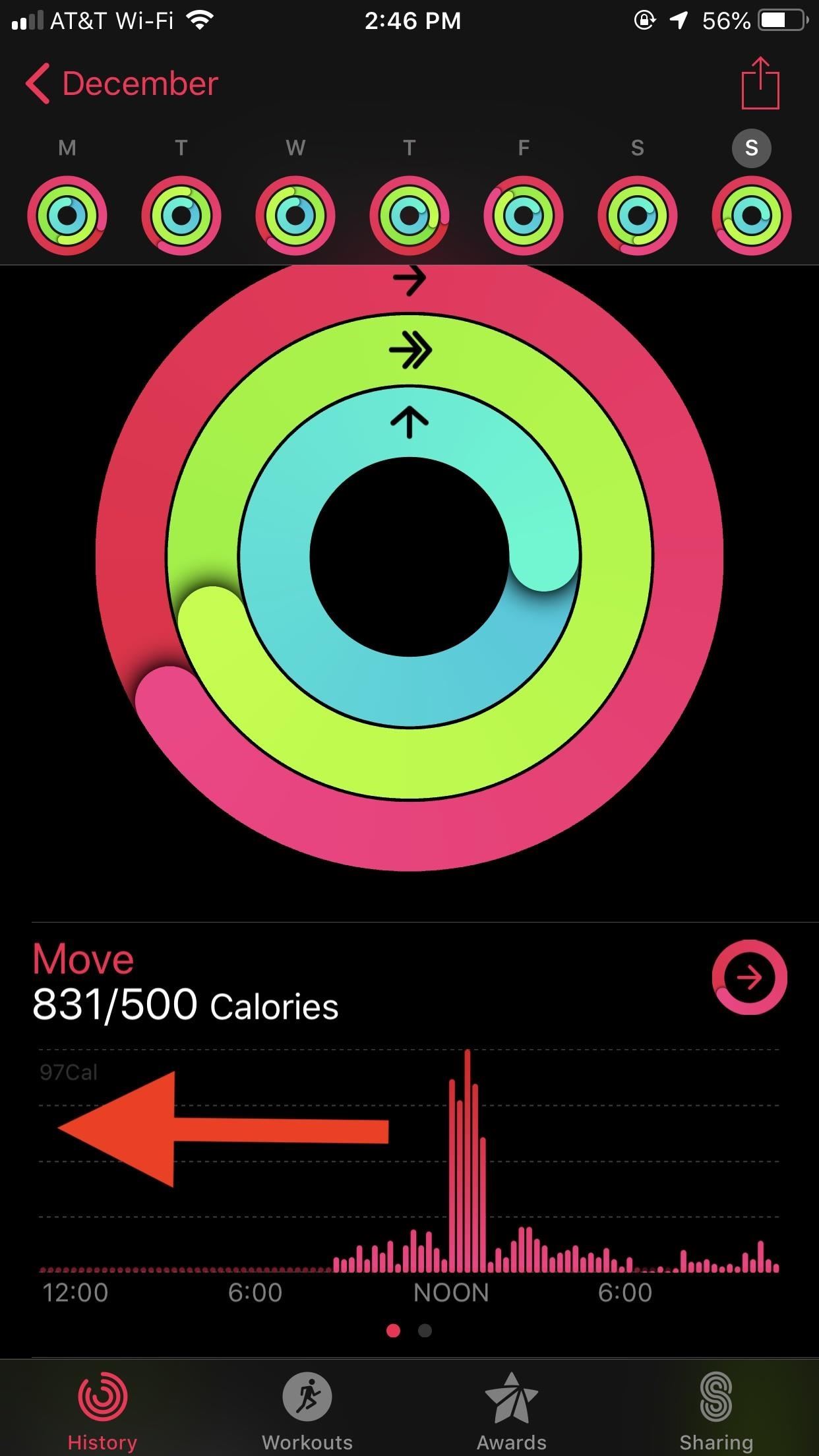
Option 1. Use ActivityWhile your Apple Watch won't tell you how many total calories you've burned today, Activity will. At first glance, the app appears to be as silent on the issue as your watch. However, dig a little deeper, and you'll find Apple does, in fact, do the calorie calculations for you.In Activity, select the day you want to view. Then, swipe left on the Move field below the rings. Presto — your day's calorie burn is listed as "Total calories" under "Active calories" in this slightly hidden pane.

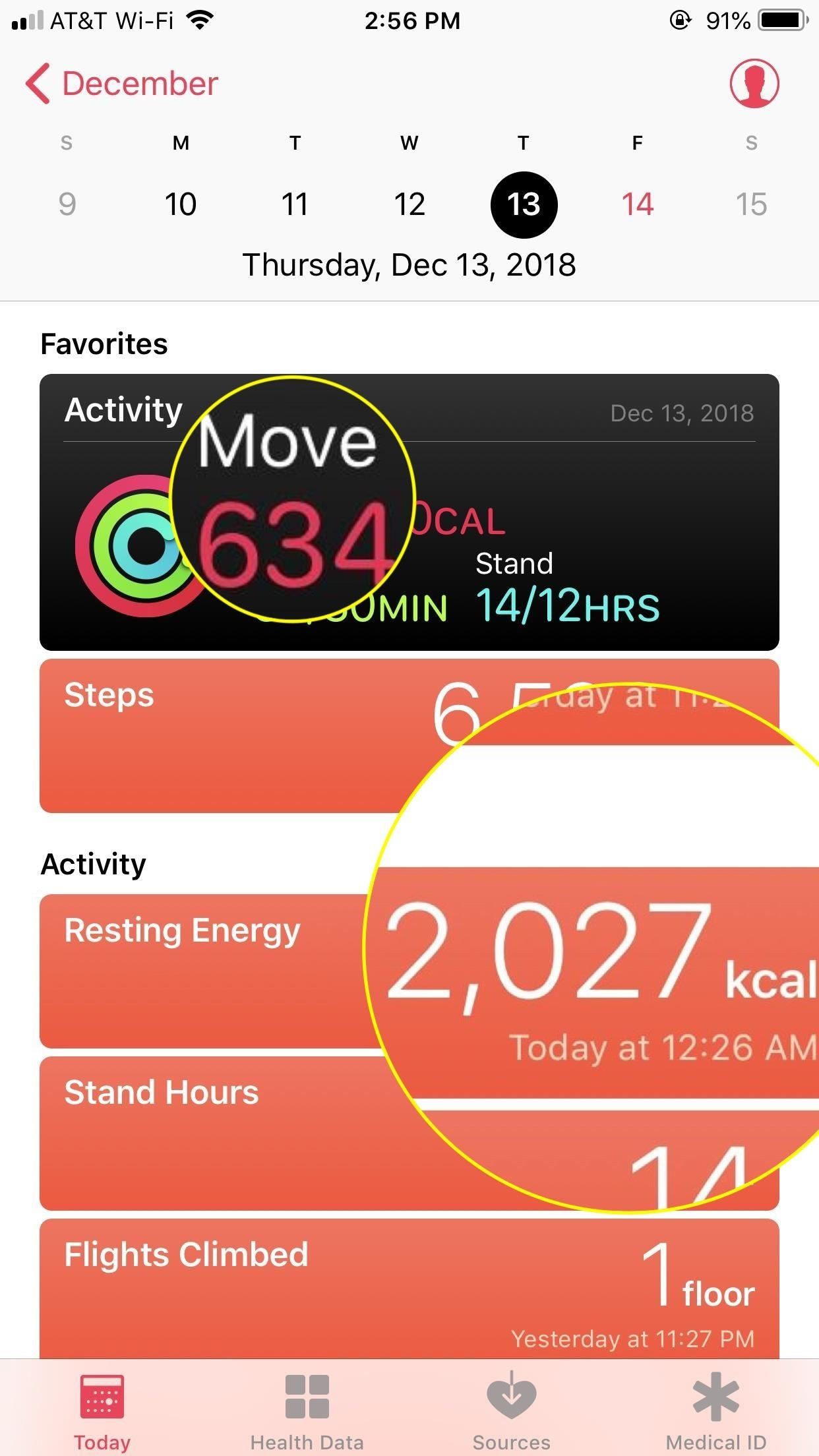
Option 2. Use the Health App to Break It DownWhile Option 1 plainly gives you your total calorie burn, it doesn't really offer any other information about your day's activity. If you want to see more of a breakdown of your day's calorie burn, head over to the Health app on your iPhone. Open the app, then choose the "Today" tab at the bottom. Now, add together your Move total with the "Resting Energy" total below. Alternatively, you can scroll down, and add together "Resting Energy" and "Active Energy." These numbers are listed in kcals — kilocalories — but don't be confused by the name. Kcals are exactly what you think of as calories. Just add these two numbers together to get a total calorie burn for the day. For example, in the screenshots above, I burned 634 active (or Move) calories alongside 2,027 resting calories. My total would then be 2,661 calories for the day.You can do this with your current calorie count for the day. However, unless it's the very end of the day, you aren't going to get a complete number. You're better off doing the math once the day has ended — after your watch has calculated all calories burned for the day.This article was produced during Gadget Hacks' annual Health & Fitness special coverage. Read all of the Health & Fitness series.Don't Miss: Here's What That High Heart Rate Warning on Your Apple Watch MeansFollow Gadget Hacks on Pinterest, Reddit, Twitter, YouTube, and Flipboard Sign up for Gadget Hacks' daily newsletter or weekly Android and iOS updates Follow WonderHowTo on Facebook, Twitter, Pinterest, and Flipboard
Cover image and screenshots by Jake Peterson/Gadget Hacks


How To: Change the Home Screen Icon Shapes on Your Pixel in Android 10 How To: Effortlessly Hack & Mod Your Samsung Galaxy Note 2 Using the Android Everything Tool Android Basics: How to Find Your Phone's Screen Density Value (320 DPI, 480 DPI, 640 DPI, Etc.)
How to Change DPI Scaling on the LG V30 « Android :: Gadget Hacks


Under the "password" field, you will see encrypted letters. Delete these letters, and type your new password. Select MD5 in the Function drop-down list on the left side of the password field. Save your new password and access your Joomla administrator backend. Using Joomla! Toolkit in cPanel
How to Recover a Lost Joomla Username and Password - Joomla


How to make a Vinegar Battery | Homemade Vinegar Battery | Science Experiment for School Kids Vinegar battery For this experiment you'll need: • Vinegar • Two glasses • Two zinc strips
How To Make A Vinegar Battery | Homemade Vinegar Battery


While we'll be using Google's own version of Android on the Pixel line of devices for this guide, if you're using a Samsung or LG device, you should be able to largely follow along at the same speed. Let's take a look at how to set your lock screen wallpaper on Android. Selecting Your Wallpaper through Settings
How to Get the iOS 7 Home & Lock Screen on Your Samsung


Soundcloud Infos: Millions of musical artists to discover and share. Soundcloud help new artists to launch their popularity. Soundcloud is a place where musicians can upload and share their music. Soundcloud allow users to listen and download free music online without registering. Producers can upload their songs.
Sites Like Soundcloud, The 14 Best Alternatives (as of
hiphopspeakeasy.com/2017/02/alternatives-soundcloud-ultimate-guide/
Teetering between the minimalism of Clyp.it and the branded style of Soundcloud, Yung.Cloud focuses on the music and the artist, that's it. Just like Soundcloud, the main focal points are around the Stream, which is made up of tracks uploaded by friends you add on the service, and Explore, which is where you can go to discover new music
How to Download Music from SoundCloud Straight to Your


Mar 23, 2018 · When you surf the web using Chrome or any other browser, your computer saves some of the data on websites you're visiting as part of your browser history. Chrome doesn't need to collect that data
A hacker explains the best way to browse the internet


In iOS 11 or later, you can create a screen recording and capture sound on your iPhone, iPad, or iPod touch. Record your screen Go to Settings > Control Center > Customize Controls, then tap next to Screen Recording.
How To Screen Record Directly From Your Ipod Touch / Iphone


WiFi Prank: Use the iOS Exploit to Keep iPhone Users Off the Internet How To: iOS 6 Broke Your Wi-Fi? Here's How to Fix Connection Problems on Your iPhone or iPad How To: Share Your Wi-Fi Password with a QR Code in Android 10 How To: Improve Wi-Fi Performance on Your Rooted Nexus 4
How to Get the Strongest Wi-Fi Connection on Your Android


This video demonstrates how to power on a Samsung phone without using the power button. How to Power On / Turn on ANY Samsung Phone Without The Power Button FAKE Galaxy S9+ vs. REAL
Galaxy S8 battery drains quicker after an update

CES 2015: These Headbands Are Really Comfortable Headphones


First Time Ever Seen: Secret of Light: 140 Year old mystery solved! Crookes Radiometer - Duration: 15:37. Theoria Apophasis 1,281,039 views
Experiments to do at home | Rivervale Primary Science

How to Disable iOS 11's New Screenshot Thumbnail Previews